

Close Menu
  • Gaming
    • Platforms
      • Nintendo
      • PC
      • PlayStation
      • Xbox
  • Entertainment
    • Movies
    • TV
    • Royals
  • Celebrity
    • Hollywood
  • Human Interest
  • Astrology
  • More
    • Anime
    • Reviews
Facebook X (Twitter) Instagram LinkedIn YouTube
  • About Us
  • Join Our Team
  • Meet the Team
  • Privacy Policy
  • DMCA Policy
  • Contact Us
  • Terms of Use
  • Sitemap
  • Editorial Guidelines
  • Advertising Policy
The Nerd Stash
  • Gaming
  • Celebrity
  • Hollywood
  • Human Interest
The Nerd Stash
Home»Gaming»Best Controller Settings for The Finals

Best Controller Settings for The Finals

Set your controller up for riches.

Victor TanBy Victor TanDecember 11, 20232 Mins Read
The Finals Best Controller Settings Image
Image Source: Embark Studios via The Nerd Stash
This article is over 2 years old and may contain outdated information.

The Finals puts you in a tough arena where everyone is fighting for cashouts and stealing them from each other. It’s fast-paced and even the slightest pause or poor reaction can bring you down. If you are using a controller, you are ready for comfort but might not be as quick as keyboard-and-mouse players. Here are the best controller settings for The Finals to give you the best response times without letting your team down.

The Best Controller Configuration for The Finals
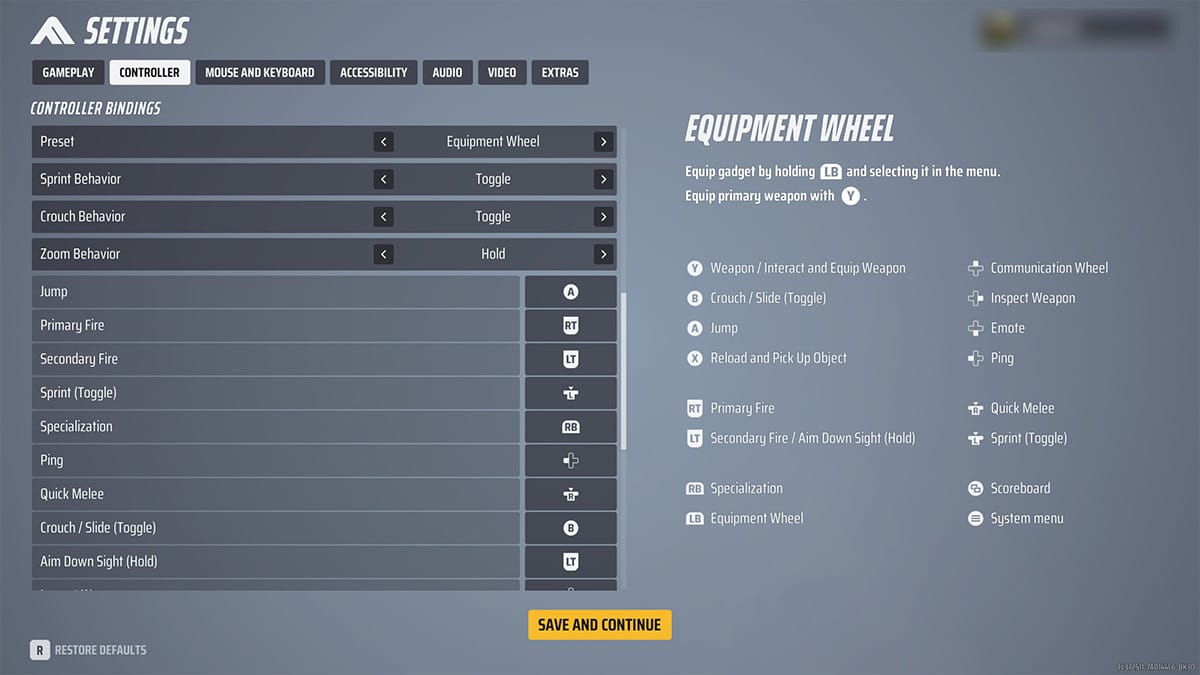
The Fiinals Controller Settings option
Image Source: Embark Studios via The Nerd Stash

The controller settings in The Finals allow you to change the look sensitivity and the speed when you look in a direction. Some settings that work well are:

Controller SettingValue
Look Sensitivity Horizontal160
Look Sensitivity Vertical130
Zoom Sensitivity Multiplier50%
Focal Length Sensitivity ScalingOn
Horizontal Look Boost200
Vertical Look Boost0
Look Boost Ramp Up Time0.5
Controller Zoom Horizontal Look Boost40
Controller Zoom Vertical Look Boost40
Controller Zoom Look Boost Ramp-up Time1.2
Aiming Inner Deadzone10
Movement Inner Deadzone15
Invert Vertical Look InputOff
Look Response CurveExponential
Look Acceleration0%
Controller PresetEquipment Wheel
Sprint BehaviorToggle
Crouch BehaviorToggle
Zoom BehaviorHold
Aim AssistOn
Sensitivity ReductionOn
Target TrackingOn
Zoom SnappingOn

These settings ensure you play well with a controller, though you may require more custom tweaking as necessary. Even with these settings, you aren’t magically going to perform better with weapons without proper practice. What these settings will do is allow you to respond to situations better and ensure you aren’t slowing down.

Don’t forget to change your graphic settings and monitor your Internet connection if you are still experiencing slow gameplay. But with these The Finals controller settings, you should be performing as well as you would in other shooters with a controller.


Related Topics
Guide The Finals
Share. Facebook Twitter LinkedIn Reddit Email
Victor Tan
  • Website

Victor enjoys helping players succeed when video games are too difficult. He knows what it's like to get stuck in tricky situations and he wants to make sure other players don't suffer the same fate.

SUGGESTED READS

Vampire Survivors Developer Goes Wild With Over 15 New Games, Expands to Japan and Italy: 'Profit Is Not a Priority'
Gaming

Vampire Survivors Developer Goes Wild With Over 15 New Projects, Expands to Japan and Italy: ‘Profit Is Not a Priority’

Gaming

The Expanse: Osiris Reborn Is Owlcats Most Ambitious Leap Yet ‘A stunning jump forward’

World of Tanks HEAT Closed Beta Preview
Features

World of Tanks HEAT Hands-On Preview – Faster, Flashier, and Just as Tactical

Where to Find the Secret Fall Shop in Roblox Adopt Me
Gaming

Where to Find the Secret Fall Shop in Roblox Adopt Me

Diablo 4 Lord of Hatred Review
10
Features

Diablo 4: Lord of Hatred Review – Breaking the Cycle

Shuhei Yoshida Says He Was Fired From Playstation Studios for Saying 'No' to Jim Ryan: 'He Asked For Ridiculous Things'
Gaming

Shuhei Yoshida Says He Was Fired From Playstation Studios for Saying ‘No’ to Jim Ryan: ‘He Asked For Ridiculous Things’

The Nerd Stash
Facebook X (Twitter) Instagram YouTube LinkedIn
  • About Us
  • Join Our Team
  • Meet the Team
  • Privacy Policy
  • DMCA Policy
  • Contact Us
  • Terms of Use
  • Sitemap
  • Editorial Guidelines
  • Advertising Policy
© 2026 The Nerd Stash. All Rights Reserved.

Type above and press Enter to search. Press Esc to cancel.
