

Close Menu
  • Gaming
    • Game Guides
    • Codes
    • Game News
    • Game Previews
    • Game Reviews
    • Game Features
    • Game Lists
    • Platforms
      • Nintendo
      • PC
      • PlayStation
      • Xbox
      • Mobile
  • Entertainment
    • Movies
    • Movie Features
    • Movie Reviews
    • TV
    • Reality TV
    • Royals
  • Celebrity
    • Hollywood
  • Human Interest
  • Astrology
  • Videos
  • More
    • Anime
    • Lists
    • Podcasts
    • Reviews
Facebook X (Twitter) Instagram LinkedIn YouTube
  • About Us
  • Join Our Team
  • Meet the Team
  • Privacy Policy
  • DMCA Policy
  • Contact Us
  • Terms of Use
  • Sitemap
  • Editorial Guidelines
  • Advertising Policy
The Nerd Stash
  • Gaming
  • Celebrity
    • Hollywood
  • Human Interest
  • Videos
The Nerd Stash
Home»Game Guides»How To Change Your Pokeball Throw Style in Pokemon Scarlet and Violet

How To Change Your Pokeball Throw Style in Pokemon Scarlet and Violet

Which style is the one you’ll be using all game?

Nat CollazoBy Nat CollazoDecember 15, 20232 Mins Read
How To Change Your Pokeball Throw Style in Pokemon Scarlet and Violet
Image Source: Game Freak
This article is over 2 years old and may contain outdated information.

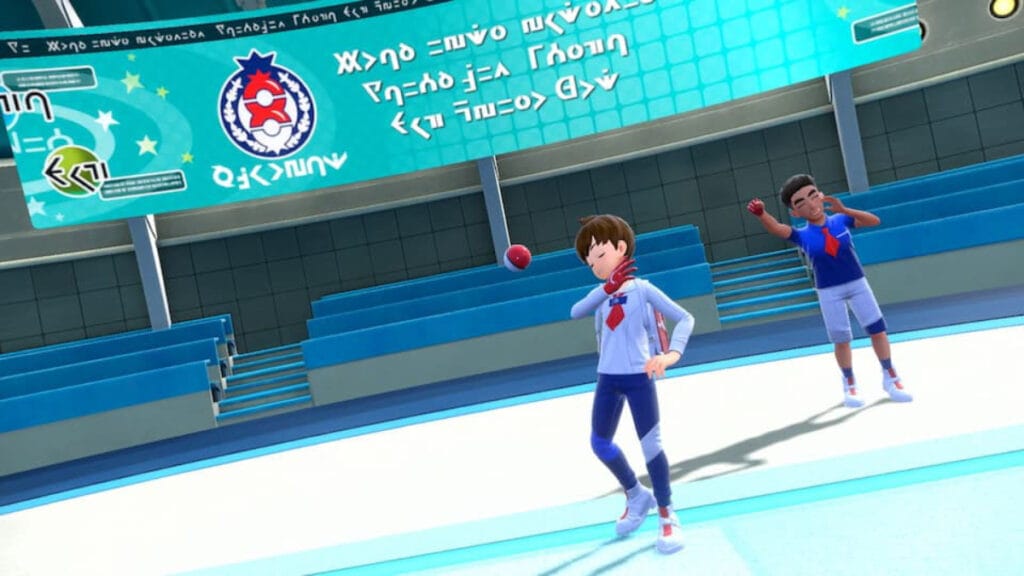
Pokemon Scarlet and Violet introduced something that players have been really wanting: the ability to change your Pokeball throwing style. While it might not seem like a huge change, your throw style helps define who you are as a trainer. It’s an easy thing to change, so let’s get into how to change your Pokeball throw style in Pokemon Scarlet and Violet.

Changing Your Pokeball Throw Style in Pokemon Scarlet and Violet

How To Change Your Pokeball Throw Style in Pokemon Scarlet and Violet
Image Source: Game Freak

After going through Drayton and completing the tutorial quest for The Indigo Disk DLC, you’ll have access to the clubroom PC. Here, you can speak with Mitch from the Baseball Club and request a change of throw style for 10 BP. At that point, you can switch to any throw style that you’ve unlocked. The following are all of the available styles you can choose from:

  • Left-handed style.
  • Reverany style.
  • Dainty style.
  • Smug style.
  • Elegant style.
  • Twirling style.

Once you change your throw style, it will cost in addition 10 BP to change it again.

How to Get More Pokebal Throw Styles

As you progress through The Indigo Disk DLC, you’ll earn more throwing styles. To unlock and use them, you need to constantly check back with the Clubroom PC and interact with the different Baseball Club Projects that you see. Some of them will cost between 150 to 450 BP. You’ll want to load up on them by doing different Blueberry Quests including the Ditto Quests if you want to get that many quickly. To break it down:

  1. Periodically check out the Clubroom PC.
  2. Select a Baseball Club Project to give BP to.
  3. Unlock new throw styles.

Related:

How To Get and Evolve Inkay in Pokemon Scarlet and Violet: The Indigo Disk

Pokemon Scarlet and Violet: The Indigo Disk is available now on Nintendo Switch.

Related Topics
Guide Pokemon Scarlet & Violet
Share. Facebook Twitter LinkedIn Reddit Email
Nat Collazo
  • Website
  • X (Twitter)
  • Instagram

I am a game journalist and guide writer with ten years of experience as well as the CEO/ Founder of Frowns Marketing, a marketing company that caters to indie games, tabletop games, and board games to help developers get more wishlists, backers, and players!

SUGGESTED READS

Crimson Desert PC Review
9.5
Features

Crimson Desert Review – It’s Real, All of it

Death Stranding 2 PC Launch Adds Fuel to DLSS 5 AI Slop Backlash: 'It Is a Disgrace'
Game News

Death Stranding 2 PC Launch Adds Fuel to DLSS 5 AI Slop Backlash: ‘It Is a Disgrace’

Starfield Free Lanes & Terran Armada DLC
Game Previews

Starfield Free Lanes & Terran Armada Hands-Off Preview – Revitalizing This Spacefaring Adventure

Resident Evil 9 DLSS5
Game Features

DLSS 5 Isn’t the Future of Graphics; It’s a Filter Over Them

What is Honey Candy in Adopt Me? How to Get It and What It's For
Game Guides

What is Honey Candy in Adopt Me on Roblox? How to Get It and What It’s For

Honkai Star Rail Version 4.1
Game News

The Phantasmoon Games Continue in Honkai: Star Rail Version 4.1

The Nerd Stash
Facebook X (Twitter) Instagram YouTube LinkedIn
  • About Us
  • Join Our Team
  • Meet the Team
  • Privacy Policy
  • DMCA Policy
  • Contact Us
  • Terms of Use
  • Sitemap
  • Editorial Guidelines
  • Advertising Policy
© 2026 The Nerd Stash. All Rights Reserved.

Type above and press Enter to search. Press Esc to cancel.




