Close Menu
  • Gaming
    • Game Guides
    • Codes
    • Game News
    • Game Previews
    • Game Reviews
    • Game Features
    • Game Lists
    • Platforms
      • Nintendo
      • PC
      • PlayStation
      • Xbox
      • Mobile
  • Entertainment
    • Movies
    • Movie Features
    • Movie Reviews
    • TV
    • Reality TV
    • Royals
  • Celebrity
    • Hollywood
  • Human Interest
  • Astrology
  • Videos
  • More
    • Anime
    • Lists
    • Podcasts
    • Reviews
Facebook X (Twitter) Instagram LinkedIn YouTube
  • About Us
  • Join Our Team
  • Meet the Team
  • Privacy Policy
  • DMCA Policy
  • Contact Us
  • Terms of Use
  • Sitemap
  • Editorial Guidelines
  • Advertising Policy
The Nerd Stash
  • Gaming
  • Celebrity
    • Hollywood
  • Human Interest
  • Videos
The Nerd Stash
Home»Game Guides»How To Switch to Anno 1800 First Person Mode

How To Switch to Anno 1800 First Person Mode

People in the Industrial Age were low-poly because of poor nutrition.

Sid NatividadBy Sid NatividadJanuary 9, 20242 Mins Read
Anno 1800 first person mode models
Image Source: Ubisoft via The Nerd Stash
This article is over 1 years old and may contain outdated information.

There are times in Anno 1800 when you must stop to breathe and admire your creation. After all, it’s common to go on 12-hour binges trying to reach skyscraper populations and turn your quaint provincial settlement into a metropolis. For that matter, the Anno 1800 first person mode helps you get a more personal view of the results of your beauty building.

How To Enter the Anno 1800 First Person Mode (All Platforms)
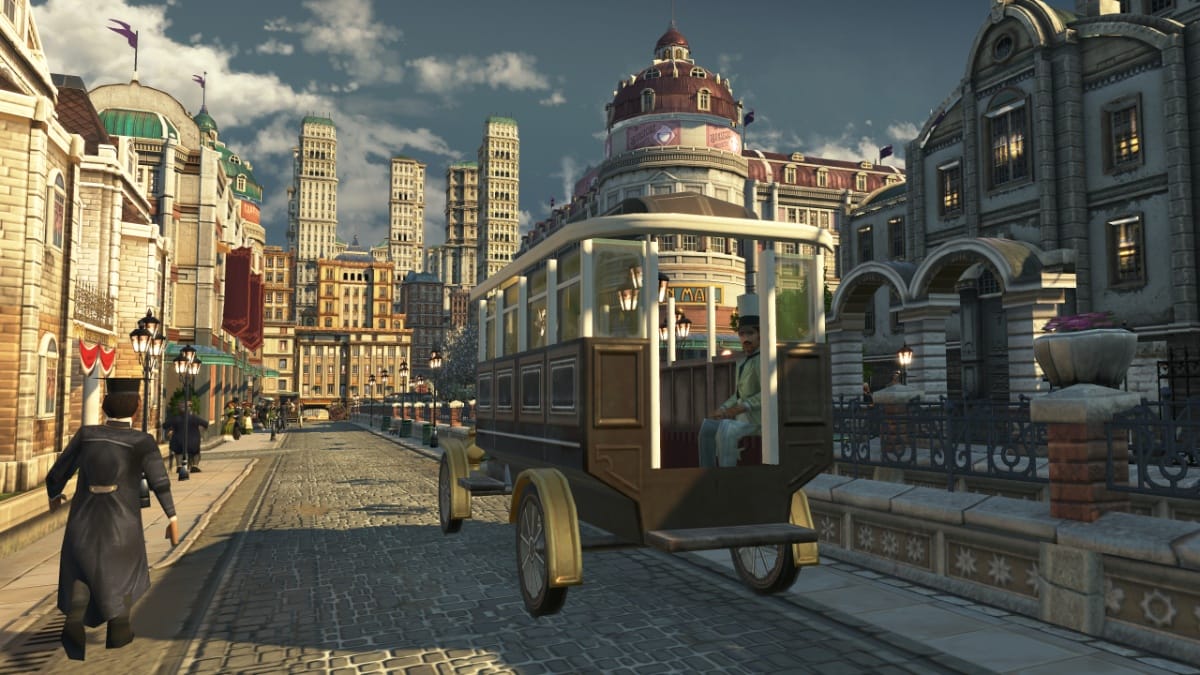
Anno 1800 first person mode image
Image Source: Ubisoft via The Nerd Stash

Switching to first person mode in Anno 1800 is an odd and unadvertised feature, almost like a cheat code. Also, the buttons might vary depending on your chosen platform.

Related:

How To Make Money in Anno 1800 (Fast & Easy)

Pressing the first person mode buttons will put you in the street view of wherever the center of the screen is. Here’s how to do it.

  • For PC (default) – Those with Windows as their OS can simply press and hold Ctrl + Shift + R in Anno 1800 to enter first person mode.
    • You can use ‘W, A, S, D’ to walk around, ‘Space’ to jump, and even ‘Shift’ to run.
    • Press ‘Esc’ or the escape key to exit first person mode.
  • For PlayStation/Xbox: Those on PS5 or Xbox Series X/S, use the “Konami Code” or up, up, down, down, left, right, left, right, O/B, X/A, Start.
    • You can use the analog sticks to move and the buttons to jump or run.
    • Press ‘Start’ if you want to exit first person mode.

Keep in mind that since Anno 1800 is a performance-heavy game, your first person view might feel laggy due to lower framerate. This is the case for areas in your city where the population is dense, usually in housing districts.

Related:

How To Settle on a New Island in Anno 1800

Moreover, you might miss some important gameplay cues and notifications in first person mode. The game will automatically disable the HUD and UI during first person mode. So, make sure to be mindful of your game and your enemies during combat when using this view. You can also pause first before entering the Anno 1800 first person mode.

Related Topics
Anno 1800 Guide
Share. Facebook Twitter LinkedIn Reddit Email
Sid Natividad
  • Website

Sid was born, did some stuff, then decided to become a writer. He found respite in the sweet embrace of video games and pop culture after serving as a journalist, covering warzones and depressed areas. It seems he prefers the much lower chance of getting hit by a stray bullet during work hours.

SUGGESTED READS

Diablo 4 Season of Divine Intervention Lanch
Game Guides

Everything You Need to Know About the Season of Divine Intervention in Diablo 4

Capgods have Pulled the Emergency Mega Man Lever, The Blue Bomber Is Back in Mega Man Dual Override
Game News

Capgods have Pulled the Emergency Mega Man Lever, The Blue Bomber Is Back in Mega Man Dual Override

Diablo 4 Lord of Hatred Expansion Announcement
Game News

Diablo 4 Announces Its Next Expansion, and Shadowdrops the Paladin Class for Those Who Pre-Order It

WH40K Fans are Eating Good with the Total War: Warhammer 40K Announcement
Game News

WH40K Fans are Eating Good with the Total War: Warhammer 40K Announcement

Warframe Wernzer Herzog explanation
Game Features

Still Confused What is Warframe? Hollywood Legend Werner Herzog is Here to Fix That

Screamer TGA Interview
Features

Screamer Exclusive Interview – Michele Caletti Talks About the Series’ Legacy, Narrative, and the Reboot’s Scope

Trending
Diablo 4 Season of Divine Intervention Lanch

Everything You Need to Know About the Season of Divine Intervention in Diablo 4

Capgods have Pulled the Emergency Mega Man Lever, The Blue Bomber Is Back in Mega Man Dual Override

Capgods have Pulled the Emergency Mega Man Lever, The Blue Bomber Is Back in Mega Man Dual Override

Diablo 4 Lord of Hatred Expansion Announcement

Diablo 4 Announces Its Next Expansion, and Shadowdrops the Paladin Class for Those Who Pre-Order It

WH40K Fans are Eating Good with the Total War: Warhammer 40K Announcement

WH40K Fans are Eating Good with the Total War: Warhammer 40K Announcement

The Nerd Stash
Facebook X (Twitter) Instagram YouTube LinkedIn
  • About Us
  • Join Our Team
  • Meet the Team
  • Privacy Policy
  • DMCA Policy
  • Contact Us
  • Terms of Use
  • Sitemap
  • Editorial Guidelines
  • Advertising Policy
© 2025 The Nerd Stash. All Rights Reserved.

Type above and press Enter to search. Press Esc to cancel.