Close Menu
  • Gaming
    • Platforms
      • Nintendo
      • PC
      • PlayStation
      • Xbox
  • Entertainment
    • Movies
    • TV
    • Royals
  • Celebrity
    • Hollywood
  • Human Interest
  • Astrology
  • More
    • Reviews
Facebook X (Twitter) Instagram LinkedIn YouTube
  • About Us
  • Join Our Team
  • Meet the Team
  • Privacy Policy
  • DMCA Policy
  • Contact Us
  • Terms of Use
  • Sitemap
  • Editorial Guidelines
  • Advertising Policy
The Nerd Stash
  • Gaming
  • Celebrity
  • Hollywood
  • Human Interest
The Nerd Stash
Home»Gaming»How To Make Sidewalks in Palworld (& Other Platforms)

How To Make Sidewalks in Palworld (& Other Platforms)

Spice up your base.

Gabriela JessicaBy Gabriela JessicaFebruary 1, 20243 Mins Read
Palworld Sidewalks
Image Source: Pocket Pair via The Nerd Stash
This article is over 2 years old and may contain outdated information.

Building your base is tough, especially when you want to make it look pretty. Although Palworld offers various decorations to make your camp look great, adding sidewalks can make it even better. Since there is no recipe for this structure in the Technology tree, you will need to perform some tricks to create fancy paths in your base. The good news is you only need to use the foundation structure from the game’s three structure sets.

How To Create Sidewalks in Palworld
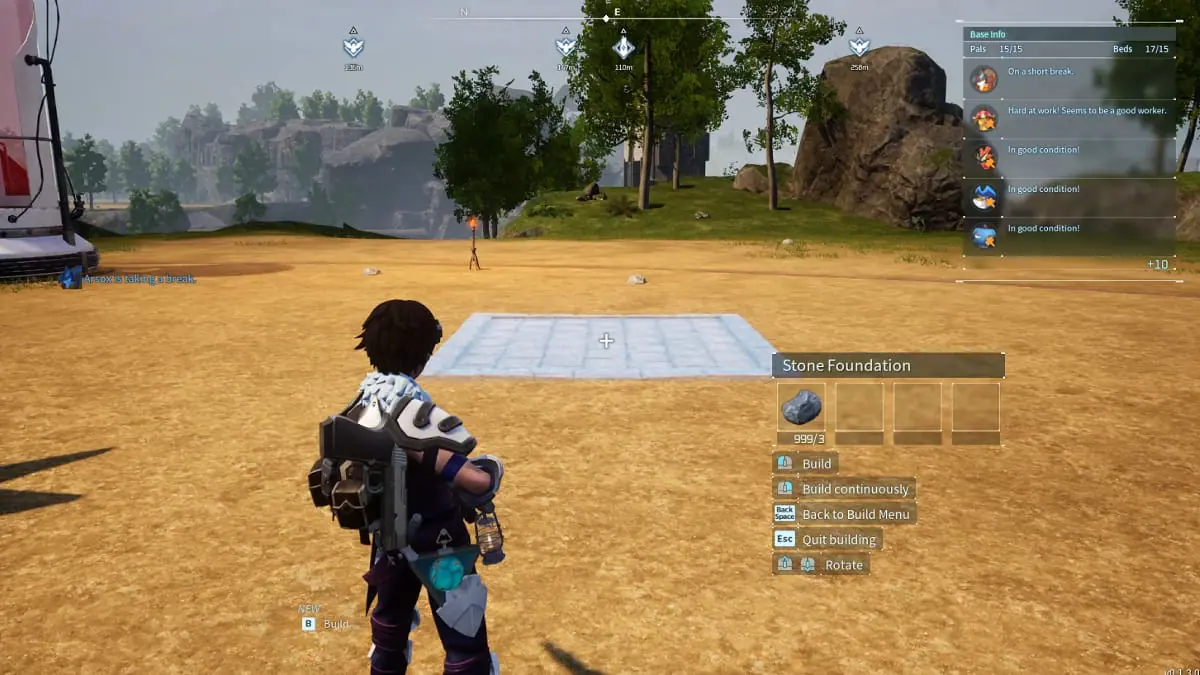
How To Make Sidewalks in Palworld
Image Source: Pocket Pair via The Nerd Stash

You can make sidewalks by using the foundation structure from the three structure sets. Usually, the foundation will be placed right above the ground. To create sidewalks, you will need to make this structure sink into the ground. You can do this by moving your cursor far away from your character and adjusting it. I recommend using a mouse instead of a controller to make it easier to place this structure.

Once you are happy with the height of your sidewalks, you can press the left button on your mouse to build it. After you’ve placed the first foundation, you can freely put the rest of them without worry since they will want to stick to the others.

Related:

This Game-Changing Palworld Trick Lets You Ignore Encumberance

How to Make Other Platforms in Palworld
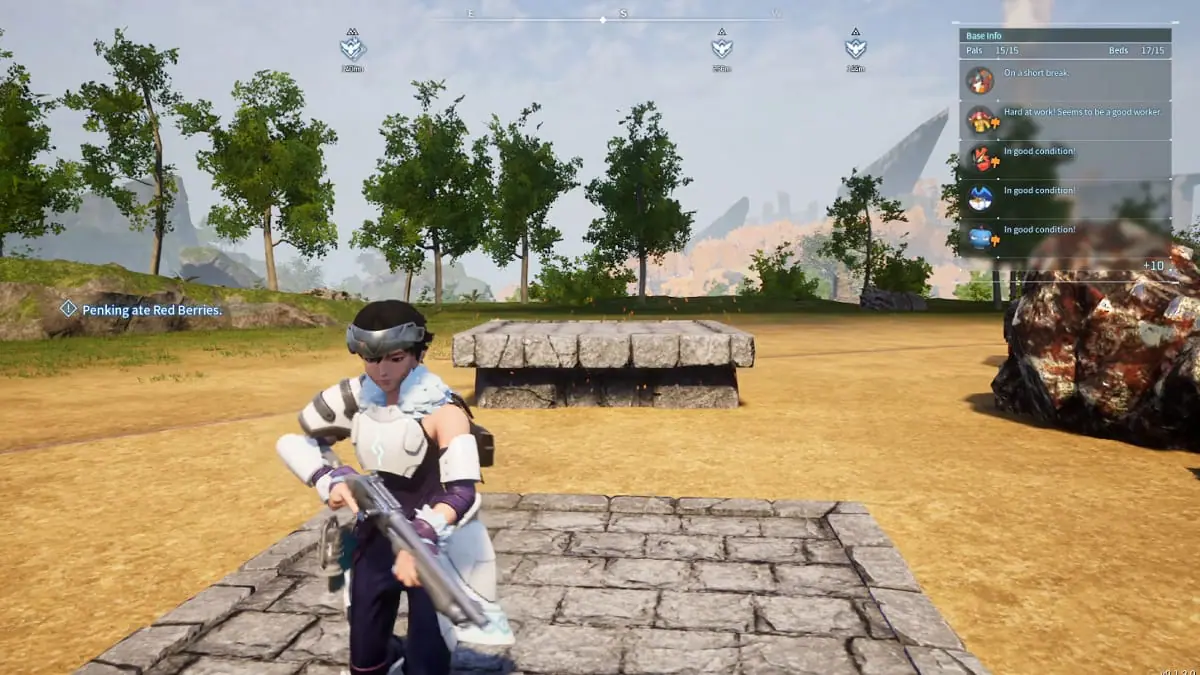
Elevated Platform in Palworld
Image Source: Pocket Pair via The Nerd Stash

Besides adding sidewalks, you can also play around with the foundations to create other structures in Palworld. For example, you can also make elevated platforms using the same trick.

Like before, you will need to move your cursor away from your character and adjust it so the foundation will be hovering above the ground. The elevated platforms are extremely useful if your base is located on uneven ground with cliffs or other landscape features.

If you want to go even further, you can even add stairs to your sidewalks! Unlike placing elevated platforms, you don’t need to be very careful with the placement because the stairs can be attached to already-placed structures. By having stairs, you can seamlessly connect your sidewalks to elevated platforms or even your home.

Related:

Pokemon Doesn’t Need to Sue Palworld, It Needs to Get With the Times

Here is the list of structures you can use to make sidewalks and other platforms in Palworld:

  • Wood Foundation
  • Wood Stairs
  • Stone Foundation
  • Stone Stairs
  • Metal Foundation
  • Metal Stairs

If you need more guidance, you can check out a YouTube video from consolecaito, who went in-depth about adding sidewalks to your Palworld base:

Related Topics
Guide Palworld
Share. Facebook Twitter LinkedIn Reddit Email
Gabriela Jessica
  • Website

Gabriela has been writing game guides since 2023, mainly covering WuWa, Genshin Impact, and Honkai: Star Rail. She also loves exploring new titles, with favorites like Tears of the Kingdom, P5R, Stardew Valley, RDR2, The Witcher 3, WWM, and the RE4 Remake.

SUGGESTED READS

All Black Marketeer Locations in Palworld
Gaming

All Black Marketeer Locations in Palworld

Gaming

A New Wolverine Trailer Playing in Front of the Odyssey is Getting Obliterated by PlayStation Fans: ‘Can’t wait for my PHYSICAL COPY’

Pal Awakening Guide - Palworld
Gaming

Complete Palworld Pal Awakening Guide

How to get Radiant Gems In Palworld 1.0
Gaming

How to get Radiant Gems In Palworld 1.0

gamescom dev 2026 Adds Subnautica 2 Creative Director as Keynote Speaker, Reveals New Awards
Gaming

gamescom dev 2026 Adds Subnautica 2 Creative Director as Keynote Speaker, Reveals New Awards

Fortnite Summer Skins Censored Rumors
Gaming

Fortnite Fans Disappointed as Upcoming Summer Skins Have Been Allegedly Censored One Day After Their Reveal: ‘They Folded Without Any Pressure’

The Nerd Stash
Facebook X (Twitter) Instagram YouTube LinkedIn
  • About Us
  • Join Our Team
  • Meet the Team
  • Privacy Policy
  • DMCA Policy
  • Contact Us
  • Terms of Use
  • Sitemap
  • Editorial Guidelines
  • Advertising Policy
© 2026 The Nerd Stash. All Rights Reserved.

Type above and press Enter to search. Press Esc to cancel.