
Close Menu
  • Gaming
    • Game Guides
    • Codes
    • Game News
    • Game Previews
    • Game Reviews
    • Game Features
    • Game Lists
    • Platforms
      • Nintendo
      • PC
      • PlayStation
      • Xbox
      • Mobile
  • Entertainment
    • Movies
    • Movie Features
    • Movie Reviews
    • TV
    • Reality TV
    • Royals
  • Celebrity
    • Hollywood
  • Human Interest
  • Astrology
  • Videos
  • More
    • Anime
    • Lists
    • Podcasts
    • Reviews
Facebook X (Twitter) Instagram LinkedIn YouTube
  • About Us
  • Join Our Team
  • Meet the Team
  • Privacy Policy
  • DMCA Policy
  • Contact Us
  • Terms of Use
  • Sitemap
  • Editorial Guidelines
  • Advertising Policy
The Nerd Stash
  • Gaming
  • Celebrity
    • Hollywood
  • Human Interest
  • Videos
The Nerd Stash
Home»Game Guides»How To Open the Golden Door in Sons of the Forest

How To Open the Golden Door in Sons of the Forest

Nothing could go wrong opening this, right?

Mykel BrightBy Mykel BrightFebruary 29, 20243 Mins Read
gold door endgame
Image Source: Endnight Games
This article is over 1 years old and may contain outdated information.

All that fighting, building, and struggling to live to see another day concludes at some point. When it does, Sons of the Forest requires you to open a Golden Door, but you’ll need the help of some Golden Armor. After crafting various armor throughout your adventures, you can transform something old into something shiny and new. It’s a step up from wearing that slimy Creepy Armor, isn’t it? But it’s not just cosmetics, as we can’t get through that door without it.

Opening the Golden Door in Sons of the Forest

sons of the forest golden door
Image Source: Endnight Games and The Survivalist (YouTube)

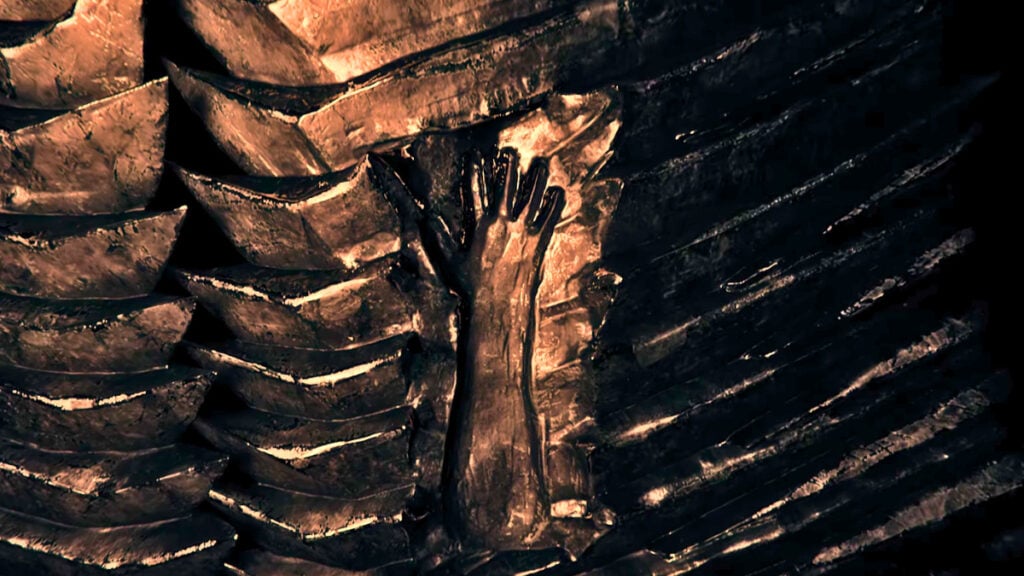
The Golden Door stands between you and the endings in Sons of the Forest. When you look at it, you’ll notice there’s an impression of an arm. Interacting with it does nothing but mention how something’s missing. What we want to do now is make sure we have Ancient Armor in our inventory. If you don’t have it, follow these steps to get it:

  1. Go to Cave D with your Rebreather and Air Tanks prepared.
  2. If you enter the Cave through the section with the wooden planks, keep right until you get to an incline.
  3. Climb the incline and drop into the nearby crevice, staying right until you break more wooden boards and soon see solafite light in the distance.
  4. You’ll swim underwater for a time and emerge in a new area where you want to go left.
  5. It’s a small swim section, and after that, ascend the rope, run through the corridor, and veer right.
  6. Continue through the path until you see more solafite light and turn left.
  7. After another incline, go right, head underwater, and keep forward until you get another branching path that you’ll want to go left at.
  8. Finally: go right to find the spacecraft in the lightning room.
  9. Go behind the spacecraft and break the wooden planks to get inside.
  10. On the body, loot the Ancient Armor (and a piece of the Artifact if you don’t have it yet).

Related:

All Artifact Piece Locations in Sons of the Forest

Crafting Golden Armor

ancient golden armor crafting
Image Source: Endnight Games and The Survivalist (YouTube)

Now that we have our Ancient Armor in Sons of the Forest, we can return to the site of the Golden Door to start the process for Golden Armor. Near the door is a skeleton. From said skeleton, you can loot a Blueprint. Take this outside, and from there, you’ll follow the crafting recipe:

  • x4 Wire
  • x1 Skull
  • x33 Bones
  • x25 Rocks

With the construction completed, add the Ancient Armor as well as x12 Solafite to transform it into Golden Armor. All that’s left for you to do is slip on the new armor, return to the Golden Door, and lay your arm in the slot to kick off your final adventures in Sons of the Forest.

Sons of the Forest is available on PC.

Related Topics
Guide Sons of The Forest
Share. Facebook Twitter LinkedIn Reddit Email
Mykel Bright
  • Website

Since childhood, Mykel has had a passion for writing, drawing, comic books, video games, and all things horror. She finds various ways to blend her loves such as sketching out ideas for potential comics and working out ideas for choice-based visual novels.

SUGGESTED READS

Marathon Raid Map
Features

Marathon Will Break Extraction Shooter Conventions by Bringing Destiny-like Raids Into the Mix

Hytale Reddit Moderator Clarifies 2.8 Million Player Count: 'How the Table Turns…'
Game News

Hytale Reddit Moderator Clarifies the Mindboggling 2.8 Million Player Count Situation: ‘How the Table Turns…’

Hytale Reaches 2.8 Million Active Players on Release Day, Says Developer: 'Eat Your Heart Out'
Game News

Hytale Reaches 2.8 Million Active Players on Release Day, Says Developer: ‘Eat Your Heart Out’

All Hytale Creative Mode and Server Console Commands
Game Guides

All Hytale Creative Mode and Server Console Commands

Hytale Email Not Sending error
Game Guides

How To Fix the ‘Email Not Sending’ Error in Hytale

Hytale How To Install Mods
Game Guides

How To Install Mods in Hytale

Trending
Marathon Raid Map

Marathon Will Break Extraction Shooter Conventions by Bringing Destiny-like Raids Into the Mix

Hytale Reddit Moderator Clarifies 2.8 Million Player Count: 'How the Table Turns…'

Hytale Reddit Moderator Clarifies the Mindboggling 2.8 Million Player Count Situation: ‘How the Table Turns…’

Hytale Reaches 2.8 Million Active Players on Release Day, Says Developer: 'Eat Your Heart Out'

Hytale Reaches 2.8 Million Active Players on Release Day, Says Developer: ‘Eat Your Heart Out’

All Hytale Creative Mode and Server Console Commands

All Hytale Creative Mode and Server Console Commands

The Nerd Stash
Facebook X (Twitter) Instagram YouTube LinkedIn
  • About Us
  • Join Our Team
  • Meet the Team
  • Privacy Policy
  • DMCA Policy
  • Contact Us
  • Terms of Use
  • Sitemap
  • Editorial Guidelines
  • Advertising Policy
© 2026 The Nerd Stash. All Rights Reserved.

Type above and press Enter to search. Press Esc to cancel.





