

Close Menu
  • Gaming
    • Platforms
      • Nintendo
      • PC
      • PlayStation
      • Xbox
  • Entertainment
    • Movies
    • TV
    • Royals
  • Celebrity
    • Hollywood
  • Human Interest
  • Astrology
  • More
    • Reviews
Facebook X (Twitter) Instagram LinkedIn YouTube
  • About Us
  • Join Our Team
  • Meet the Team
  • Privacy Policy
  • DMCA Policy
  • Contact Us
  • Terms of Use
  • Sitemap
  • Editorial Guidelines
  • Advertising Policy
The Nerd Stash
  • Gaming
  • Celebrity
  • Hollywood
  • Human Interest
The Nerd Stash
Home»Gaming»How To Sign Out (Log Out) of Monopoly Go

How To Sign Out (Log Out) of Monopoly Go

Logging in… and loggin out

Nat CollazoBy Nat CollazoJuly 11, 20242 Mins Read
How To Sign Out (Log Out) of Monopoly Go
Image Source: Scopely
This article is over 2 years old and may contain outdated information.

Monopoly Go is one of the most addictive phone games I have ever played. Rolling dice, stealing from other players, and watching your cash rack up is incredibly satisfying. You can keep up with your progress on other devices by signing in via Facebook and other services. Conversely, if players can log into other devices, that should mean that they can also sign out of them. Let’s take a look at how to log out of Monopoly Go.

Signing out of Monopoly Go
How To Sign Out (Log Out) of Monopoly Go
Image Source: Scopely via The Nerd Stash

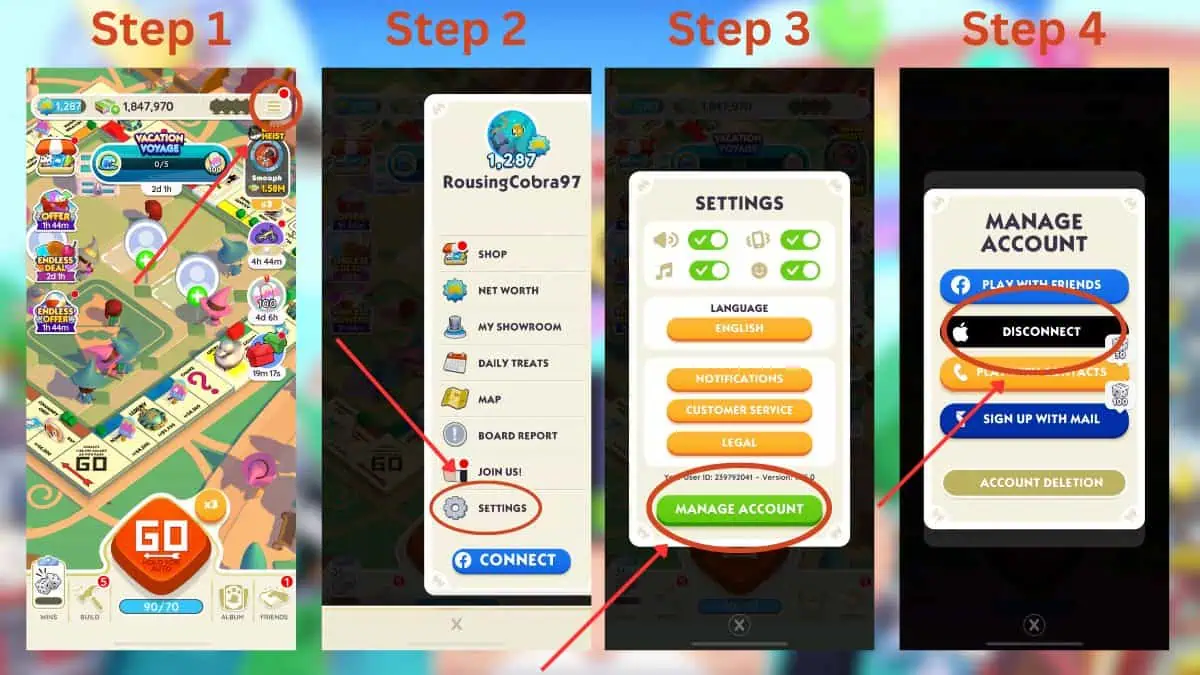
To log out of Monopoly Go, follow these steps:

  1. In-game, press the three horizontal lines on the top-right corner.
  2. In the new menu, select the Settings button at the bottom.
  3. A new window will appear where you must select the Manage Account button.
  4. All of your account connections will be visible, with the ones available to be disconnected saying Disconnect over them.
    • In the example above, the account is connected via my Apple account, meaning that to log out, I’d need to select the Apple icon.

Using this method, you can sign in and out of different mobile devices that can host the game. Before you finish playing, make sure that you log out of a device other than your own to ensure that there aren’t any login issues when you return to your own device.

Alternatively, you can delete your account altogether on this same screen.

Deleting Your Monopoly Go Account

The Account Deletion button is at the bottom of the window where you can delete of your account. It’s only there for those who are positive that they no longer want their accounts. Deleting your account cannot be reversed.

Related:

Monopoly Go: Culinary Stars Guide (All Event Rewards and Milestones)

Monopoly Go is available to play on mobile devices.

Related Topics
Guide Monopoly Go
Share. Facebook Twitter LinkedIn Reddit Email
Nat Collazo
  • Website
  • X (Twitter)
  • Instagram

Nat is a journalist with over ten years of online publishing experience. They are a massive fan of hanging out with both their wife and cat which would ideally be all the time. Nat received an undergraduate degree in English Literature from Florida International University, then returned to complete a graduate degree in Mass Communications before moving across the country to settle in New England.

SUGGESTED READS

Where to Get Corrosive Solvent in Palworld 1.0
Gaming

Where to Get Corrosive Solvent in Palworld 1.0

Where to Find All Echobones & Catch Panthalus in Palworld 1.0
Gaming

Where to Find All Echobones & Catch Panthalus in Palworld 1.0

Transport Fever 3 Features
Gaming

Transport Fever 3 Is Gearing Up for Launch With New Footage Showcasing Several Features for Transport Tycoon Fans

9.5
Gaming

Rhythm Heaven Groove Review – Harmonic Perfection

Marvel Rivals Season 9 Hands-On Preview
Gaming

Marvel Rivals Season 9 Hands-On Impressions: Feels Like a Whole New Game

Diablo 4 x Overwatch Collab
Gaming

Diablo 4 x Overwatch Impressions: Something of an Inconsistent Bag

The Nerd Stash
Facebook X (Twitter) Instagram YouTube LinkedIn
  • About Us
  • Join Our Team
  • Meet the Team
  • Privacy Policy
  • DMCA Policy
  • Contact Us
  • Terms of Use
  • Sitemap
  • Editorial Guidelines
  • Advertising Policy
© 2026 The Nerd Stash. All Rights Reserved.

Type above and press Enter to search. Press Esc to cancel.




