Close Menu
  • Gaming
    • Platforms
      • Nintendo
      • PC
      • PlayStation
      • Xbox
  • Entertainment
    • Movies
    • TV
    • Royals
  • Celebrity
    • Hollywood
  • Human Interest
  • Astrology
  • More
    • Anime
    • Reviews
Facebook X (Twitter) Instagram LinkedIn YouTube
  • About Us
  • Join Our Team
  • Meet the Team
  • Privacy Policy
  • DMCA Policy
  • Contact Us
  • Terms of Use
  • Sitemap
  • Editorial Guidelines
  • Advertising Policy
The Nerd Stash
  • Gaming
  • Celebrity
  • Hollywood
  • Human Interest
The Nerd Stash
Home»Gaming»How to Create Pop-Up Camps in Monster Hunter Wilds

How to Create Pop-Up Camps in Monster Hunter Wilds

Home away from home

Julio La PineBy Julio La PineFebruary 27, 20253 Mins Read
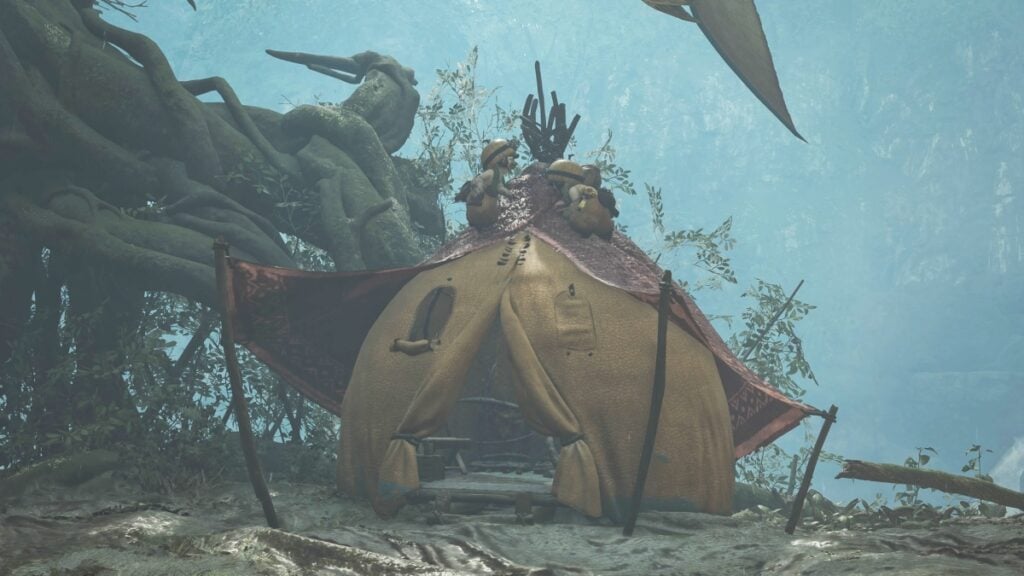
A Pop-up Camp in the Scarlet Forest
Image Source: Capcom via The Nerd Stash

Monster Hunter Wilds embraces that expedition feel when exploring and beyond the many small hubs across all the different areas, you can also create things called pop-up camps. These places let you change your weapons, grill a meal, and even customize them with different colors, materials, and amenities. However, placing one on the map has a few requirements; even when you put it, you must watch out for monsters. Here, we’ll tell you everything about these little havens.

How To Unlock Pop-Up Camps

Before you even try to find a suitable location for your pop-up camps in Monster Hunter Wilds, you’ll need to unlock this feature. To do so, you need to progress through the main story to the point where you fight your first Congalala. After that, you can start placing pop-up camps in certain areas on the map. One important thing to remember is that all areas have a camp limit. This limit can increase after completing certain main story missions, but most of the time, you can place at least two pop-up camps in every area.

Placing and Customizing Your Camp
Customizing a Pop-Up Camp
Image Source: Capcom via The Nerd Stash

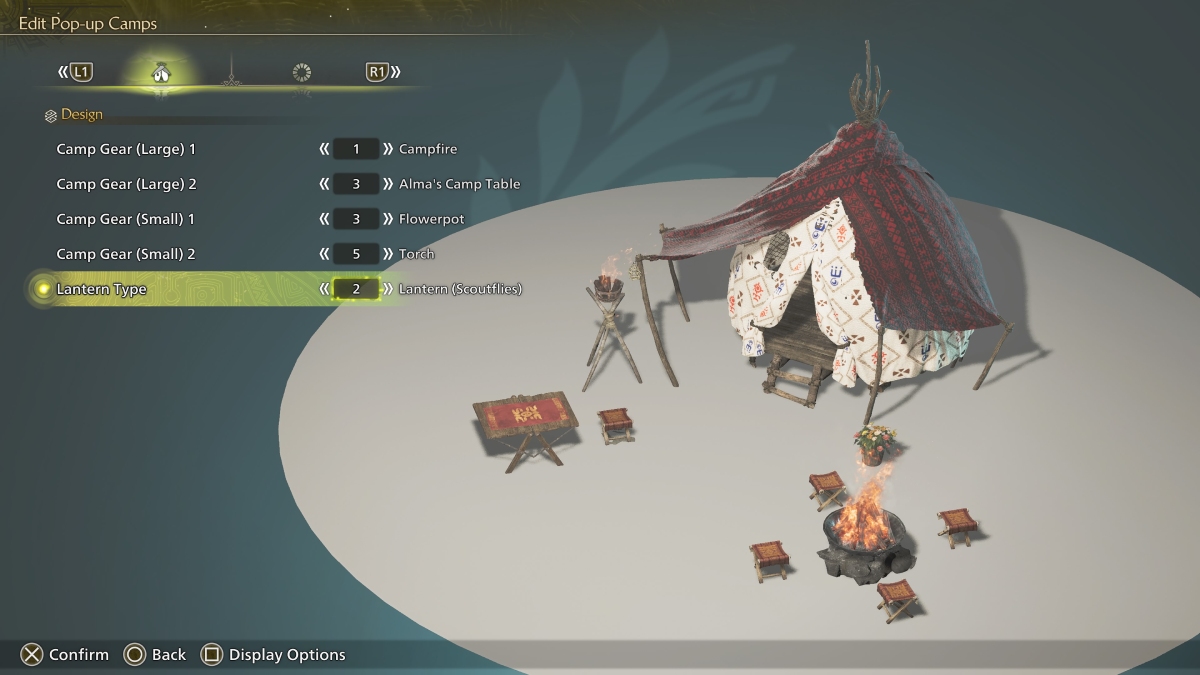
To place a pop-up camp in Monster Hunter Wilds, you need to find a suitable spot first. Usually, these spots have some flies around them, and whenever you pass near one, you’ll get a notification that says, “You’ve unlocked a camp spot.” All you must do now is return to that spot and place your camp by using the camping kit in your inventory. However, there are a few things to keep in mind. For starters, the camp limit. You won’t be able to place a lot of camps from the get-go. Second, you must watch out for the danger level around your camp. Camps usually go from dangerous to safe, depending on the monsters around them. The more dangerous the area, the more likely monsters will come to destroy your camp.

Monster Hunter Wilds: Weapon Tier List
Related: Monster Hunter Wilds: Weapon Tier List

Once you decide where to place your pop-up camp, you can start customizing it by speaking to the Palico next to it. You can change your tent’s material and color and even place some furniture outside it. Some amenities allow Alma and your Palico to interact with them. Also, there are a few new customization options you can unlock by progressing through the main story or completing side missions.

While you can fast-travel back to any hub on the map, and it doesn’t take long to do so, we recommend placing as many pop-up camps as possible. Certain encounters in Monster Hunter Wilds can be challenging, and these camps will serve as checkpoints for you to recover or prepare for the next hunt.

Related Topics
Guide Monster Hunter Wilds
Share. Facebook Twitter LinkedIn Reddit Email
Julio La Pine
  • Website

Been gaming since '99! I am a huge JRPG fan and my favorite franchise is Final Fantasy. I love writing about games and I hope I can do it for the rest of my days!

SUGGESTED READS

Path of Exiles 2 Build Planner Guide
Gaming

How To Use the Build Planner in Path of Exile 2

Adopt Me Kicks Off Summer With Journey to Summer Camp Update, Here's All The New Week 1 Pets & Rewards
Gaming

Roblox Adopt Me Launches Journey to Summer Camp Update, Here’s All the Week 1 Pets & Rewards

LEGO Batman Legacy of the Dark Knight PC Review
9
Gaming

LEGO Batman: Legacy of the Dark Knight Review – A Hero Rises

Call of Duty: Modern Warfare 4 Launching This October on Next-Gen Consoles & Switch 2, But Not Game Pass
Gaming

Call of Duty: Modern Warfare 4 Launching This October on Next-Gen Consoles & Switch 2, But Not Game Pass

Hideo Kojima Teams Up With Prada for an AI Film, And Fans Aren't Happy: 'Beyond Incredibly Disappointing'
Gaming

Hideo Kojima Teams Up With Prada for an AI Film, And Fans Aren’t Happy: ‘Beyond Incredibly Disappointing’

The Witcher 3 Songs of the Past expansion
Gaming

A Witcher 3 Leak Just Forced CD Projekt Red to Announce a Brand-New Expansion: Songs of the Past

The Nerd Stash
Facebook X (Twitter) Instagram YouTube LinkedIn
  • About Us
  • Join Our Team
  • Meet the Team
  • Privacy Policy
  • DMCA Policy
  • Contact Us
  • Terms of Use
  • Sitemap
  • Editorial Guidelines
  • Advertising Policy
© 2026 The Nerd Stash. All Rights Reserved.

Type above and press Enter to search. Press Esc to cancel.