Utilizing Hytale‘s Creative Mode and server console commands is where the game really opens up for true crafting fans. From block manipulations to world settings and server control, these commands let you shape the game exactly how you want. If you’re looking for them, this guide covers all Hytale console commands, with quick explanations and examples. Helping you build faster and experiment freely without too much guesswork.
Remember that you can also type in /help to see all available commands in your current game mode!
Player Commands
These are basic console commands that can be used in any game mode.
| Command | Description | How to Use / Example |
|---|---|---|
/emote | Performs an emote or animation | Type /emote <emote_name> to play a specific emoteExample: /emote wave |
/help | Shows a list of available commands | |
/op | Grants operator privileges | – Type /op self to add yourself to the operator group– Type /op self and then press ‘O’ to switch between Adventure and Creative Mode |
/ping | Checks your connection latency | /ping graph shows your connection in a graph visual |
/who | Displays a list of online players in your world | |
/whoami | Shows your player info and permission level | |
/whoami <player_name> | Shows a player’s info and permission level | Example: /whoami TheNerdStash |
/whereami | Shows your current location in coordinates and chunks |
Hytale Server Admin Commands
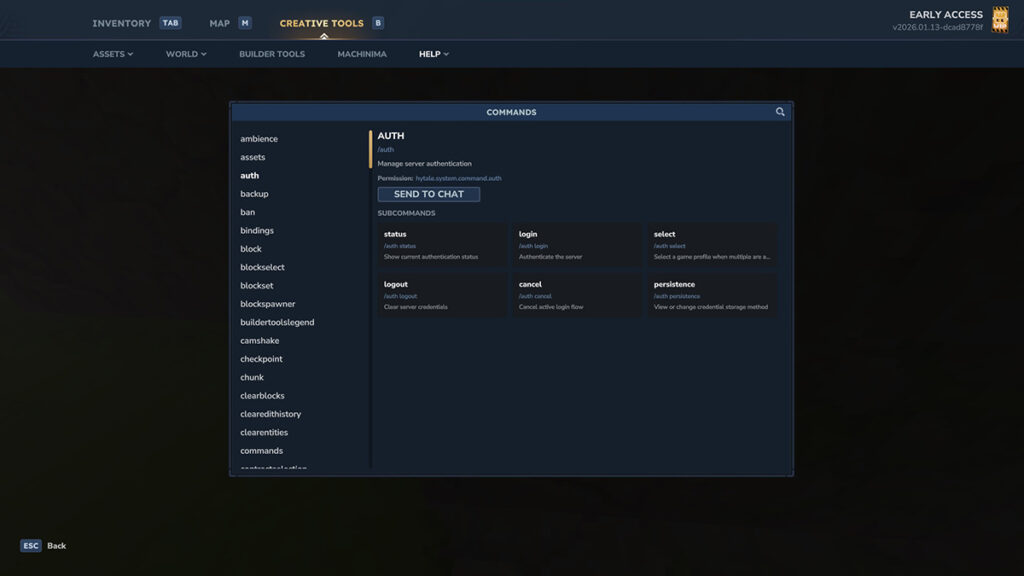
Do note that you need a specific user permission to use these console commands. Otherwise, you’ll get the “You do not have permission to use this command” error message. Setting yourself up with the /op command or as a server admin is the easiest way to get full access. The complete list of materials or items’ IDs can be found in the Creative Mode inventory.
| Command | Description |
|---|---|
/auth | Manage server authentication (login, etc.) |
/backup | Backup the world’s current state |
/ban | Permanently removes a player from the server |
/camshake | Modify camera shake settings |
/checkpoint | Commands related to parkour settings |
/curses | Apply a curse to the held item |
/damage | Inflicts damage on the selected player |
/gamemode | Changes the current game mode |
/give | Grants items directly to a player |
/heal | Restores health and stamina to maximum |
/kick | Removes a player from the server |
/kill | Instantly defeats and respawns the selected player |
/maxplayers | Set the maximum number of players |
/memories | Commands related to Memories system Example: /memories unlockall unlocks all Memories |
/mount | Dismount yourself or other players, or check mount status |
/neardeath | Sets health to 1 |
/noon | Change the time to noon and freeze the time |
/npc | Commands related to NPCs Example: /npc attack makes NPCs aggressive |
/objective | Commands related to objectives Example: /objective complete clears current objective |
/perm | Manages user and group permissions |
/plugin | Controls and configures server plugins |
/say | Server-wide chat |
/spawn | Teleports you to the world’s main spawn point |
/spawning | Controls and manages NPC spawning behavior |
/spawnitem | Spawn an item Example: /spawnitem Food_Beef_Raw --qty 1 |
/stop | Forces the server to shut down immediately |
/sudo | Executes a command as another player |
/tp | Teleports to a specific player or location |
/unban | Lifts a ban and restores server access |
/unstuck | Teleport to the top of the world at your current position |
/whitelist | Manages the server’s whitelist settings |
/worldmap | Manages world map settings Example: /worldmap discover discovers all zones |
Hytale Creative Mode Console Commands
Keep in mind that Hytale offers robust Creative options outside of using console commands. Be sure to check out the Creative Tools in the menu. The complete list of materials or items’ IDs can be found in the Creative Mode inventory.
| Command | Description | Example / How to Use |
|---|---|---|
/ambience | Set the world’s ambience | |
/block | Block-related commands including placement, queries, and state control | – Type /block set <x> <y> <z> <block_type> to place a block– Type /block get <x> <y> <z> to inspect a block– Type /block setstate <x> <y> <z> <state> to modify block statesExample: /block set 10 64 10 stone |
/buildertoolslegend | Shows or hides the Builder Tools HUD legend | – Type /buildertoolslegend --hide to hide it |
/clearblocks | Clears blocks inside the current selection or a defined area | – Type /clearblocks to clear a specific areaExample: /copy 10 10 10 30 30 25 |
/clearedithistory | Clears clipboard and edit history | |
/contractselection | Shrinks the current selection inward | – Type /contractselection <distance> to reduce selection sizeExample: /contractselection 2 |
/copy | Copies a selection or defined block area to the clipboard | – Type /copy <xMin> <yMin> <zMin> <xMax> <yMax> <zMax> to copy a specific areaExample: /copy 10 10 10 30 30 25 |
/cut | Cuts blocks from the world and stores them in the clipboard | – Type /cut <xMin> <yMin> <zMin> <xMax> <yMax> <zMax> to cut a defined areaExample: /copy 10 10 10 30 30 25 |
/deselect | Clears the current block selection | |
/editline | Draws a straight line of blocks between two points. | – Type /editline <start> <end> <material> to draw a lineExample: /editline 10 32 10 10 32 10 Soil_Dirt |
/environment | Sets the environment type within a selected area. | Example: /environment desert |
/expand | Expands the current selection outward. | Example: /expand --distance 10 |
/extendface | Extends the face you are currently targeting. | |
/fillblocks | Fills empty spaces inside a selection with blocks. | Example: /fillblocks Soil_Dirt |
/flip | Flips clipboard contents along an axis | – Type /flip <axis> to flip on a specific axisExample: /flip x |
/gmask | Applies a global block placement mask | – Type /gmask <block> to enable a mask– Type /gmask clear to remove itExample: /gmask Soil_Dirt |
/hollow | Hollows out a selection while keeping walls intact | – Type /hollow --thickness <value> to hollow a structureExample: /hollow --thickness 1 |
/hotbar | Restores a saved hotbar configuration | – Type /hotbar <slot> to load a saved hotbarExample: /hotbar 1 |
/hub | Returns you to the Cosmos of Creativity Hub | |
/importimage | Open the image import tool to convert an image into blocks | |
/importobj | Imports an OBJ file as voxel blocks | |
/itemstate | Changes the state of the currently held item | |
/move | Moves a selection and its contents. | – Type /move <distance> to move forward– Type /move <axis> <distance> for directional movement |
/paste | Pastes clipboard contents into the world | – Type /paste to paste at your position– Type /paste <x> <y> <z> to paste at coordinates |
/pos1 | Sets the first corner of a selection | Example: /pos1 --x 10 --y 100 --z 15 |
/pos2 | Sets the second corner of a selection | Example: /pos2 --x 50 --y 50 --z 0 |
/prefab | Saves, loads, deletes, or lists prefabs | – Type /prefab save to store a prefab– Type /prefab load to place one– Type /prefab list to view all prefabs |
/redo | Reapplies undone actions | – Type /redo <count> to redo multiple actions |
/repairfillers | Repairs filler blocks within a selection | |
/replace | Replaces blocks within a selection | – Type /replace <to> to replace all blocks– Type /replace <from> <to> for specific replacementExample: /replace Soil_Dirt Rock_Crystal_Blue_Block |
/selectchunk | Selects the entire chunk you are standing in | |
/selectchunksection | Selects a chunk section instead of the full chunk | |
/selectionhistory | Enables or disables selection tracking for undo/redo | – Type /selectionhistory true to enable tracking |
/setblocks | Sets all blocks in a selection to a specific type | Example: /setblocks Soil_Dirt |
/settoolhistorysize | Sets how many build actions can be undone | Example: /settoolhistorysize 20 |
/shift | Shifts the selection box without moving blocks | Example: /shift --distance 15 |
/stack | Duplicates a selection multiple times | – Type /stack <count> to stack forward– Type /stack <axis> <count> for directional control |
/submerge | Fills a selection with a fluid | Example: /submerge Water |
/time | Gets or sets the world time | Example: /time morning |
/tint | Applies a color tint to blocks in a selection | Example: /tint blue |
/undo | Reverts recent build actions | – Type /undo <count> to undo multiple actions |
/updateselection | Manually updates selection boundaries | – Type /updateselection <bounds> to redefine selectionExample: /updateselection 5 5 5 10 10 10 |
/wall | Applies blocks only to the walls of a selection. | – Type /wall <block> --thickness <value> to set wallsExample: /wall Soil_Dirt --thickness 1 |