
Close Menu
  • Gaming
    • Game Guides
    • Codes
    • Game News
    • Game Previews
    • Game Reviews
    • Game Features
    • Game Lists
    • Platforms
      • Nintendo
      • PC
      • PlayStation
      • Xbox
      • Mobile
  • Entertainment
    • Movies
    • Movie Features
    • Movie Reviews
    • TV
    • Reality TV
    • Royals
  • Celebrity
    • Hollywood
  • Human Interest
  • Astrology
  • Videos
  • More
    • Anime
    • Lists
    • Podcasts
    • Reviews
Facebook X (Twitter) Instagram LinkedIn YouTube
  • About Us
  • Join Our Team
  • Meet the Team
  • Privacy Policy
  • DMCA Policy
  • Contact Us
  • Terms of Use
  • Sitemap
  • Editorial Guidelines
  • Advertising Policy
The Nerd Stash
  • Gaming
  • Celebrity
    • Hollywood
  • Human Interest
  • Videos
The Nerd Stash
Home»Game Guides»Best Krig 6 Loadout in CoD Mobile

Best Krig 6 Loadout in CoD Mobile

Do you want to know the best Krig 6 loadout in CoD Mobile? The game has many guns, but the Krig 6 is one of…

Asanga WijeratneBy Asanga WijeratneJuly 12, 20233 Mins Read
Best Krig 6 Loadout Cod Mobile
Image Source: Activision via The Nerd Stash
This article is over 2 years old and may contain outdated information.

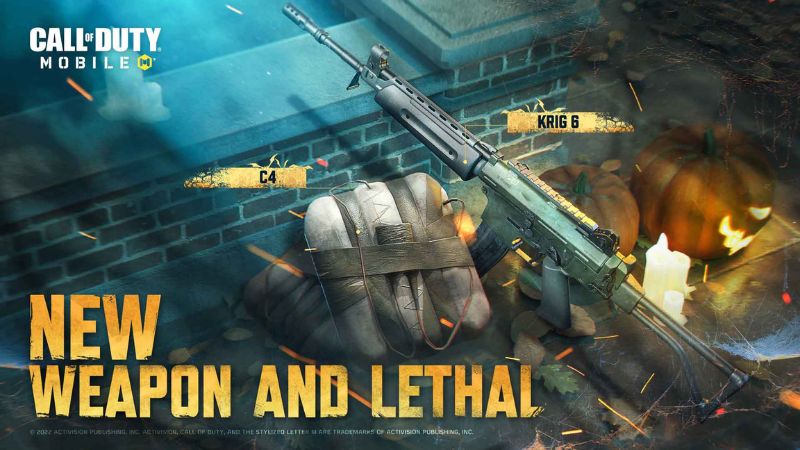
Do you want to know the best Krig 6 loadout in CoD Mobile? The game has many guns, but the Krig 6 is one of the most popular weapons. The Krig 6 is a powerful Assault Rifle with an impressive rate of fire and high damage. It is one of the most popular weapons in the game and can shred enemies in seconds. However, making the most of this weapon without a good loadout can be difficult.

What The Best Krig 6 Loadout Is in CoD Mobile
Cod Mobile Krig 6 Loadout
Image Source: Activision

The best Krig 6 loadout in CoD Mobile must increase its damage range while reducing the recoil. With the right attachments, you can make the Krig 6 an absolute beast on the battlefield. Here are some of the best Krig 6 loadout attachments.

  1. Muzzle: Agency Suppressor
  2. Barrel: Taskforce Barrel
  3. Stock: Light Weight Stock
  4. Ammunition: Large Extended Mag B
  5. Rear Grip: Firm Grip Tape

Related:
How To Get CR5 – GRD-11 Attachment In Call of Duty Mobile

The Agency Suppressor muzzle is essential for reducing the vertical recoil of the rifle by 10%. Not only does it make the weapon easier to handle, but it also eliminates muzzle flash, reducing your chances of being detected by enemies.

Next, you’ll want to add the Taskforce Barrel to your Krig 6 loadout in Cod Mobile. This extended barrel has polygonal rifling, significantly increasing bullet speed and damage. With the Taskforce Barrel, the gun will have a more extended range, making it a perfect choice for long-range engagements.

To further improve mobility, you should also equip the Light Weight Stock. This stock significantly boosts your movement speed while aiming down sights, making it easier to dodge enemy fire and keep your aim focused.

Another essential attachment you don’t want to miss is the Large Extended Mag B. As the name suggests, this attachment increases the magazine’s capacity, giving you more bullets to work with each firefight.

Lastly, add the Firm Grip Tape to your weapon to reduce the ADS time and hit flinch. This attachment is a game-changer for your Krig 6 loadout in Cod Mobile in reducing the delay when aiming down sights, giving you a split-second advantage over your opponents. While this attachment has a downside, an increase in the sprint-to-fire delay, its benefits far outweigh the drawbacks.

By equipping your Krig 6 with the Agency Suppressor, Taskforce Barrel, Light Weight Stock, Large Extended Mag B, and Firm Grip Tape, you will have an exceptional weapon loadout that will help you dominate the battlefield. If you still need visual guidance, the video below from BULLSHOT CODM will help.


Related Topics
CoD Mobile Guide
Share. Facebook Twitter LinkedIn Reddit Email
Asanga Wijeratne
  • Website

SUGGESTED READS

Minecraft Accused of Mocking Lonely Kids, Sparking Mental Health Backlash: 'One of the Ickiest Things I've Seen'
Features

Minecraft Accused of Mocking Lonely Kids, Sparking Mental Health Backlash: ‘One of the Ickiest Things I’ve Seen’

Destiny 2 Renegades PS5 Review
8.5
Features

Destiny 2: Renegades Review – The Shooter Strikes Back

Clair Obscur: Expedition 33 Loses GOTY, Other Award from Indie Game Awards Over Generative AI: 'Some Weird Performative BS'
Game News

GOTY Stripped Over AI?: Clair Obscur: Expedition 33 Loses Awards at Indie Game Awards, ‘Some Weird Performative BS’

Sony Patents Real-time AI Game Censorship Tech That Could Even Make GTA 6 Kid-Friendly
Game News

Sony Patents Real-Time AI Game Censorship Tech That Could Even Make GTA 6 Kid-Friendly

Zenless Zone Zero Version 2.5 Announcement
Game News

Zenless Zone Zero Version 2.5 Is Ready To Wrap Up the Year With Two New Agents and a Free Outfit

PC Gamers Can't Catch a Break as Nvidia Plans 40% GeForce GPU Production Cuts, Report: 'Who Needs a PC Anyways'
Game News

PC Gamers Can’t Catch a Break as Nvidia Reportedly Plans 40% GeForce GPU Production Cuts: ‘Who Needs a PC Anyways’

Trending
Minecraft Accused of Mocking Lonely Kids, Sparking Mental Health Backlash: 'One of the Ickiest Things I've Seen'

Minecraft Accused of Mocking Lonely Kids, Sparking Mental Health Backlash: ‘One of the Ickiest Things I’ve Seen’

Destiny 2 Renegades PS5 Review
8.5

Destiny 2: Renegades Review – The Shooter Strikes Back

Clair Obscur: Expedition 33 Loses GOTY, Other Award from Indie Game Awards Over Generative AI: 'Some Weird Performative BS'

GOTY Stripped Over AI?: Clair Obscur: Expedition 33 Loses Awards at Indie Game Awards, ‘Some Weird Performative BS’

Sony Patents Real-time AI Game Censorship Tech That Could Even Make GTA 6 Kid-Friendly

Sony Patents Real-Time AI Game Censorship Tech That Could Even Make GTA 6 Kid-Friendly

The Nerd Stash
Facebook X (Twitter) Instagram YouTube LinkedIn
  • About Us
  • Join Our Team
  • Meet the Team
  • Privacy Policy
  • DMCA Policy
  • Contact Us
  • Terms of Use
  • Sitemap
  • Editorial Guidelines
  • Advertising Policy
© 2025 The Nerd Stash. All Rights Reserved.

Type above and press Enter to search. Press Esc to cancel.




