Close Menu
  • Gaming
    • Platforms
      • Nintendo
      • PC
      • PlayStation
      • Xbox
  • Entertainment
    • Movies
    • TV
    • Royals
  • Celebrity
    • Hollywood
  • Human Interest
  • Astrology
  • More
    • Anime
    • Reviews
Facebook X (Twitter) Instagram LinkedIn YouTube
  • About Us
  • Join Our Team
  • Meet the Team
  • Privacy Policy
  • DMCA Policy
  • Contact Us
  • Terms of Use
  • Sitemap
  • Editorial Guidelines
  • Advertising Policy
The Nerd Stash
  • Gaming
  • Celebrity
  • Hollywood
  • Human Interest
The Nerd Stash
Home»Gaming»Diablo 4: How to Solve the Note’s Riddle in Travelers Superstition

Diablo 4: How to Solve the Note’s Riddle in Travelers Superstition

Time to solve a riddle!

Cande MaldonadoBy Cande MaldonadoJune 10, 20232 Mins Read
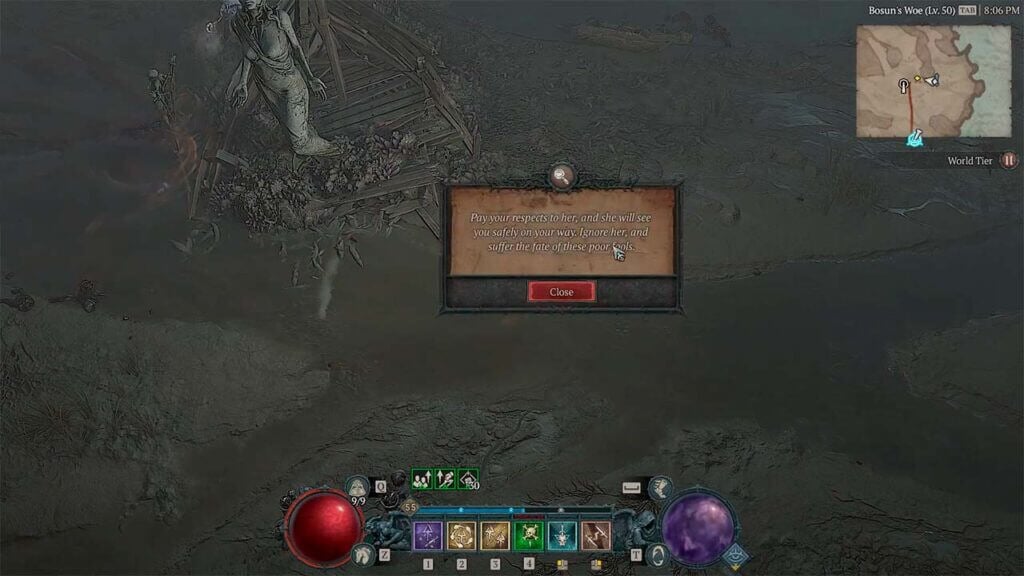
Note Riddle Diablo 4
Image Source: Blizzard via The Nerd Stash
This article is over 2 years old and may contain outdated information.

[Updated on August 26, 2024, to revise outdated formatting and improve readability.]

Riddle quests can be confusing, but you can successfully complete the Note’s Riddle in Traveler’s Superstition in Diablo 4 with the proper steps. To start Traveler’s Superstition:

  1. Locate the Hastily Scrawled Note. This note can be found beside a giant statue and the shell of a crashed wooden wagon known as Traveler’s Superstition in Diablo 4.
  2. Make your way to Bosun’s Woe in the Rotspill Delta area of the Hawezar region.
  3. Look for the statue in the northeastern part of the Rotspill Delta along the eastern coast of Sanctuary.

Related:

How To Bind And Use Skills in Diablo 4

Once you have found the Hastily Scrawled Note, position yourself before the Traveler’s Superstition statue. On PC, press the E key to open the Emote Wheel. This will allow you to choose and perform different emotes.
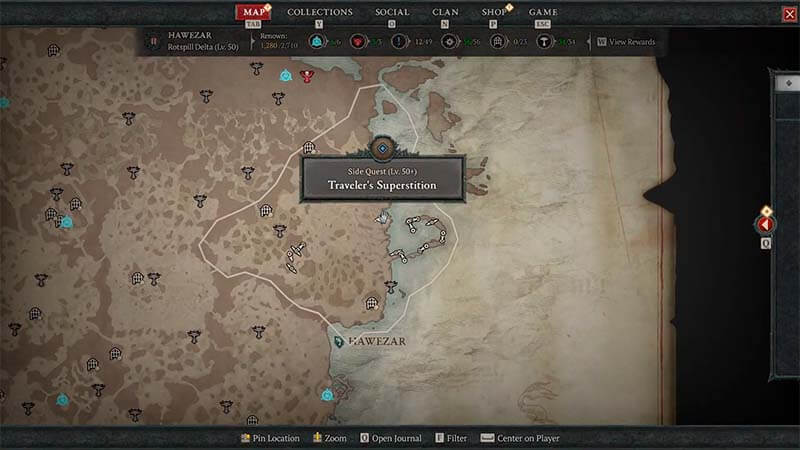
Note Riddle Location
Image Source: Blizzard via The Nerd Stash

From the Emote Wheel, select the ‘Hello’ emote. This emote is crucial to solving the riddle. Execute the ‘Hello’ emote while standing in front of the statue. This action will trigger a response and initiate the appearance of a chest. Once the chest appears, approach and interact with it to loot its contents.
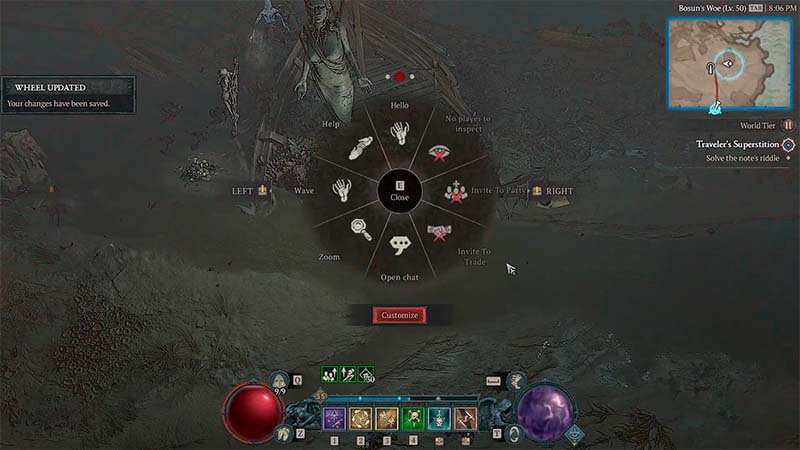
Emote Wheel Diablo 4
Image Source: Blizzard via The Nerd Stash

To spice up your emote wheel in Diablo 4 and solve the Note’s Riddle, follow these quick steps: 

  1. Press the “E” key (PC) or the “Up” button (consoles) to pop up the wheel.
  2. Hit “Customize” and drag your desired emote to an open spot. 
  3. Repeat for more emotes, or fine-tune the wheel to your liking. 
Related Topics
Diablo 4 Guide
Share. Facebook Twitter LinkedIn Reddit Email
Cande Maldonado
  • Website

Pot-smasher, NPC-annoyer, side quest-completionist. Oh, there's that writing gig, too.

SUGGESTED READS

Honkai Star Rail Version 4.3 Announcements
Gaming

Honkai: Star Rail Version 4.3 Unveils Blade’s New Form and More Fate Collab Characters

Take-Two CEO Reveals Fans Will Be Forced To Wait a Bit Longer for GTA 6 News 'This Summer,' But Insiders Disagree
Gaming

Take-Two CEO Reveals Fans Will Be Forced To Wait a Bit Longer for GTA 6 News ‘This Summer,’ But Insiders Disagree

007 First Light Launch Trailer
Gaming

007 First Light Celebrates the Long-Awaited Return of James Bond With Its Launch Trailer

Destiny 2 Final Update
Features

Destiny 2 Is Dead: Bungie’s Divisive Franchise Going on Maintenance Mode With Its Last Update Launching on June 9

GTA Studio's Secrets Stay Buried Forever as Rockstar Reportedly Enforces 'Lifetime NDAs' on Ex-Developers
Gaming

GTA Studio’s Secrets Stay Buried Forever as Rockstar Reportedly Enforces ‘Lifetime NDAs’ on Ex-Developers

Warhammer 40,000 Boltgun 2 Hands-On Preview
Features

Warhammer 40,000: Boltgun 2 Hands-On Preview – Retro-Shooting for the Emperor

The Nerd Stash
Facebook X (Twitter) Instagram YouTube LinkedIn
  • About Us
  • Join Our Team
  • Meet the Team
  • Privacy Policy
  • DMCA Policy
  • Contact Us
  • Terms of Use
  • Sitemap
  • Editorial Guidelines
  • Advertising Policy
© 2026 The Nerd Stash. All Rights Reserved.

Type above and press Enter to search. Press Esc to cancel.