


Close Menu
  • Gaming
    • Game Guides
    • Codes
    • Game News
    • Game Previews
    • Game Reviews
    • Game Features
    • Game Lists
    • Platforms
      • Nintendo
      • PC
      • PlayStation
      • Xbox
      • Mobile
  • Entertainment
    • Movies
    • Movie Features
    • Movie Reviews
    • TV
    • Reality TV
    • Royals
  • Celebrity
    • Hollywood
  • Human Interest
  • Astrology
  • Videos
  • More
    • Anime
    • Lists
    • Podcasts
    • Reviews
Facebook X (Twitter) Instagram LinkedIn YouTube
  • About Us
  • Join Our Team
  • Meet the Team
  • Privacy Policy
  • DMCA Policy
  • Contact Us
  • Terms of Use
  • Sitemap
  • Editorial Guidelines
  • Advertising Policy
The Nerd Stash
  • Gaming
  • Celebrity
    • Hollywood
  • Human Interest
  • Videos
The Nerd Stash
Home»Game News»Discord Testing New Age Verification With Photo or ID Scans

Discord Testing New Age Verification With Photo or ID Scans

Verify before you vibe

Sidharta F. RasidiBy Sidharta F. RasidiApril 17, 20252 Mins Read
Discord Testing New Age Verification With Photo or ID Scans
Image source: Discord via The Nerd Stash

Once the home of chaotic gaming voice chats and spontaneous memes, Discord is now testing stricter content access policies. As the platform grows beyond gaming, moderation tools have gotten more serious. In a bid to protect users under the age of 13, Discord is rolling out face or ID scan age verification. This system will be used to change content filters or view sensitive media.

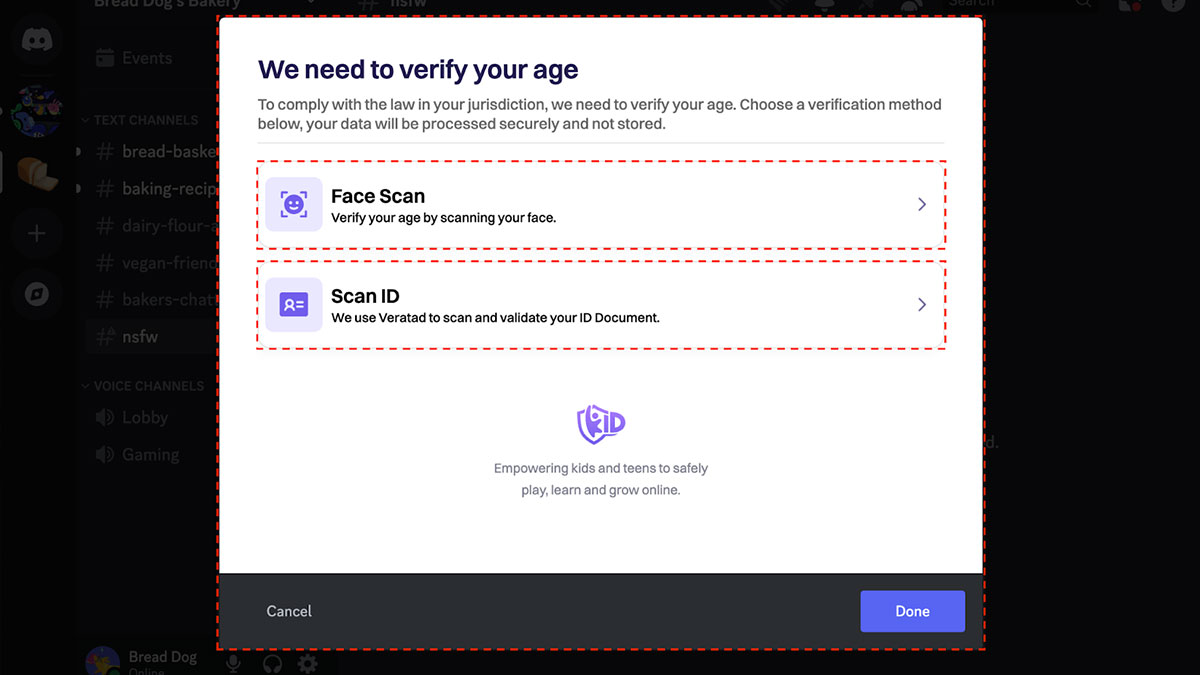
According to Discord’s official FAQ, this one-time age verification process is currently being tested in the UK and Australia. It activates when users try to unblur media flagged as sensitive or attempt to access age-restricted settings. If the user has not verified their age, they will be prompted to do so before proceeding.
Discord Testing New Age Verification With Photo or ID Scans
Image source: Discord

The voice chat app offers two options: Face Scan and ID Scan. For Face Scan, Discord will request camera access and walk users through an on-device verification. For ID Scan, the user will need to scan a QR code with a phone, then take a clear photo of their government-issued ID. Once verified, Discord will send a confirmation DM, and you won’t have to verify again.

Discord claims no biometric data is stored or sent to its servers. Face Scans operate on-device, and ID images are deleted after verification. Still, this system doesn’t only apply to PC and mobile apps, but targets PlayStation and Xbox platforms as well. It’s also unclear how long this test will last, and whether it will be implemented in other regions later.

How to Downgrade Discord on Mobile
Related: How to Downgrade Discord on Mobile

The timing isn’t helping ease concerns regarding the voice chat app’s current situation. Discord is reportedly preparing to go public, raising fears of monetization and other drastic changes. “RIP Discord, brought into the cycle of infinite growth at any cost,” one Redditor lamented. With Revolt and other alternatives gaining attention, longtime users seem to be starting to consider jumping ship.


Related Topics
Discord gaming
Share. Facebook Twitter LinkedIn Reddit Email
Sidharta F. Rasidi
  • Website

An ordinary Indonesian who enjoys playing and talking about video games. His favorite games are Monster Hunter: World, Space Invader Extreme 2, THE iDOLM@STER SP, Road Trip Adventure, Halo series, and KOEI Tecmo's Warriors series.

SUGGESTED READS

Hytale Reddit Moderator Clarifies 2.8 Million Player Count: 'How the Table Turns…'
Game News

Hytale Reddit Moderator Clarifies the Mindboggling 2.8 Million Player Count Situation: ‘How the Table Turns…’

Hytale Reaches 2.8 Million Active Players on Release Day, Says Developer: 'Eat Your Heart Out'
Game News

Hytale Reaches 2.8 Million Active Players on Release Day, Says Developer: ‘Eat Your Heart Out’

All Hytale Creative Mode and Server Console Commands
Game Guides

All Hytale Creative Mode and Server Console Commands

Hytale Email Not Sending error
Game Guides

How To Fix the ‘Email Not Sending’ Error in Hytale

Hytale How To Install Mods
Game Guides

How To Install Mods in Hytale

Is Hytale Free to Play? Editions and Available Platforms, Explained
Game Guides

Is Hytale Free to Play? Editions and Available Platforms, Explained

Trending
Hytale Reddit Moderator Clarifies 2.8 Million Player Count: 'How the Table Turns…'

Hytale Reddit Moderator Clarifies the Mindboggling 2.8 Million Player Count Situation: ‘How the Table Turns…’

Hytale Reaches 2.8 Million Active Players on Release Day, Says Developer: 'Eat Your Heart Out'

Hytale Reaches 2.8 Million Active Players on Release Day, Says Developer: ‘Eat Your Heart Out’

All Hytale Creative Mode and Server Console Commands

All Hytale Creative Mode and Server Console Commands

Hytale Email Not Sending error

How To Fix the ‘Email Not Sending’ Error in Hytale

The Nerd Stash
Facebook X (Twitter) Instagram YouTube LinkedIn
  • About Us
  • Join Our Team
  • Meet the Team
  • Privacy Policy
  • DMCA Policy
  • Contact Us
  • Terms of Use
  • Sitemap
  • Editorial Guidelines
  • Advertising Policy
© 2026 The Nerd Stash. All Rights Reserved.

Type above and press Enter to search. Press Esc to cancel.



