
Close Menu
  • Gaming
    • Game Guides
    • Codes
    • Game News
    • Game Previews
    • Game Reviews
    • Game Features
    • Game Lists
    • Platforms
      • Nintendo
      • PC
      • PlayStation
      • Xbox
      • Mobile
  • Entertainment
    • Movies
    • Movie Features
    • TV
    • Reality TV
    • Royals
  • Celebrity
    • Hollywood
  • Human Interest
  • Astrology
  • More
    • Anime
    • Lists
    • Podcasts
    • Reviews
Facebook X (Twitter) Instagram LinkedIn YouTube
  • About Us
  • Join Our Team
  • Meet the Team
  • Privacy Policy
  • DMCA Policy
  • Contact Us
  • Terms of Use
  • Sitemap
  • Editorial Guidelines
  • Advertising Policy
The Nerd Stash
  • Gaming
  • Celebrity
  • Hollywood
  • Human Interest
The Nerd Stash
Home»Features»Have a Nice Death: How to Turn on Easy Mode

Have a Nice Death: How to Turn on Easy Mode

Have a Nice Death is a unique 2D rogue-like action game that plops you down in the body of the Grim Reaper. But he’s not…

Mykel BrightBy Mykel BrightMarch 28, 20233 Mins Read
This article is over 3 years old and may contain outdated information.

Have a Nice Death is a unique 2D rogue-like action game that plops you down in the body of the Grim Reaper. But he’s not the intense, scary beast that haunts nightmares. Instead, he’s an overworked being, his exhaustion showing physically in his newly small stature. Battling can get tough on him and you. If this is the case, you can turn on easy mode in Have a Nice Death to make the game more fun and relaxing.

How to Turn on Easy Mode in Have a Nice Death
How to Turn on Easy Mode in Have a Nice Death

In Have a Nice Death, Death battles various enemies and bosses. Things can get tough, and you can find yourself “dead” quite a few times.

Of course, seeing as your Death, you don’t exactly die. Instead of a “game over” screen, you’ll “Rest in Paperwork”. After a few times of experiencing this process, we understand how things can get tiresome.

Thankfully, Have a Nice Death does have an easy mode, but it’s not clear how you can turn it on. It isn’t even called easy mode though. Instead, it’s referred to as “Self-Fulfillment Mode”.

Self-Fulfillment Mode won’t unlock until after you’ve had your first “death”. Follow the steps below to activate it:

  1. Once you die and enter Death’s office, head to the last node before the elevator.
  2. Interact with Death’s portrait that should have a sticky note nearby.
  3. Scroll to the left until you find Self-Fulfillment Mode.

Once selected, you’ll return to the office and notice the sticky note replaced with tally marks. You have successfully turned on easy mode for Have a Nice Death. Just enter the elevator to begin your journey once more.

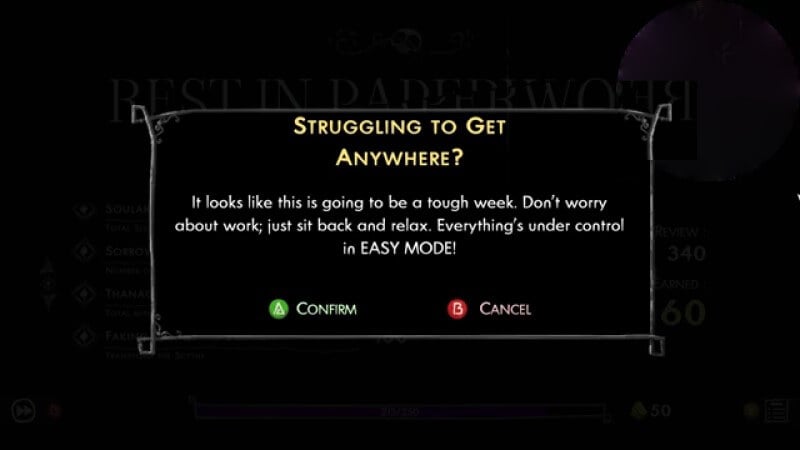
In some instances, you may not even have to do that. Sometimes, if you die enough, the game may suggest you turn it on yourself as indicated in the image above. This gives you a quicker route to easy mode.

Related:

How to Get the True Ending in Have a Nice Death

Self-Fulfillment Mode is a worthwhile mode to try out. It comes with the benefits laid out below:

  • Reduces damage from Minions by -5%
  • Start your run with +3 Animas
  • Animas heal more after each death
  • When you defeat a Sorrow, gain +50% max HP

Once you turn on easy mode in Have a Nice Death, you can experience a more laidback game. This is a great way to better learn the controls so that you’re ready to tackle the harder difficulties.

Have a Nice Death is available on Nintendo Switch and PC.

Related Topics
Guide
Share. Facebook Twitter LinkedIn Reddit Email
Mykel Bright
  • Website

Since childhood, Mykel has had a passion for writing, drawing, comic books, video games, and all things horror. She finds various ways to blend her loves such as sketching out ideas for potential comics and working out ideas for choice-based visual novels.

SUGGESTED READS

LEGO Batman Legacy of the Dark Knight Batcave
Game News

LEGO Batman: Legacy of the Dark Knight Could Oddly Be the Most Faithful Love Letter to the Caped Crusader

New York City Recording Artist Lana Del Rey Announced as Singer for 007 First Light Title Song
Gaming

New York City Recording Artist Lana Del Rey Announced as Singer for 007 First Light Title Song

Marvel Rivals Season 7.5 Preview
Game Previews

Marvel Rivals Season 7.5 Hands-On Preview – The Good, the Bad, and the Ugly

Leaked GTA Online Sales Suggest It Recoups GTA 6's $1B Budget in Just 2 Years, Skyrockets Take-Two Stock
Game News

Leaked GTA Online Sales Suggest It Recoups GTA 6’s $1B Budget in Just 2 Years, Skyrockets Take-Two Stock

Pragmata Mass Production Array Mini Cabin Figures
Game Guides

All Mass Production Array Mini Cabin Figure Locations in Pragmata

Pragmata Solar Power Plant Mini Cabin Figures Locations
Game Guides

All Solar Power Plant Mini Cabin Locations in Pragmata

The Nerd Stash
Facebook X (Twitter) Instagram YouTube LinkedIn
  • About Us
  • Join Our Team
  • Meet the Team
  • Privacy Policy
  • DMCA Policy
  • Contact Us
  • Terms of Use
  • Sitemap
  • Editorial Guidelines
  • Advertising Policy
© 2026 The Nerd Stash. All Rights Reserved.

Type above and press Enter to search. Press Esc to cancel.





