Close Menu
  • Gaming
    • Game Guides
    • Codes
    • Game News
    • Game Previews
    • Game Reviews
    • Game Features
    • Game Lists
    • Platforms
      • Nintendo
      • PC
      • PlayStation
      • Xbox
      • Mobile
  • Entertainment
    • Movies
    • Movie Features
    • Movie Reviews
    • TV
    • Reality TV
    • Royals
  • Celebrity
    • Hollywood
  • Human Interest
  • Astrology
  • Videos
  • More
    • Anime
    • Lists
    • Podcasts
    • Reviews
Facebook X (Twitter) Instagram LinkedIn YouTube
  • About Us
  • Join Our Team
  • Meet the Team
  • Privacy Policy
  • DMCA Policy
  • Contact Us
  • Terms of Use
  • Sitemap
  • Editorial Guidelines
  • Advertising Policy
The Nerd Stash
  • Gaming
  • Celebrity
    • Hollywood
  • Human Interest
  • Videos
The Nerd Stash
Home»Game Guides»How To Activate the Hunter’s Arm in Wild Hearts

How To Activate the Hunter’s Arm in Wild Hearts

Unleash your wild side

Sidharta F. RasidiBy Sidharta F. RasidiFebruary 18, 20232 Mins Read
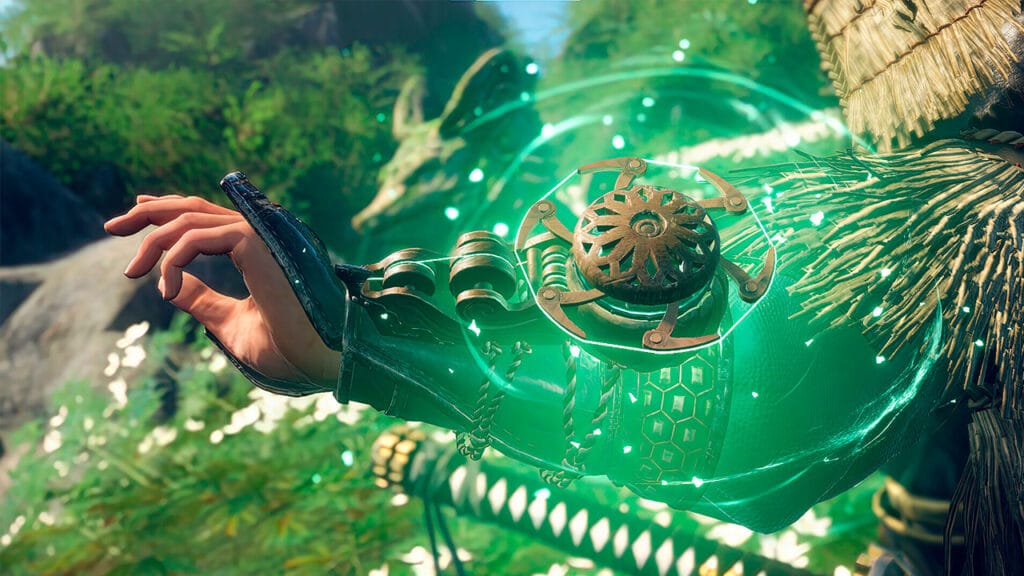
How To Activate the Hunters Arm in Wild Hearts
This article is over 2 years old and may contain outdated information.

In Wild Hearts, as the hunter of Kemono, you are equipped with a variety of equipment to successfully fall the beasts from your armor and weapon to the Karakuri tools. However, one tool you might have accidentally neglected is the Hunter’s Arm. We will show you how to activate and use the Hunter’s Arm in your hunts in Wild Hearts.

Using the Hunter’s Arm consists of two steps: First, you must mount or climb a Kemono. Run toward the creature, jump, and mount a Kemono by holding the R1 (PlayStation) or RB (Xbox) button. After that, you can maneuver and try to hold on to the monster’s body.

Now that you are currently holding on to a Kemono, you will need to locate an exposed weak point of the beast, which is hidden until you have damaged it enough using your standard weaponry and Karakuri. To locate the weak points, find the bright blue spots. Once you are near one of those spots, the Hunter’s Arm attack prompt appears. Once it appears, use the L2 button (PlayStation) or LT button (Xbox), which is the same button used for Hunter Sense. This should activate the Hunter’s Arm attack to obtain Karakuri Threads, making your hunts in Wild Hearts much more dynamic.

Related:

How To Get Sharp Scale In Wild Hearts

One of the Guild of Fishermen Job side quests, the “Hunter’s Mighty Arm,” tasks you to use the Hunters Arm attack twice. You can complete this side quest by following the steps outlined above. I think fans of Dragon’s Dogma and Shadow of the Colossus would enjoy utilizing the Hunter’s Arm mechanics since both games also have a fun monster-climbing feature.
Related Topics
Guide Wild Hearts
Share. Facebook Twitter LinkedIn Reddit Email
Sidharta F. Rasidi
  • Website

An ordinary Indonesian who enjoys playing and talking about video games. His favorite games are Monster Hunter: World, Space Invader Extreme 2, THE iDOLM@STER SP, Road Trip Adventure, Halo series, and KOEI Tecmo's Warriors series.

SUGGESTED READS

Game Guides

How to Get the Darksaber-Inspired Dark Matter Crystal in Destiny 2: Renegades

Destiny 2 The Dawning 2025 Guide
Game Guides

Destiny 2 – The Dawning 2025 Guide

Winter's Jest Event Guide
Game Guides

Phasmophobia – Winter’s Jest Guide

Pokemon Go Winter Holiday Part 1
Game Guides

Pokemon Go Winter Holiday Part 1 Guide

FFXIV Starlight Celebration 2025 Event
Game Guides

FFXIV Starlight Celebration 2025 Event Guide

guild wars 2 wintersday
Game Guides

Guild Wars 2 Wintersday 2025 Guide

Trending

How to Get the Darksaber-Inspired Dark Matter Crystal in Destiny 2: Renegades

Destiny 2 The Dawning 2025 Guide

Destiny 2 – The Dawning 2025 Guide

Winter's Jest Event Guide

Phasmophobia – Winter’s Jest Guide

Pokemon Go Winter Holiday Part 1

Pokemon Go Winter Holiday Part 1 Guide

The Nerd Stash
Facebook X (Twitter) Instagram YouTube LinkedIn
  • About Us
  • Join Our Team
  • Meet the Team
  • Privacy Policy
  • DMCA Policy
  • Contact Us
  • Terms of Use
  • Sitemap
  • Editorial Guidelines
  • Advertising Policy
© 2025 The Nerd Stash. All Rights Reserved.

Type above and press Enter to search. Press Esc to cancel.