Close Menu
  • Gaming
    • Platforms
      • Nintendo
      • PC
      • PlayStation
      • Xbox
  • Entertainment
    • Movies
    • TV
    • Royals
  • Celebrity
    • Hollywood
  • Human Interest
  • Astrology
  • More
    • Reviews
Facebook X (Twitter) Instagram LinkedIn YouTube
  • About Us
  • Join Our Team
  • Meet the Team
  • Privacy Policy
  • DMCA Policy
  • Contact Us
  • Terms of Use
  • Sitemap
  • Editorial Guidelines
  • Advertising Policy
The Nerd Stash
  • Gaming
  • Celebrity
  • Hollywood
  • Human Interest
The Nerd Stash
Home»Gaming»How to Assign Crew to Ships & Outposts in Starfield

How to Assign Crew to Ships & Outposts in Starfield

Regardless of which ship you choose, the standard Frontier or the giant Privateer, you will definitely not be able to take care of it on…

Vladyslav PetrenkoBy Vladyslav PetrenkoSeptember 1, 20233 Mins Read
How to Assign Crew to Ships & Outposts in Starfield
Image Source: Bethesda via The Nerd Stash
This article is over 2 years old and may contain outdated information.

Regardless of which ship you choose, the standard Frontier or the giant Privateer, you will definitely not be able to take care of it on your own. You will need a crew to travel with you, as well as those who will stay at outposts while you are away. So next, you will learn how to assign crew to Ships and outposts in Starfield. Fortunately, it’s not difficult, and we’ve described how to do it below.

Starfield: How to Assign Crew to Ships & Outposts
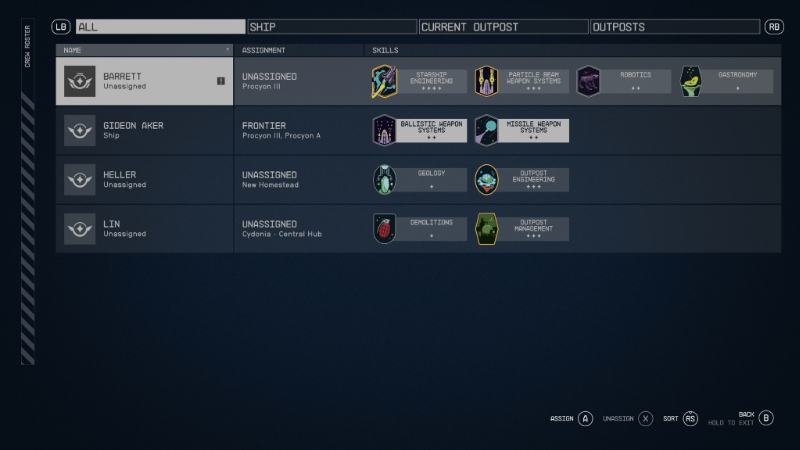
Crew Roster in Starfield
Image Source: Bethesda via The Nerd Stash

If you have crew members, you need to follow these steps to appoint them to a position:

  1. Open the Crew Roster menu. To do this, go to the Ship menu, and then press the “Y” button on Xbox or “C” button on PC.
  2. You will see a menu with all crew members and the places (Ship, Outposts) where they can be assigned.
  3. Select the character and the place you want to assign it to.
  4. Confirm your decision with the interaction button.

This way, you can assign all crew members to their positions and travel with some of them, leaving the rest to defend outposts.

How to Find New Crew Members in Starfield

You can find someone to hire almost everywhere. In cities, you will find experienced people and other creatures ready to help you for a fee, or even on deserted planets you can find a traveling or lost astronaut. Regardless, eventually, you will find the right characters and create your first team.

Finding them is only the first step, as you will also need to assign them to roles according to the skills they have. To assign a character as a crew or outpost member, go to the Crew Roster menu. Here you can see all the characters you have hired, as well as their skills. Be attentive and carefully study their skills to ensure that you assign each of them to a position rationally.

For outposts, we recommend choosing characters who are good with weapons to be able to fight off pirates and other enemies. For example, a great choice would be Heller. And for the ship, you should those characters who have some experience in this, like Marika Boros. But again, carefully study their skills.

Now you know how to assign crew to ships and outposts in Starfield, you are free to build the ultimate crew to venture around space with.

Related:

How to Heal & Increase Max Health in Starfield

Starfield comes out on September 6th for Xbox Series X/S and PC.

Related Topics
Guide Starfield
Share. Facebook Twitter LinkedIn Reddit Email
Vladyslav Petrenko
  • Website
  • Facebook

Vladyslav Petrenko is a freelance contributor for TNS.

SUGGESTED READS

PlayStation Fighting Controller Backlash
Gaming

PlayStation’s Return to Social Media is Met With Backlash and Angry Consumers: ‘I Was Hoping It Was a Digital Controller’

Black Flag Resynced
Gaming

Assassin’s Creed Black Flag Remake Delivers Brutal Skull & Bones Comparison Before Launch

PlayStation Reportedly Didn't Warn Asian Partners, Local Branches Before Physical Disc Shut Down Announcement: 'They Didn't Know Either'
Gaming

PlayStation Reportedly Didn’t Warn Asian Partners, Local Branches Before Physical Disc Shut Down Announcement: ‘They Didn’t Know Either’

XBOX Sells Off Four Studios, Cuts 3,000 Jobs, as Marvel's Blade Reportedly Goes Over Budget
Gaming

Xbox Sells Off Four Studios and Cuts 3,000 Jobs as Marvel’s Blade Reportedly Goes Over Budget

PSN Region Ban Claims Another Victim as Marvel Tokon is Blocked in 132 Countries
Gaming

PSN Region Ban Claims Another Victim as Marvel Tokon is Blocked in 132 Countries

PlayStation PS Plus subscription cancel
Gaming

Angry PlayStation Users Threaten to Cancel PS Plus After Sony Cancels Physical Media: ‘They’re Already on Thin Ice’

The Nerd Stash
Facebook X (Twitter) Instagram YouTube LinkedIn
  • About Us
  • Join Our Team
  • Meet the Team
  • Privacy Policy
  • DMCA Policy
  • Contact Us
  • Terms of Use
  • Sitemap
  • Editorial Guidelines
  • Advertising Policy
© 2026 The Nerd Stash. All Rights Reserved.

Type above and press Enter to search. Press Esc to cancel.