Close Menu
  • Gaming
    • Platforms
      • Nintendo
      • PC
      • PlayStation
      • Xbox
  • Entertainment
    • Movies
    • TV
    • Royals
  • Celebrity
    • Hollywood
  • Human Interest
  • Astrology
  • More
    • Reviews
Facebook X (Twitter) Instagram LinkedIn YouTube
  • About Us
  • Join Our Team
  • Meet the Team
  • Privacy Policy
  • DMCA Policy
  • Contact Us
  • Terms of Use
  • Sitemap
  • Editorial Guidelines
  • Advertising Policy
The Nerd Stash
  • Gaming
  • Celebrity
  • Hollywood
  • Human Interest
The Nerd Stash
Home»Gaming»How To Change a Tera Type in Pokemon Scarlet and Violet

How To Change a Tera Type in Pokemon Scarlet and Violet

Normal Type, I choose you!

Patrick ArmstrongBy Patrick ArmstrongDecember 15, 20232 Mins Read
Eevee transforms in Pokemon Scarlet and Violet
Image Source: Game Freak
This article is over 2 years old and may contain outdated information.

The Tera Type of Pokemon in Scarlet and Violet usually matches their main elemental type, but you can change that. Changing a Pokemon’s Tera Type can be useful for combat situations, either strengthening one’s type or altering it completely. This mechanic allows the player to execute more complex and unique movesets than they would otherwise be able to. Not only does that make you more likely to win battles, but it also makes the game more fun by encouraging experimentation. Here’s how to change a Tera Type in Pokemon Scarlet and Violet.

Tera Shards and Changing Tera Types in Scarlet and Violet
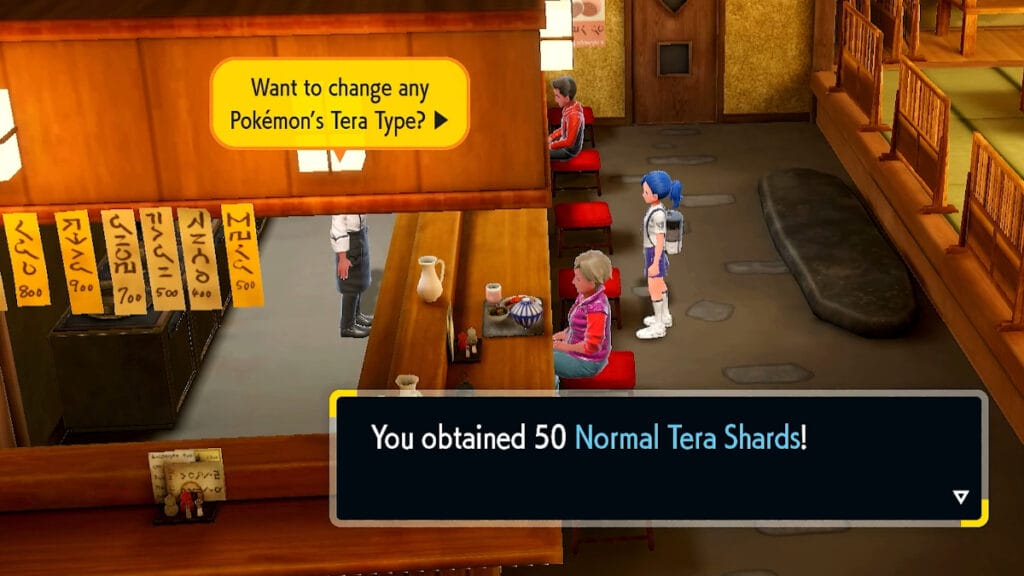
Image Source: KyleAye YouTube

Changing your Pokemon’s Tera Type isn’t difficult in Scarlet and Violet, but there are a few important steps you’ll need to take. Visiting a Raid Den (marked by a gem icon on the map) and participating in a Raid Battle will earn you Tera Shards. You’ll need 50 Shards of a given type to perform a Tera Shard transformation. You can get 50 Normal Tera Shards for free the first time you try to change a Tera Type, however. Here are the steps you need to follow to change your Pokemon’s Tera Type:

  • Defeat Larry at the Medali Gym
  • Travel to Medali (West)
  • Speak with the chef at the Treasury Eatery (near where you participated in the Gym Leader challenge)
  • Receive 50 Tera Shards (one-time only)
  • Select a Pokemon in your party or box and confirm that you want to change its type

Related:

How to Hatch Eggs in Pokemon Scarlet and Violet

The Tera Shards the chef gives you will change your Pokemon to a Normal type, but other Shard types make other changes possible. That’s great news if you’re trying to transform a Pokemon into one of the strongest types available. If you want more Tera Shards to transform more Pokemon, it’s time to jump into some Raid Events.

Pokemon Scarlet and Violet are available for Nintendo Switch.

Related Topics
Guide Pokemon Scarlet and Violet
Share. Facebook Twitter LinkedIn Reddit Email
Patrick Armstrong
  • Website

Artist and writer with a lifelong love of video games. Their favorite games include Dead by Daylight, Meet Your Maker, and Project Zomboid.

SUGGESTED READS

DC white house MAGA game
Gaming

Trump’s MAGA Video Games Feature Immigrant Hunts and Tetris Walls in Bold New Vision for DC: ‘It’s Like the White House is Being Run by Evil 12 Year Olds’

Can Blood of Dawnwalker Run on Steam Deck? Best Settings & Performance Guide
Gaming

Can Blood of Dawnwalker Run on Steam Deck? Best Settings & Performance Guide

The Blood of Dawnwalker Scouting Towers
Gaming

The Blood of Dawnwalker: How to Clear Scouting Towers and Reveal Map Locations

How to Fast Travel and Activate Shrines in Blood of Dawnwalker
Gaming

How to Fast Travel and Activate Shrines in Blood of Dawnwalker

State of Play September 2026 Announcements
Gaming

PlayStation State of Play (September 2026): All Major Announcements

CS2 float values
Gaming

How to Read Float Before Buying a Skin

The Nerd Stash
Facebook X (Twitter) Instagram YouTube LinkedIn
  • About Us
  • Join Our Team
  • Meet the Team
  • Privacy Policy
  • DMCA Policy
  • Contact Us
  • Terms of Use
  • Sitemap
  • Editorial Guidelines
  • Advertising Policy
© 2026 The Nerd Stash. All Rights Reserved.

Type above and press Enter to search. Press Esc to cancel.