
Close Menu
  • Gaming
    • Game Guides
    • Codes
    • Game News
    • Game Previews
    • Game Reviews
    • Game Features
    • Game Lists
    • Platforms
      • Nintendo
      • PC
      • PlayStation
      • Xbox
      • Mobile
  • Entertainment
    • Movies
    • Movie Features
    • Movie Reviews
    • TV
    • Reality TV
    • Royals
  • Celebrity
    • Hollywood
  • Human Interest
  • Astrology
  • Videos
  • More
    • Anime
    • Lists
    • Podcasts
    • Reviews
Facebook X (Twitter) Instagram LinkedIn YouTube
  • About Us
  • Join Our Team
  • Meet the Team
  • Privacy Policy
  • DMCA Policy
  • Contact Us
  • Terms of Use
  • Sitemap
  • Editorial Guidelines
  • Advertising Policy
The Nerd Stash
  • Gaming
  • Celebrity
    • Hollywood
  • Human Interest
  • Videos
The Nerd Stash
Home»Game Guides»How To Complete The Fountain Flows Again in Genshin Impact

How To Complete The Fountain Flows Again in Genshin Impact

The much-awaited Genshin Impact update 4.0 was launched a while ago, offering folks a wide range of new activities to explore. Alongside new characters, areas,…

Tunahan KarakisBy Tunahan KarakisAugust 22, 20232 Mins Read
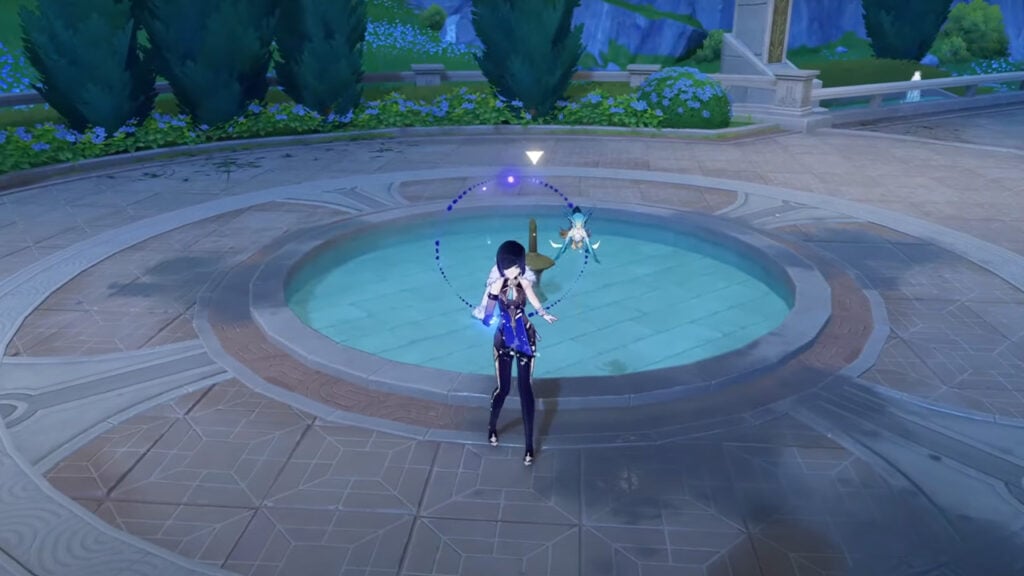
Completing The Fountain Flows Again Quest in Genshin Impact - Fountain
Image Source: HoYoverse via KyoStinV YouTube Channel Screenshot
This article is over 2 years old and may contain outdated information.

The much-awaited Genshin Impact update 4.0 was launched a while ago, offering folks a wide range of new activities to explore. Alongside new characters, areas, and features, one of the most noteworthy additions was the introduction of new World Quests. By completing these missions, players can advance their progress within the game. Let’s examine how to complete The Fountain Flows Again quest in Genshin Impact.

Completing The Fountain Flows Again Quest in Genshin Impact
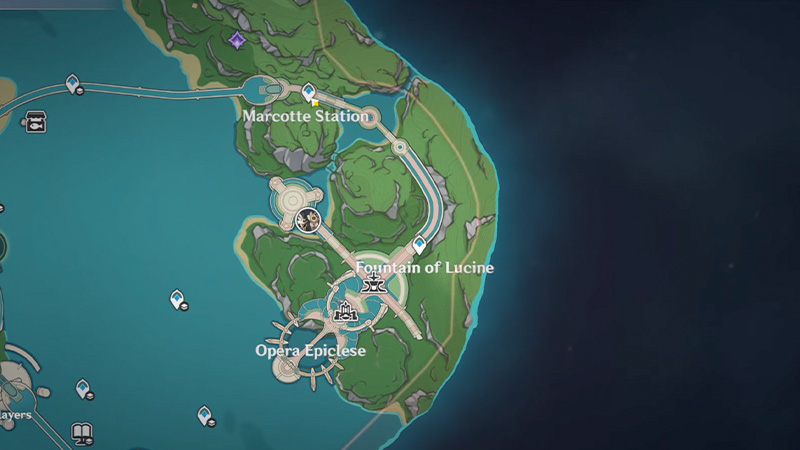
Completing The Fountain Flows Again Quest in Genshin Impact - Fountain Location
Image Source: HoYoverse via KyoStinV YouTube Channel Screenshot

One essential detail is to consider before learning how to complete this quest. To start this quest, you must complete the Archon Quest Chapter IV: Act II “As Light Rain Falls Without Reason” quest. This may seem a little complicated, but it is the only way to access the mission. Besides, the task is not complicated at all; you just need to talk to a few people and help them fix a fountain that is not working properly. The game handles all the remaining steps on your behalf.

Assuming everything is in order, the first step involves inspecting the fountain situated somewhere between Marcotte Station and Lucine Fountain to start the quest. Upon inspecting the fountain, a cutscene will be triggered, pointing out the commencement of the quest. After the cutscene, you need to talk to an NPC named Remaudiere. After the conversation is over, you need to talk to Edel. To do this, simply follow the flashing mission logo on your map.

When finishing your chat with Edel, teleport to the Court of Fontaine on your map’s left side. Initiate a conversation with Estelle at this point. She’ll request three Iron Chunks, essential for the fountain’s repair. You will again trigger a cutscene after you give her what she wants. You will then be sent to the fountain with Remaudiere, Edel, and Estelle. Here you will work together with these NPCs and restore the fountain. You don’t need to do anything here; after a few conversations, you’ll be done. Then the mission will be successfully completed, and you will be rewarded with 21,500 Mora and three Hero’s Wit.

Related:

How To Complete Book of Esoteric Revelations in Genshin Impact

If you want to give the game a chance and experience the new additions, Genshin Impact, and the 4.0 update are available on PlayStation 5, PlayStation 4, Mobile, and PC.


Related Topics
Genshin Impact Guide
Share. Facebook Twitter LinkedIn Reddit Email
Tunahan Karakis
  • Website

Game nerd

SUGGESTED READS

Minecraft Accused of Mocking Lonely Kids, Sparking Mental Health Backlash: 'One of the Ickiest Things I've Seen'
Features

Minecraft Accused of Mocking Lonely Kids, Sparking Mental Health Backlash: ‘One of the Ickiest Things I’ve Seen’

Destiny 2 Renegades PS5 Review
8.5
Features

Destiny 2: Renegades Review – The Shooter Strikes Back

Clair Obscur: Expedition 33 Loses GOTY, Other Award from Indie Game Awards Over Generative AI: 'Some Weird Performative BS'
Game News

GOTY Stripped Over AI?: Clair Obscur: Expedition 33 Loses Awards at Indie Game Awards, ‘Some Weird Performative BS’

Sony Patents Real-time AI Game Censorship Tech That Could Even Make GTA 6 Kid-Friendly
Game News

Sony Patents Real-Time AI Game Censorship Tech That Could Even Make GTA 6 Kid-Friendly

Zenless Zone Zero Version 2.5 Announcement
Game News

Zenless Zone Zero Version 2.5 Is Ready To Wrap Up the Year With Two New Agents and a Free Outfit

PC Gamers Can't Catch a Break as Nvidia Plans 40% GeForce GPU Production Cuts, Report: 'Who Needs a PC Anyways'
Game News

PC Gamers Can’t Catch a Break as Nvidia Reportedly Plans 40% GeForce GPU Production Cuts: ‘Who Needs a PC Anyways’

Trending
Minecraft Accused of Mocking Lonely Kids, Sparking Mental Health Backlash: 'One of the Ickiest Things I've Seen'

Minecraft Accused of Mocking Lonely Kids, Sparking Mental Health Backlash: ‘One of the Ickiest Things I’ve Seen’

Destiny 2 Renegades PS5 Review
8.5

Destiny 2: Renegades Review – The Shooter Strikes Back

Clair Obscur: Expedition 33 Loses GOTY, Other Award from Indie Game Awards Over Generative AI: 'Some Weird Performative BS'

GOTY Stripped Over AI?: Clair Obscur: Expedition 33 Loses Awards at Indie Game Awards, ‘Some Weird Performative BS’

Sony Patents Real-time AI Game Censorship Tech That Could Even Make GTA 6 Kid-Friendly

Sony Patents Real-Time AI Game Censorship Tech That Could Even Make GTA 6 Kid-Friendly

The Nerd Stash
Facebook X (Twitter) Instagram YouTube LinkedIn
  • About Us
  • Join Our Team
  • Meet the Team
  • Privacy Policy
  • DMCA Policy
  • Contact Us
  • Terms of Use
  • Sitemap
  • Editorial Guidelines
  • Advertising Policy
© 2025 The Nerd Stash. All Rights Reserved.

Type above and press Enter to search. Press Esc to cancel.




