Close Menu
  • Gaming
    • Game Guides
    • Codes
    • Game News
    • Game Previews
    • Game Reviews
    • Game Features
    • Game Lists
    • Platforms
      • Nintendo
      • PC
      • PlayStation
      • Xbox
      • Mobile
  • Entertainment
    • Movies
    • Movie Features
    • Movie Reviews
    • TV
    • Reality TV
    • Royals
  • Celebrity
    • Hollywood
  • Human Interest
  • Astrology
  • Videos
  • More
    • Anime
    • Lists
    • Podcasts
    • Reviews
Facebook X (Twitter) Instagram LinkedIn YouTube
  • About Us
  • Join Our Team
  • Meet the Team
  • Privacy Policy
  • DMCA Policy
  • Contact Us
  • Terms of Use
  • Sitemap
  • Editorial Guidelines
  • Advertising Policy
The Nerd Stash
  • Gaming
  • Celebrity
    • Hollywood
  • Human Interest
  • Videos
The Nerd Stash
Home»Game Guides»How to evolve Eevee into Sylveon in Pokémon Scarlet & Violet

How to evolve Eevee into Sylveon in Pokémon Scarlet & Violet

Do you want to know how to evolve Eevee into Sylveon in Pokémon Scarlet & Violet? Pokémon Scarlet & Violet is the latest installment in…

Asanga WijeratneBy Asanga WijeratneNovember 23, 20223 Mins Read
Pokémon Scarlet & Violet evolve Eevee

Skip To...

  • Who is Eevee in Pokémon Scarlet & Violet?
  • How to Evolve Eevee into Sylveon in Pokémon Scarlet & Violet
This article is over 3 years old and may contain outdated information.

Do you want to know how to evolve Eevee into Sylveon in Pokémon Scarlet & Violet? Pokémon Scarlet & Violet is the latest installment in the Pokémon franchise, and it has many different ways to evolve Eevee. Also,  Eevee is a Normal type Pokémon and can evolve into one of eight different types. Sylveon is one type of evolution that Eevee can grow into. Here’s how to evolve Eevee into Sylveon in Pokémon Scarlet & Violet.

[Updated August 13, 2024 – Fixed inconsistencies and updated links]

Who is Eevee in Pokémon Scarlet & Violet?

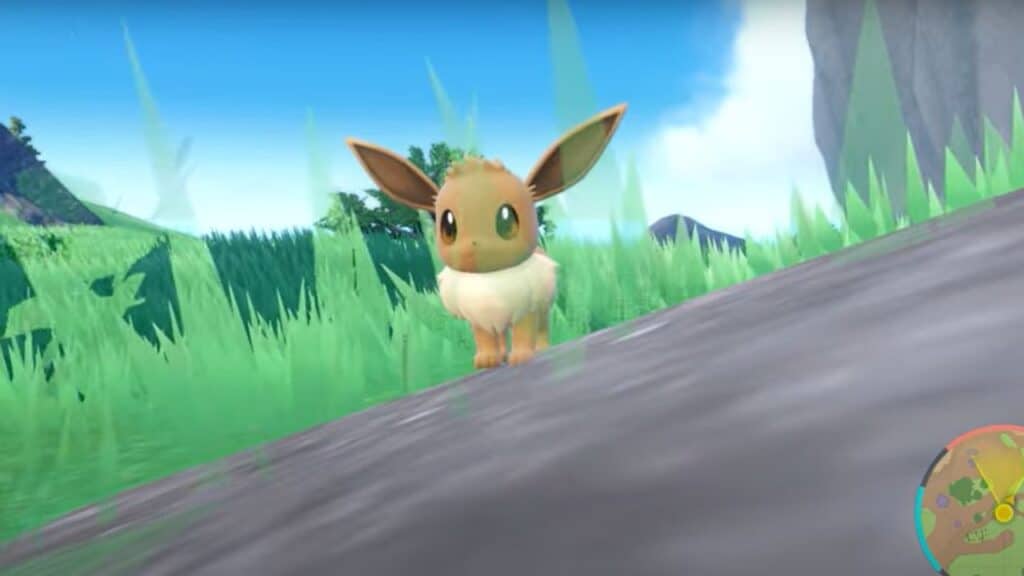
Eevee is a Normal-type Pokémon found in the wild in many places. Also, as an unevolved first form, it is known to be very versatile, able to learn many different moves and evolve into one of eight different types depending on how it is raised and trained.

Eevee looks like a small, fox-like creature with big ears and a furry tail. It is also known to be very friendly and loyal, making it a popular choice among Trainers. While its Normal typing may not seem very exciting initially, its ability to change into powerful Pokémon like Vaporeon, Jolteon, and Flareon makes it a force to be reckoned with. So, if you ever come across an Eevee in the wild, make sure to catch it! You never know what it might evolve into.

Related:

Can You Get a Shiny Starter Pokemon in Pokemon Scarlet & Violet? Answered

How to Evolve Eevee into Sylveon in Pokémon Scarlet & Violet

evolve Eevee in Pokémon Scarlet & Violet

You can evolve Eevee into Sylveon by training it with Fairy type moves and increasing its friendship. To increase your Eevee friendship level, you will need to give it treats and play with it regularly. Once the company is high enough, you can use a Fairy type move like Charm or Draining Kiss to trigger the evolution. If successful, your Eevee will evolve into a Sylveon.

Sylveon is a Fairy type Pokémon with several powerful moves like Dazzling Gleam, Misty Terrain, and Moonblast. It is known to be a very loyal Pokémon and will stick by its Trainer’s side no matter what.

So, if you ever come across an Eevee in the wild, catch it and start training immediately. With enough effort and a lot of love, you may be able to evolve it into a beautiful Sylveon.

That’s all there is to know about how to evolve Eevee into Sylveon in Pokémon Scarlet & Violet. So take your Eevee on an adventure and see where it takes you! Good luck and happy training!


Related Topics
Guide Pokemon Scarlet and Violet
Share. Facebook Twitter LinkedIn Reddit Email
Asanga Wijeratne
  • Website

SUGGESTED READS

Minecraft Accused of Mocking Lonely Kids, Sparking Mental Health Backlash: 'One of the Ickiest Things I've Seen'
Features

Minecraft Accused of Mocking Lonely Kids, Sparking Mental Health Backlash: ‘One of the Ickiest Things I’ve Seen’

Destiny 2 Renegades PS5 Review
8.5
Features

Destiny 2: Renegades Review – The Shooter Strikes Back

Clair Obscur: Expedition 33 Loses GOTY, Other Award from Indie Game Awards Over Generative AI: 'Some Weird Performative BS'
Game News

GOTY Stripped Over AI?: Clair Obscur: Expedition 33 Loses Awards at Indie Game Awards, ‘Some Weird Performative BS’

Sony Patents Real-time AI Game Censorship Tech That Could Even Make GTA 6 Kid-Friendly
Game News

Sony Patents Real-Time AI Game Censorship Tech That Could Even Make GTA 6 Kid-Friendly

Zenless Zone Zero Version 2.5 Announcement
Game News

Zenless Zone Zero Version 2.5 Is Ready To Wrap Up the Year With Two New Agents and a Free Outfit

PC Gamers Can't Catch a Break as Nvidia Plans 40% GeForce GPU Production Cuts, Report: 'Who Needs a PC Anyways'
Game News

PC Gamers Can’t Catch a Break as Nvidia Reportedly Plans 40% GeForce GPU Production Cuts: ‘Who Needs a PC Anyways’

Trending
Minecraft Accused of Mocking Lonely Kids, Sparking Mental Health Backlash: 'One of the Ickiest Things I've Seen'

Minecraft Accused of Mocking Lonely Kids, Sparking Mental Health Backlash: ‘One of the Ickiest Things I’ve Seen’

Destiny 2 Renegades PS5 Review
8.5

Destiny 2: Renegades Review – The Shooter Strikes Back

Clair Obscur: Expedition 33 Loses GOTY, Other Award from Indie Game Awards Over Generative AI: 'Some Weird Performative BS'

GOTY Stripped Over AI?: Clair Obscur: Expedition 33 Loses Awards at Indie Game Awards, ‘Some Weird Performative BS’

Sony Patents Real-time AI Game Censorship Tech That Could Even Make GTA 6 Kid-Friendly

Sony Patents Real-Time AI Game Censorship Tech That Could Even Make GTA 6 Kid-Friendly

The Nerd Stash
Facebook X (Twitter) Instagram YouTube LinkedIn
  • About Us
  • Join Our Team
  • Meet the Team
  • Privacy Policy
  • DMCA Policy
  • Contact Us
  • Terms of Use
  • Sitemap
  • Editorial Guidelines
  • Advertising Policy
© 2025 The Nerd Stash. All Rights Reserved.

Type above and press Enter to search. Press Esc to cancel.