Close Menu
  • Gaming
    • Game Guides
    • Codes
    • Game News
    • Game Previews
    • Game Reviews
    • Game Features
    • Game Lists
    • Platforms
      • Nintendo
      • PC
      • PlayStation
      • Xbox
      • Mobile
  • Entertainment
    • Movies
    • Movie Features
    • Movie Reviews
    • TV
    • Reality TV
    • Royals
  • Celebrity
    • Hollywood
  • Human Interest
  • Astrology
  • More
    • Anime
    • Lists
    • Podcasts
    • Reviews
Facebook X (Twitter) Instagram LinkedIn YouTube
  • About Us
  • Join Our Team
  • Meet the Team
  • Privacy Policy
  • DMCA Policy
  • Contact Us
  • Terms of Use
  • Sitemap
  • Editorial Guidelines
  • Advertising Policy
The Nerd Stash
  • Gaming
  • Celebrity
  • Hollywood
  • Human Interest
The Nerd Stash
Home»Game Guides»How To Get a Cargobob in GTA Online

How To Get a Cargobob in GTA Online

Get to da choppa!

Masoud KazemiBy Masoud KazemiJanuary 19, 20242 Mins Read
How to Get Cargobob in GTA Online
Image Source: Rockstar via GTA Wiki Fandom
This article is over 2 years old and may contain outdated information.

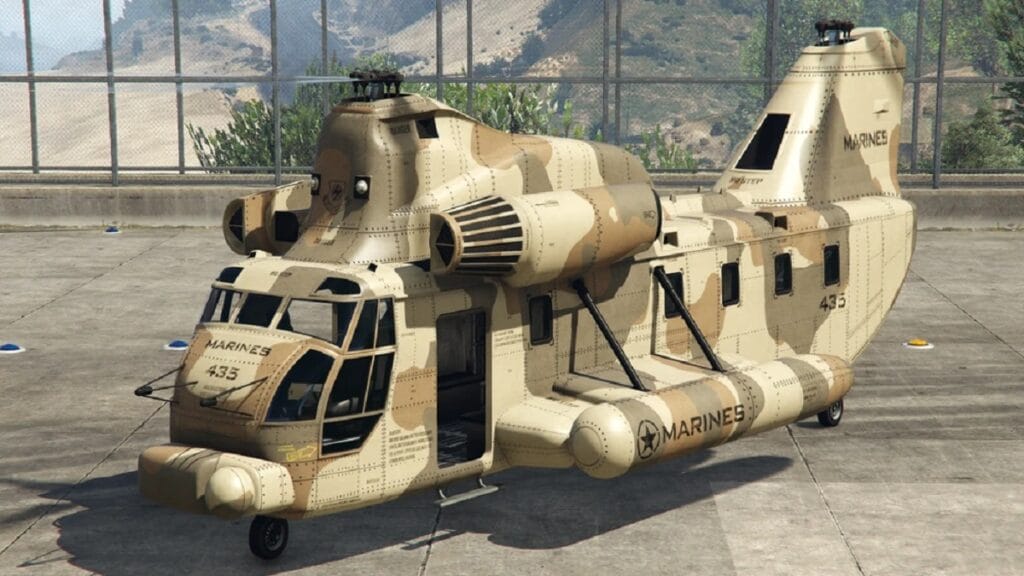
Speed and armor are two of the most important aspects players must pay attention to when they buy vehicles in GTA Online. Cargobob is a heavy chopper that can carry heavy weights and has decent armor at the cost of speed. There are some heists and missions that such vehicle can be very helpful so here is how to get a Cargobob in GTA Online.

Where to Get a Cargobob in GTA Online
GTA Online - Cargobob
Image Source: Rockstar via StraightForwardStuff Screenshot

There are two ways that GTA Online players can get their hands on a Cargobob chopper. The free way to get a Cargobob in the game is to first reach a level above 25. This vehicle might randomly spawn in these locations:

  • Los Santos Airport
  • Los Santos Hospital
  • La Puerta Helipads
  • N.O.O.S.E. Headquarters
  • Sandy Shores Helipad
  • Paleto Bay Sherriff Office
  • Grapeseed Runway

The problem with this method is that you may not find a Cargobob in any of these locations since its respawn is totally random. Therefore, there is a more certain but costly method you can use to get such a chopper.

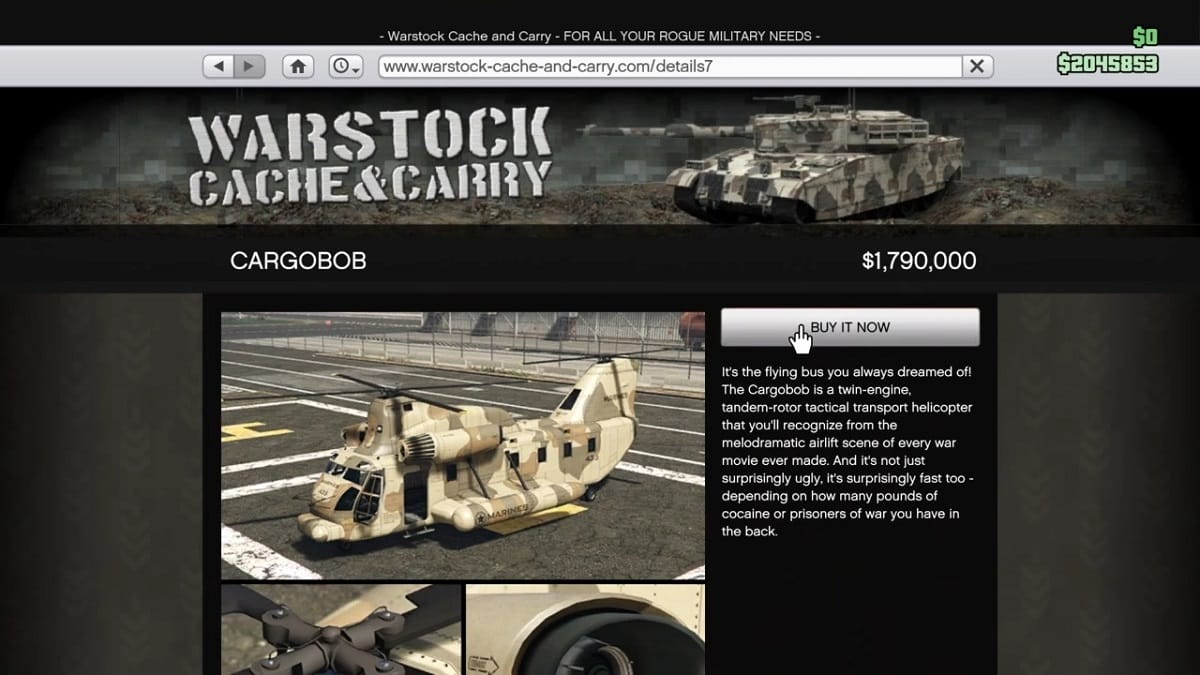
Use your phone to browse the internet in the game and open the Warstock Cache and Carry website. Then search for a Cargobob and you will see a Jetsam Edition with a $1,955,000 price tag and one standards version with a $1,790,000 price tag.

Related:

Special Cargo Warehouse Guide for GTA Online

You can also steal a Cargobob from other players if you can and save them at your hangar. But apart from that, those are the only methods you can get a Cargobob in GTA Online. Make sure to check our website for more guides and content on GTA as well.

GTA Online is available for PC, PS4, PS5, Xbox One, and Xbox Series X|S.

Related Topics
GTA Online Guide
Share. Facebook Twitter LinkedIn Reddit Email
Masoud Kazemi
  • Website
  • X (Twitter)

I don't care about the real world. I cared only about the world of fiction. -Woody Allen

SUGGESTED READS

Honkai: Star Rail 4.2 Update
Game News

Honkai: Star Rail Is Gearing Up For Its Third Anniversary Coming With Version 4.2

'SteamGPT' Datamine May Bring AI Chatbot, Anti-cheat Support to Steam
Game News

‘SteamGPT’ Datamine May Bring AI Chatbot, Anti-cheat Support to Steam

GTA 6 Online May Not Launch Day One, and That Might Be a Smart Move From Rockstar
Game News

GTA 6 Online May Not Launch Day One, and That Might Be a Smart Move From Rockstar

Invincible VS Open Beta Features
Game News

The Invincible VS Open Beta Will Feature 10 Characters and Three Game Modes

Samson PC Review
7
Game Reviews

Samson Review – An Uninspiring Tyndalston Story

Best mods for Project Zomboid Build 42
Game Guides

Top 10 Best Project Zomboid Mods (Updated for Build 42.16)

The Nerd Stash
Facebook X (Twitter) Instagram YouTube LinkedIn
  • About Us
  • Join Our Team
  • Meet the Team
  • Privacy Policy
  • DMCA Policy
  • Contact Us
  • Terms of Use
  • Sitemap
  • Editorial Guidelines
  • Advertising Policy
© 2026 The Nerd Stash. All Rights Reserved.

Type above and press Enter to search. Press Esc to cancel.