Close Menu
  • Gaming
    • Game Guides
    • Codes
    • Game News
    • Game Previews
    • Game Reviews
    • Game Features
    • Game Lists
    • Platforms
      • Nintendo
      • PC
      • PlayStation
      • Xbox
      • Mobile
  • Entertainment
    • Movies
    • Movie Features
    • Movie Reviews
    • TV
    • Reality TV
    • Royals
  • Celebrity
    • Hollywood
  • Human Interest
  • Astrology
  • Videos
  • More
    • Anime
    • Lists
    • Podcasts
    • Reviews
Facebook X (Twitter) Instagram LinkedIn YouTube
  • About Us
  • Join Our Team
  • Meet the Team
  • Privacy Policy
  • DMCA Policy
  • Contact Us
  • Terms of Use
  • Sitemap
  • Editorial Guidelines
  • Advertising Policy
The Nerd Stash
  • Gaming
  • Celebrity
    • Hollywood
  • Human Interest
  • Videos
The Nerd Stash
Home»Game Guides»How To Get and Use Cannon Devices in Tears of the Kingdom

How To Get and Use Cannon Devices in Tears of the Kingdom

We can all agree that the fuse mechanic is one of the best things in the latest Zelda game. While many players are still on…

Giovanna De ItaBy Giovanna De ItaMay 16, 20233 Mins Read
How To Get Cannon Zonai Devices in Zelda Tears of the Kingdom
Image Source: Nintendo via Nerd Stash

Skip To...

  • How To Get and Use Cannon Zonai Devices in Tears of the Kingdom
  • How To Use Cannon Zonai Devices in Tears of the Kingdom
This article is over 2 years old and may contain outdated information.

We can all agree that the fuse mechanic is one of the best things in the latest Zelda game. While many players are still on the fence about the weapon durability feature, others love all the crazy creations one can do with Link’s new abilities. If you’ve come across some Zonai devices, you might have used to build a thing or two, they have another function. Given the need to create almost all weapons now, you can add anything and make some crazy combinations. For that, today we’ll tell you how to get and use Cannon Zonai Devices in Zelda Tears of the Kingdom.

How To Get and Use Cannon Zonai Devices in Tears of the Kingdom
How to Use Cannon in Zelda Tears of the Kingdom
Image via The Nerd Stash

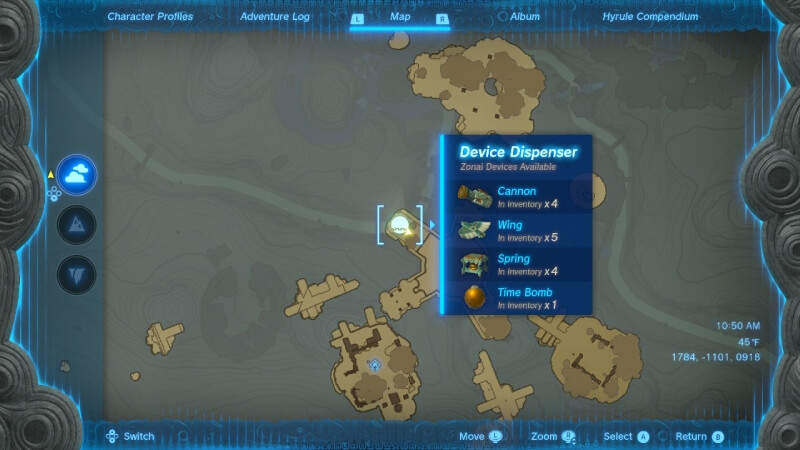
Let’s start with the where. Finding Cannon Zonai Devices in Tears of the Kingdom can be easy if you know where to look. While some might be around the map in certain areas, others will only appear if you go to the Zonai Device dispensers. The easiest one to get Cannon Zonai Devices in Tears of the Kingdom is in North Necluda Sky Archipelago. If you’ve unlocked the Skytower below this place, you only have to launch yourself and land on these islands.

How To Use Cannon Zonai Devices in Tears of the Kingdom

There are many ways to use Cannon Zonai Devices in Tears of the Kingdom, but we’ve listed our three favorite ones:

  • Attach it to a weapon to launch Zonai blasts
  • Fuse it with a shield to blast opponents away while protecting yourself
  • Place it on a makeshift car to blast enemies while moving
  • There are even more ways to use these devices in the game, but these are our favorites due to how great they work.

Using it on a weapon is great but might break easily and spend your energy quickly. If you have a Zonai shield, though, that’s better. Zonai shields have a bonus that doesn’t deplete energy as fast as other items, which is great if you put a Zonai device. On the other hand, you can also attach the Zonai Cannon to a makeshift car or plane to blast enemies from afar.

Whatever you choose to do, remember to keep this guide on how to get and use Cannon Zonai Devices in Tears of the Kingdom close to you. You can experiment with all pieces to make something funny and powerful, so don’t be afraid to tinker with any Zonai device you find.


Related Topics
Guide Legend of Zelda Tears of Kingdom
Share. Facebook Twitter LinkedIn Reddit Email
Giovanna De Ita
  • Website

Giovanna is a fan of every single game HoYoverse has launched. When she's not covering videogames, she writes her daily horoscopes and tarot readings for the astrology vertical in The Nerd Stash.

SUGGESTED READS

Minecraft Accused of Mocking Lonely Kids, Sparking Mental Health Backlash: 'One of the Ickiest Things I've Seen'
Features

Minecraft Accused of Mocking Lonely Kids, Sparking Mental Health Backlash: ‘One of the Ickiest Things I’ve Seen’

Destiny 2 Renegades PS5 Review
8.5
Features

Destiny 2: Renegades Review – The Shooter Strikes Back

Clair Obscur: Expedition 33 Loses GOTY, Other Award from Indie Game Awards Over Generative AI: 'Some Weird Performative BS'
Game News

GOTY Stripped Over AI?: Clair Obscur: Expedition 33 Loses Awards at Indie Game Awards, ‘Some Weird Performative BS’

Sony Patents Real-time AI Game Censorship Tech That Could Even Make GTA 6 Kid-Friendly
Game News

Sony Patents Real-Time AI Game Censorship Tech That Could Even Make GTA 6 Kid-Friendly

Zenless Zone Zero Version 2.5 Announcement
Game News

Zenless Zone Zero Version 2.5 Is Ready To Wrap Up the Year With Two New Agents and a Free Outfit

PC Gamers Can't Catch a Break as Nvidia Plans 40% GeForce GPU Production Cuts, Report: 'Who Needs a PC Anyways'
Game News

PC Gamers Can’t Catch a Break as Nvidia Reportedly Plans 40% GeForce GPU Production Cuts: ‘Who Needs a PC Anyways’

Trending
Minecraft Accused of Mocking Lonely Kids, Sparking Mental Health Backlash: 'One of the Ickiest Things I've Seen'

Minecraft Accused of Mocking Lonely Kids, Sparking Mental Health Backlash: ‘One of the Ickiest Things I’ve Seen’

Destiny 2 Renegades PS5 Review
8.5

Destiny 2: Renegades Review – The Shooter Strikes Back

Clair Obscur: Expedition 33 Loses GOTY, Other Award from Indie Game Awards Over Generative AI: 'Some Weird Performative BS'

GOTY Stripped Over AI?: Clair Obscur: Expedition 33 Loses Awards at Indie Game Awards, ‘Some Weird Performative BS’

Sony Patents Real-time AI Game Censorship Tech That Could Even Make GTA 6 Kid-Friendly

Sony Patents Real-Time AI Game Censorship Tech That Could Even Make GTA 6 Kid-Friendly

The Nerd Stash
Facebook X (Twitter) Instagram YouTube LinkedIn
  • About Us
  • Join Our Team
  • Meet the Team
  • Privacy Policy
  • DMCA Policy
  • Contact Us
  • Terms of Use
  • Sitemap
  • Editorial Guidelines
  • Advertising Policy
© 2025 The Nerd Stash. All Rights Reserved.

Type above and press Enter to search. Press Esc to cancel.