Close Menu
  • Gaming
    • Platforms
      • Nintendo
      • PC
      • PlayStation
      • Xbox
  • Entertainment
    • Movies
    • TV
    • Royals
  • Celebrity
    • Hollywood
  • Human Interest
  • Astrology
  • More
    • Anime
    • Reviews
Facebook X (Twitter) Instagram LinkedIn YouTube
  • About Us
  • Join Our Team
  • Meet the Team
  • Privacy Policy
  • DMCA Policy
  • Contact Us
  • Terms of Use
  • Sitemap
  • Editorial Guidelines
  • Advertising Policy
The Nerd Stash
  • Gaming
  • Celebrity
  • Hollywood
  • Human Interest
The Nerd Stash
Home»Gaming»How To Get Ashen Corsair in Skull and Bones

How To Get Ashen Corsair in Skull and Bones

One more for the dread fleet.

Patrick ArmstrongBy Patrick ArmstrongFebruary 13, 20242 Mins Read
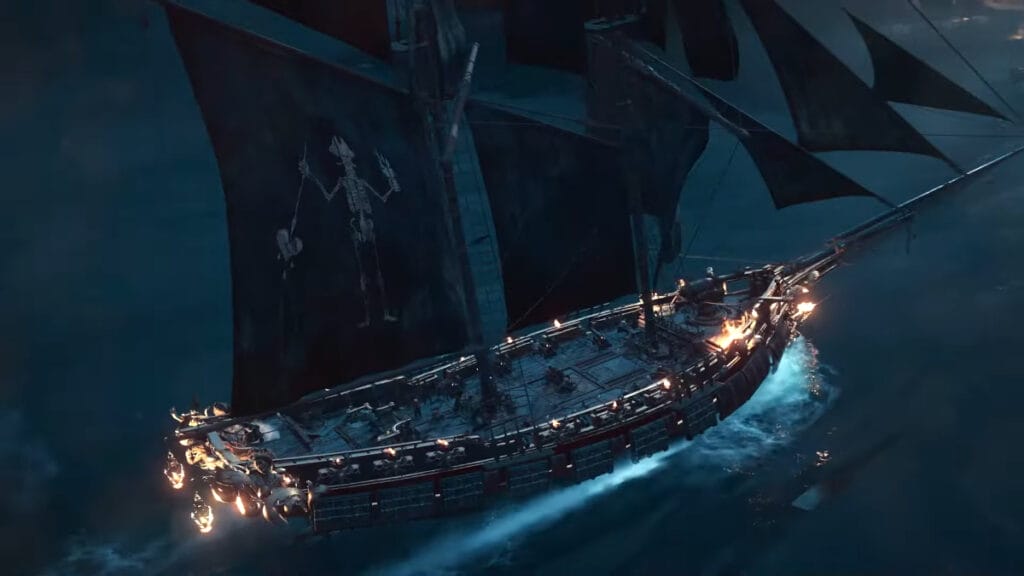
A ship with the pre-order bonus Ashen Corsair cosmetic in Skull and Bones
Image Source: Ubisoft YouTube via The Nerd Stash
This article is over 2 years old and may contain outdated information.

One of the best parts of Skull and Bones, Sea of Thieves, or any good pirate game is getting to customize your ship. You’re not a proper swashbuckler until every inch of your vessel announces your deadly ambitions. Fortunately, ship customization is one of the things that Skull and Bones does best. Players have a wide range of customization options, from changing the insignia and color of your flag to adding an adorable animal companion to the deck. If you purchased the Premium Edition you’ll have even more cosmetics to work with. Here’s how to get the Ashen Corsair pre-order bonus in Skull and Bones.

How To Claim Pre-Order Bonuses in Skull and Bones

The player checks their mailbox to get the Ashen Corsair pre-order bonus in Skull and Bones
Image Source: Deadly Deity YouTube via The Nerd Stash

If you purchased the Premium Edition of Skull and Bones, you’ll get the Ballad of Bloody Bones collection in addition to two extra missions and other items. To claim your pre-order bonus you’ll need to check the mailbox in Saint Anne. That’s the first main hub location after the tutorial. You can find it a short distance from the docks when you disembark. It’s marked by a yellow dot and an envelope in case you’re struggling to find it. Interact with the mailbox to retrieve the letters titled “Your Redemption (Premium Edition).” One contains the Ashen Corsair cosmetic set to help with that pirate feel.

Related:

11 Years Later, Black Flag Is Still A More Complete Pirate Game Than Skull and Bones

After collecting the Ashen Corsair set from the mailbox in Skull and Bones, you’ll need to use the Ship Docking Menu to equip it. That’s the same process you’d use to install a new cannon. Unfortunately, some players have reported issues with redeeming their Premium Edition content including the Ashen Corsair set. The appropriate letters simply don’t appear in the mailbox, which appears to be a bug. Some players who have experienced this issue have reported the letters appearing later, however, so Ubisoft is seemingly aware of the issue. If you haven’t received your Premium Edition letters yet, you might just have to wait a little while while the devs sort it out.

Skull and Bones is available for PC, PlayStation 5, and Xbox Series X/S.

Related Topics
Guides Skull and Bones
Share. Facebook Twitter LinkedIn Reddit Email
Patrick Armstrong
  • Website

Artist and writer with a lifelong love of video games. Their favorite games include Dead by Daylight, Meet Your Maker, and Project Zomboid.

SUGGESTED READS

MindsEye Layoffs 2026
Gaming

Studio Behind GTA-like Game, MindsEye, Hit With More Layoffs, and Nobody is Surprised: ‘Shocked There’s Even a Janitor Working There’

Princess Peach Spin-Off Movie May Already Be in Development, Job Listing Suggests
Gaming

Princess Peach Spin-Off Movie May Already Be in Development, Job Listing Suggests

Xbox's New CEO Wants to Reconnect With the 'Community,' Yet Brings In More CoreAI Leaders
Gaming

Xbox’s New CEO Wants to Reconnect With the ‘Community,’ Yet Brings In More CoreAI Leaders

Diablo 4 Season 13 Tier List
Gaming

Class Tier List for Diablo 4 Season 13 (Best Classes for Endgame & Leveling)

Take-Two Boss Finally Explains Why GTA 6 Is Skipping PC at Launch: 'We'll See How It Works Out'
Gaming

Take-Two Boss Finally Explains Why GTA 6 Is Skipping PC at Launch: ‘We’ll See How It Works Out’

Rockstar Employee Review Claims 'Unrealistic' Crunch as GTA 6 Development Intensifies: 'Had to Work Till 3AM'
Gaming

Rockstar Employee Review Claims ‘Unrealistic’ Crunch as GTA 6 Development Intensifies: ‘Had to Work Till 3AM’

The Nerd Stash
Facebook X (Twitter) Instagram YouTube LinkedIn
  • About Us
  • Join Our Team
  • Meet the Team
  • Privacy Policy
  • DMCA Policy
  • Contact Us
  • Terms of Use
  • Sitemap
  • Editorial Guidelines
  • Advertising Policy
© 2026 The Nerd Stash. All Rights Reserved.

Type above and press Enter to search. Press Esc to cancel.