
Close Menu
  • Gaming
    • Game Guides
    • Codes
    • Game News
    • Game Previews
    • Game Reviews
    • Game Features
    • Game Lists
    • Platforms
      • Nintendo
      • PC
      • PlayStation
      • Xbox
      • Mobile
  • Entertainment
    • Movies
    • Movie Features
    • Movie Reviews
    • TV
    • Reality TV
    • Royals
  • Celebrity
    • Hollywood
  • Human Interest
  • Astrology
  • Videos
  • More
    • Anime
    • Lists
    • Podcasts
    • Reviews
Facebook X (Twitter) Instagram LinkedIn YouTube
  • About Us
  • Join Our Team
  • Meet the Team
  • Privacy Policy
  • DMCA Policy
  • Contact Us
  • Terms of Use
  • Sitemap
  • Editorial Guidelines
  • Advertising Policy
The Nerd Stash
  • Gaming
  • Celebrity
    • Hollywood
  • Human Interest
  • Videos
The Nerd Stash
Home»Game Guides»How To Get Farosh’s Claw in Zelda Tears of the Kingdom

How To Get Farosh’s Claw in Zelda Tears of the Kingdom

Zelda games usually feature a wide range of items and weapons. They can be collected throughout the story. Yet, this entry shakes things up by encouraging players…

Asanga WijeratneBy Asanga WijeratneMay 27, 20233 Mins Read
How To Get Farosh's Claw in Zelda Tears of the Kingdom
Image source: Nintendo via The Gamers Heroes Screenshot

Skip To...

  • Farosh’s Claw Locations in Zelda Tears of the Kingdom
  • What Is Farosh’s Claw?
This article is over 2 years old and may contain outdated information.

Zelda games usually feature a wide range of items and weapons. They can be collected throughout the story. Yet, this entry shakes things up by encouraging players to mix certain materials to create even more powerful armaments. One of the materials you can get is dropped by the Light Dragon, Farosh, and locating this Dragon might be daunting for many players. Therefore, this guide will tell you how to get Farosh’s Claw in Zelda Tears of the Kingdom.

Farosh’s Claw Locations in Zelda Tears of the Kingdom

[Updated on September 8, 2024 – Updated the guide’s information and links]
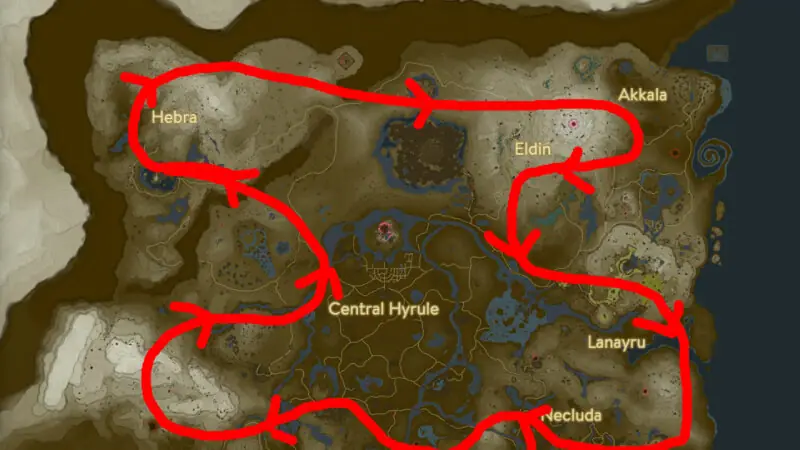
Tears of the Kingdom Farosh's Claw Map Location
Image Source: Nintendo via Zelda Maps Screenshot

You can get Farosh’s Claw in Zelda Tears of the Kingdom from Light Dragon’s Claw. Generally, a light Dragon travels full circle on the exterior of Hyrule. Therefore, the Necluda Sky Tower and the Popla Foothills Skyview Tower are the best locations to spot the Light Dragon. Also, if you have unlocked the Sensor, you can set up the Sensor to track the Light Dragon. Here are the steps you must follow once you spot the Light Dragon.

  1. Use the glider and get under the Light Dragon.
  2. Aim at its claws and shoot it at the right time with an arrow. If you hit correctly, the glowing Farosh’s Claw will drop off.
  3.  Follow it to the drop location and pick it up.

Remember, you can get only one dragon material for one time, and then you have to wait for some time if you need more Farosh’s Claws in Zelda Tears of the Kingdom.

What Is Farosh’s Claw?

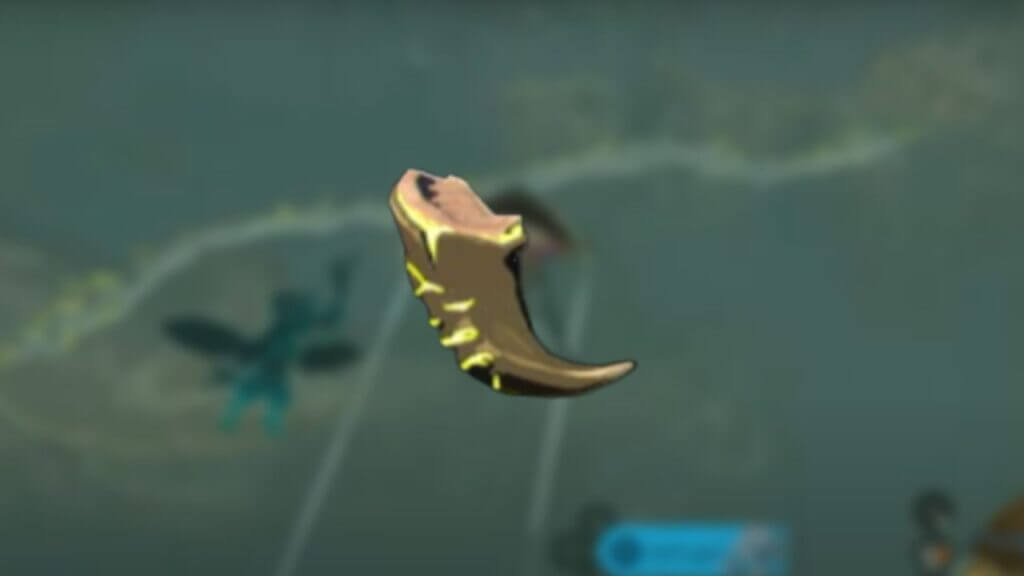
Farosh’s Claw is a valuable monster part in The Legend of Zelda: Tears of the Kingdom. This Claw is known for producing lightning and can be attached to a weapon to increase its attack power significantly. Additionally, it can be cooked or sold for rupees. While it is not used in any armor upgrades for Tier One and Tier Three, Farosh’s Claw is necessary for upgrading the Fierce Deity Boots and Cap of the Wild in Tier Two.

Additionally, players can use it for the Tough Elixir to increase their defense and the Energizing Elixir to restore their stamina wheel. Overall, Farosh’s Claw in Zelda Tears of the Kingdom is a highly sought-after item for any player looking to improve their attack power and upgrade their armor in the game. The below Gampley from Gamers Heroes shows the visuals for getting the Farosh’s Claw.


Related Topics
Guide Zelda Tears of the Kingdom
Share. Facebook Twitter LinkedIn Reddit Email
Asanga Wijeratne
  • Website

SUGGESTED READS

Minecraft Accused of Mocking Lonely Kids, Sparking Mental Health Backlash: 'One of the Ickiest Things I've Seen'
Features

Minecraft Accused of Mocking Lonely Kids, Sparking Mental Health Backlash: ‘One of the Ickiest Things I’ve Seen’

Destiny 2 Renegades PS5 Review
8.5
Features

Destiny 2: Renegades Review – The Shooter Strikes Back

Clair Obscur: Expedition 33 Loses GOTY, Other Award from Indie Game Awards Over Generative AI: 'Some Weird Performative BS'
Game News

GOTY Stripped Over AI?: Clair Obscur: Expedition 33 Loses Awards at Indie Game Awards, ‘Some Weird Performative BS’

Sony Patents Real-time AI Game Censorship Tech That Could Even Make GTA 6 Kid-Friendly
Game News

Sony Patents Real-Time AI Game Censorship Tech That Could Even Make GTA 6 Kid-Friendly

Zenless Zone Zero Version 2.5 Announcement
Game News

Zenless Zone Zero Version 2.5 Is Ready To Wrap Up the Year With Two New Agents and a Free Outfit

PC Gamers Can't Catch a Break as Nvidia Plans 40% GeForce GPU Production Cuts, Report: 'Who Needs a PC Anyways'
Game News

PC Gamers Can’t Catch a Break as Nvidia Reportedly Plans 40% GeForce GPU Production Cuts: ‘Who Needs a PC Anyways’

Trending
Minecraft Accused of Mocking Lonely Kids, Sparking Mental Health Backlash: 'One of the Ickiest Things I've Seen'

Minecraft Accused of Mocking Lonely Kids, Sparking Mental Health Backlash: ‘One of the Ickiest Things I’ve Seen’

Destiny 2 Renegades PS5 Review
8.5

Destiny 2: Renegades Review – The Shooter Strikes Back

Clair Obscur: Expedition 33 Loses GOTY, Other Award from Indie Game Awards Over Generative AI: 'Some Weird Performative BS'

GOTY Stripped Over AI?: Clair Obscur: Expedition 33 Loses Awards at Indie Game Awards, ‘Some Weird Performative BS’

Sony Patents Real-time AI Game Censorship Tech That Could Even Make GTA 6 Kid-Friendly

Sony Patents Real-Time AI Game Censorship Tech That Could Even Make GTA 6 Kid-Friendly

The Nerd Stash
Facebook X (Twitter) Instagram YouTube LinkedIn
  • About Us
  • Join Our Team
  • Meet the Team
  • Privacy Policy
  • DMCA Policy
  • Contact Us
  • Terms of Use
  • Sitemap
  • Editorial Guidelines
  • Advertising Policy
© 2025 The Nerd Stash. All Rights Reserved.

Type above and press Enter to search. Press Esc to cancel.




