Close Menu
  • Gaming
    • Platforms
      • Nintendo
      • PC
      • PlayStation
      • Xbox
  • Entertainment
    • Movies
    • TV
    • Royals
  • Celebrity
    • Hollywood
  • Human Interest
  • Astrology
  • More
    • Reviews
Facebook X (Twitter) Instagram LinkedIn YouTube
  • About Us
  • Join Our Team
  • Meet the Team
  • Privacy Policy
  • DMCA Policy
  • Contact Us
  • Terms of Use
  • Sitemap
  • Editorial Guidelines
  • Advertising Policy
The Nerd Stash
  • Gaming
  • Celebrity
  • Hollywood
  • Human Interest
The Nerd Stash
Home»Gaming»How To Get Steering Stick Devices in Zelda Tears of the Kingdom

How To Get Steering Stick Devices in Zelda Tears of the Kingdom

You have a ton of freedom in The Legend of Zelda: Tears of the Kingdom to explore how you want. With the new Ultrahand ability,…

John HansenBy John HansenMay 19, 20232 Mins Read
This article is over 3 years old and may contain outdated information.

You have a ton of freedom in The Legend of Zelda: Tears of the Kingdom to explore how you want. With the new Ultrahand ability, you can create all kinds of vehicles that are only limited by your imagination. That being said, if you want to have direct control of them, you are going to need a way to steer them. Here is where you can get Steering Sticks in Tears of the Kingdom.

How To Get Control Stick Devices in Zelda Tears of the Kingdom

To get Steering Stick devices in The Legend of Zelda: Tears of the Kingdom, you will need to get them out of particular Zonai Device Dispensers. The one we use is located in the North Hyrule Sky Archipelago. This mass of sky islands is located almost directly above the Thyphlo Ruins Skyview Tower, north of Great Hyrule Forest. This makes it very easy to access if you have not been there yet. Of course, there are other Device Dispensers that will give Steering Sticks, this is just our personal favorite for easy access. They can also be found laying around the open world, but those can not be put in your inventory.
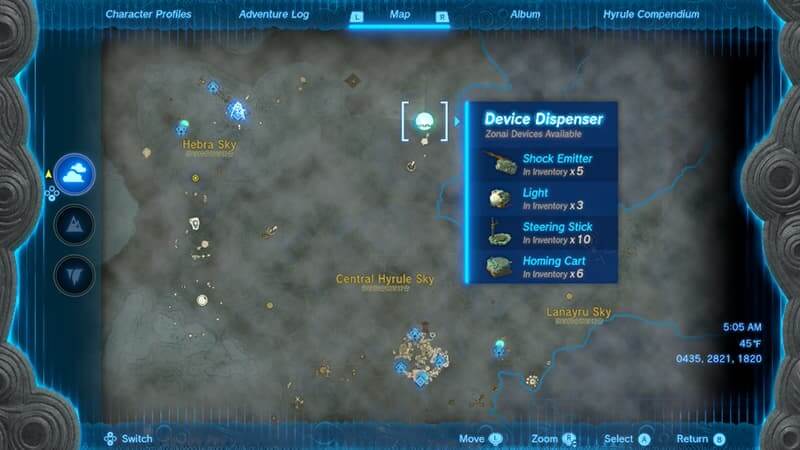
Location of Steering Sticks in Tears of the Kingdom.
Screenshot by The Nerd Stash

When you approach the Device Dispenser, you just need to drop Zonai Charges into it. The more you put in, the more capsules you will be rewarded to add to your inventory, giving you a better chance to get more Steering Sticks. In this particular Device Dispenser, you can also get Shock Emitters, Lights, and Homing Carts. If the machine runs out of capsules, you can come back to it the next day for it to be refilled.

These Control Stick devices are one of the most useful items you can have for building vehicles in Tears of the Kingdom. Wherever you decide to attach them, they will automatically activate your other devices when you interact with them. There’s no complex connection thing you need to do. Just set it and forget it.

You will spend a pretty significant amount of time designing and creating devices in The Legend of Zelda: Tears of the Kingdom. With all of the various Zonai devices available, knowing what each Dispenser provides you is a good idea. Luckily, after you get them, you can check on the map which Dispenser gives which devices.


Related Topics
Guide Zelda Tears of the Kingdom
Share. Facebook Twitter LinkedIn Reddit Email
John Hansen
  • Website
  • X (Twitter)

SUGGESTED READS

007 First Light Story Review
Gaming

007 First Light Launches Its Update #1 With New TacSim Content

XBOX Backward Compatibility on PC Could Support Xbox 360 Games Too, Dataminers Confirm
Gaming

XBOX Backward Compatibility on PC Could Support Xbox 360 Games Too, Dataminers Confirm

Aliens Fireteam Elite 2 Release Date
Gaming

Aliens: Fireteam Elite 2 Launches on August 25 With Movie-inspired DLC Packs

Sony Reportedly Knew the PlayStation Disc Shut Down Would 'Piss Everyone Off,' Warned Employees to Stay Silent
Gaming

Sony Reportedly Knew the PlayStation Disc Shut Down Would ‘Piss Everyone Off,’ Warned Employees to Stay Silent

How to play Halo: Campaign Evolved Co-Op
Gaming

Halo Campaign Evolved Co-Op Guide

Aliens Fireteam Elite 2 Horde Mode
Gaming

Aliens: Fireteam Elite 2 Has Revamped Its Horde Mode In the Best Possible Way

The Nerd Stash
Facebook X (Twitter) Instagram YouTube LinkedIn
  • About Us
  • Join Our Team
  • Meet the Team
  • Privacy Policy
  • DMCA Policy
  • Contact Us
  • Terms of Use
  • Sitemap
  • Editorial Guidelines
  • Advertising Policy
© 2026 The Nerd Stash. All Rights Reserved.

Type above and press Enter to search. Press Esc to cancel.