Close Menu
  • Gaming
    • Game Guides
    • Codes
    • Game News
    • Game Previews
    • Game Reviews
    • Game Features
    • Game Lists
    • Platforms
      • Nintendo
      • PC
      • PlayStation
      • Xbox
      • Mobile
  • Entertainment
    • Movies
    • Movie Features
    • Movie Reviews
    • TV
    • Reality TV
    • Royals
  • Celebrity
    • Hollywood
  • Human Interest
  • Astrology
  • Videos
  • More
    • Anime
    • Lists
    • Podcasts
    • Reviews
Facebook X (Twitter) Instagram LinkedIn YouTube
  • About Us
  • Join Our Team
  • Meet the Team
  • Privacy Policy
  • DMCA Policy
  • Contact Us
  • Terms of Use
  • Sitemap
  • Editorial Guidelines
  • Advertising Policy
The Nerd Stash
  • Gaming
  • Celebrity
    • Hollywood
  • Human Interest
  • Videos
The Nerd Stash
Home»Game Guides»How to Get Through Emergency Cuttable Walls in Starfield

How to Get Through Emergency Cuttable Walls in Starfield

There is no such thing as a barrier in games if you know how to get through it; and if the game genuinely allows you…

Nat CollazoBy Nat CollazoAugust 31, 20233 Mins Read
How to Get Through Emergency Cuttable Walls in Starfield
Image Source: Bethesda via The Nerd Stash
This article is over 2 years old and may contain outdated information.

There is no such thing as a barrier in games if you know how to get through it; and if the game genuinely allows you to get past it. When it comes to Starfield, you’ll need to get through emergency cuttable walls. If you have the right ammo and haven’t already come across one of these walls, then you’ll want to zoom in and take aim because we are going to show you how to get through emergency cuttable walls in Starfield.

Getting Through Emergency Cuttable Walls in Starfield
How to Get Through Emergency Cuttable Walls in Starfield
Image Source: Bethesda via The Nerd Stash

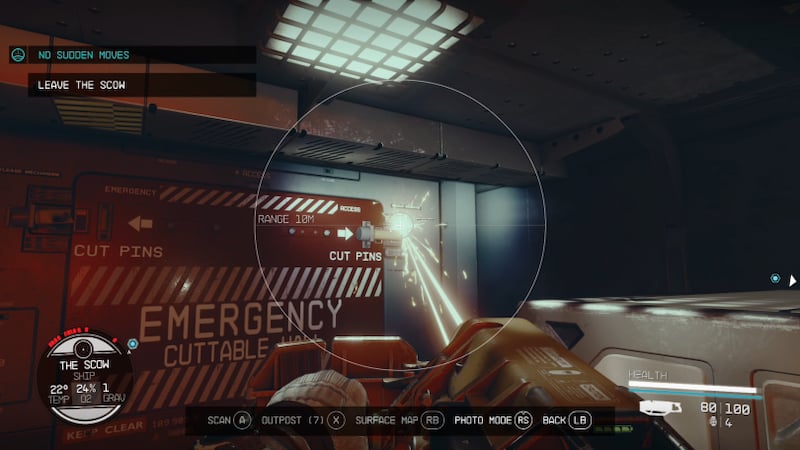
If you haven’t already come across these walls, they are red and have white print on them that says Emergency Cuttable Wall. The wall itself doesn’t seem cuttable, as it is a steel door that is pinned on either side of the steel walls around it. Considering that, how would you get through these doors? What the game doesn’t tell you is that you need to have your Mining Cutter tool prepared. The pins that are on either corner of the door are actually cuttable, as signified by the signs next to each pin that says Cut Pins. All you need to do is aim the gun at each of these pins and fire. Once the pins have been cut, you won’t have any issue bypassing the door as it is now unlocked.

You won’t even need to worry about actually unlocking the doors once the pins have been cut because it will just fall down, opening up the area so that there isn’t a door at all. If you’ve shot at all of the pins and the door still hasn’t fallen down, you might want to go back and make sure that you shot at each of the yellow locks because it won’t open up otherwise. It might actually be a blessing in disguise if that happens, as you’re able to see the hostile enemies on your minimap regardless of whether you’ve unlocked the door or not, so knowing where they might be good for you so that you can better prepare yourself before busting down the Emergency Cuttable Wall.

While most people won’t try to shoot at these pins from a distance, it is important to note that the pins need to be shot at from a distance of at least 10 m.

Related:

How to Get Money (Credits) Fast in Starfield

Starfield releases on September 6 for PC and Xbox Series X|S.

Related Topics
Guide Starfield
Share. Facebook Twitter LinkedIn Reddit Email
Nat Collazo
  • Website
  • X (Twitter)
  • Instagram

I am a game journalist and guide writer with ten years of experience as well as the CEO/ Founder of Frowns Marketing, a marketing company that caters to indie games, tabletop games, and board games to help developers get more wishlists, backers, and players!

SUGGESTED READS

Minecraft Accused of Mocking Lonely Kids, Sparking Mental Health Backlash: 'One of the Ickiest Things I've Seen'
Features

Minecraft Accused of Mocking Lonely Kids, Sparking Mental Health Backlash: ‘One of the Ickiest Things I’ve Seen’

Destiny 2 Renegades PS5 Review
8.5
Features

Destiny 2: Renegades Review – The Shooter Strikes Back

Clair Obscur: Expedition 33 Loses GOTY, Other Award from Indie Game Awards Over Generative AI: 'Some Weird Performative BS'
Game News

GOTY Stripped Over AI?: Clair Obscur: Expedition 33 Loses Awards at Indie Game Awards, ‘Some Weird Performative BS’

Sony Patents Real-time AI Game Censorship Tech That Could Even Make GTA 6 Kid-Friendly
Game News

Sony Patents Real-Time AI Game Censorship Tech That Could Even Make GTA 6 Kid-Friendly

Zenless Zone Zero Version 2.5 Announcement
Game News

Zenless Zone Zero Version 2.5 Is Ready To Wrap Up the Year With Two New Agents and a Free Outfit

PC Gamers Can't Catch a Break as Nvidia Plans 40% GeForce GPU Production Cuts, Report: 'Who Needs a PC Anyways'
Game News

PC Gamers Can’t Catch a Break as Nvidia Reportedly Plans 40% GeForce GPU Production Cuts: ‘Who Needs a PC Anyways’

Trending
Minecraft Accused of Mocking Lonely Kids, Sparking Mental Health Backlash: 'One of the Ickiest Things I've Seen'

Minecraft Accused of Mocking Lonely Kids, Sparking Mental Health Backlash: ‘One of the Ickiest Things I’ve Seen’

Destiny 2 Renegades PS5 Review
8.5

Destiny 2: Renegades Review – The Shooter Strikes Back

Clair Obscur: Expedition 33 Loses GOTY, Other Award from Indie Game Awards Over Generative AI: 'Some Weird Performative BS'

GOTY Stripped Over AI?: Clair Obscur: Expedition 33 Loses Awards at Indie Game Awards, ‘Some Weird Performative BS’

Sony Patents Real-time AI Game Censorship Tech That Could Even Make GTA 6 Kid-Friendly

Sony Patents Real-Time AI Game Censorship Tech That Could Even Make GTA 6 Kid-Friendly

The Nerd Stash
Facebook X (Twitter) Instagram YouTube LinkedIn
  • About Us
  • Join Our Team
  • Meet the Team
  • Privacy Policy
  • DMCA Policy
  • Contact Us
  • Terms of Use
  • Sitemap
  • Editorial Guidelines
  • Advertising Policy
© 2025 The Nerd Stash. All Rights Reserved.

Type above and press Enter to search. Press Esc to cancel.