
Close Menu
  • Gaming
    • Game Guides
    • Codes
    • Game News
    • Game Previews
    • Game Reviews
    • Game Features
    • Game Lists
    • Platforms
      • Nintendo
      • PC
      • PlayStation
      • Xbox
      • Mobile
  • Entertainment
    • Movies
    • Movie Features
    • Movie Reviews
    • TV
    • Reality TV
    • Royals
  • Celebrity
    • Hollywood
  • Human Interest
  • Astrology
  • Videos
  • More
    • Anime
    • Lists
    • Podcasts
    • Reviews
Facebook X (Twitter) Instagram LinkedIn YouTube
  • About Us
  • Join Our Team
  • Meet the Team
  • Privacy Policy
  • DMCA Policy
  • Contact Us
  • Terms of Use
  • Sitemap
  • Editorial Guidelines
  • Advertising Policy
The Nerd Stash
  • Gaming
  • Celebrity
    • Hollywood
  • Human Interest
  • Videos
The Nerd Stash
Home»Game Guides»How To Get to the Flight Simulator Location in Starfield

How To Get to the Flight Simulator Location in Starfield

Like previous Bethesda titles, Starfield has a vast open world with many quests. Some of them will be quite simple, while others may keep you…

Nerd Stash StaffBy Nerd Stash StaffSeptember 12, 20233 Mins Read
How To Get to the Flight Simulator Location in Starfield
Image Source: Bethesda Game Studios via WoW Quests Screenshot

Skip To...

  • How To Find UC Flight Simulator
  • How To Beat Tier 6 in UC Flight Simulator
This article is over 2 years old and may contain outdated information.

Like previous Bethesda titles, Starfield has a vast open world with many quests. Some of them will be quite simple, while others may keep you busy for a long time. Some will even help you hone your space battle skills. One such quest will become available to you as soon as you reach New Atlantis. During it, you will have to take several tests in the flight simulator, of course, if you get to it. So, read on to find out how to find the UC flight simulator location in Starfield.

How To Find UC Flight Simulator
How To Find UC Flight Simulator
Image Source: Bethesda Game Studios via WoW Quests Screenshot

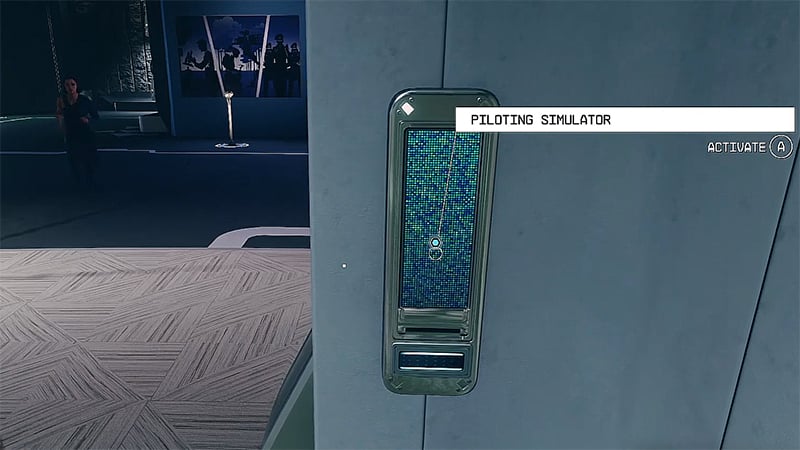
Before you can access the UC Flight Simulator in Starfield, you will need to start the Supra Et Ultra quest. Luckily, all you have to do is visit the MAST Building in the MAST District. There, you will find John Tuala, who will invite you to join the UC Vanguard faction. But to do this, you have to pass a test in the ship simulator in Starfield.

So, after you accept the quest, you need to use the elevator and go down to Orientation Hall. Then, accept the agreement in one of the terminals. After this, go through the historical exhibition to the elevator leading to the UC flight simulator location in Starfield.

This way, you will find yourself in the Vanguard Piloting Simulator Chamber. Go up the stairs and enter the left simulation pod. Before you start the simulation, pay attention to the Simulation Controls panel on the wall. You will need it to complete the exam perfectly.

How To Beat Tier 6 in UC Flight Simulator

Even though you only need to fight off 3 waves of enemies to pass the exam, we recommend you beat all 6 tiers. However, to do this you will need to upgrade your Piloting and Security skills. The latter is needed for hacking the Simulation Controls panel. This way, players will unlock Debug Ally and Infinite Upgrades, which will help them beat all the tiers of this simulation without any problems. And you can get a lot of Credits for this.

That’s all you need to know about how to get to the UC ship simulator location in Starfield. This challenge isn’t the hardest in the game, but it might be a bit much for new players. Therefore, follow our advice to pass the Vanguard exam perfectly. And while you are here, please take a look at our guide on how to get Starfield weapon skins.

Starfield is available on Xbox Series X|S and PC.

Related Topics
Guide Starfield
Share. Facebook Twitter LinkedIn Reddit Email
Nerd Stash Staff
  • Website

SUGGESTED READS

Minecraft Accused of Mocking Lonely Kids, Sparking Mental Health Backlash: 'One of the Ickiest Things I've Seen'
Features

Minecraft Accused of Mocking Lonely Kids, Sparking Mental Health Backlash: ‘One of the Ickiest Things I’ve Seen’

Destiny 2 Renegades PS5 Review
8.5
Features

Destiny 2: Renegades Review – The Shooter Strikes Back

Clair Obscur: Expedition 33 Loses GOTY, Other Award from Indie Game Awards Over Generative AI: 'Some Weird Performative BS'
Game News

GOTY Stripped Over AI?: Clair Obscur: Expedition 33 Loses Awards at Indie Game Awards, ‘Some Weird Performative BS’

Sony Patents Real-time AI Game Censorship Tech That Could Even Make GTA 6 Kid-Friendly
Game News

Sony Patents Real-Time AI Game Censorship Tech That Could Even Make GTA 6 Kid-Friendly

Zenless Zone Zero Version 2.5 Announcement
Game News

Zenless Zone Zero Version 2.5 Is Ready To Wrap Up the Year With Two New Agents and a Free Outfit

PC Gamers Can't Catch a Break as Nvidia Plans 40% GeForce GPU Production Cuts, Report: 'Who Needs a PC Anyways'
Game News

PC Gamers Can’t Catch a Break as Nvidia Reportedly Plans 40% GeForce GPU Production Cuts: ‘Who Needs a PC Anyways’

Trending
Minecraft Accused of Mocking Lonely Kids, Sparking Mental Health Backlash: 'One of the Ickiest Things I've Seen'

Minecraft Accused of Mocking Lonely Kids, Sparking Mental Health Backlash: ‘One of the Ickiest Things I’ve Seen’

Destiny 2 Renegades PS5 Review
8.5

Destiny 2: Renegades Review – The Shooter Strikes Back

Clair Obscur: Expedition 33 Loses GOTY, Other Award from Indie Game Awards Over Generative AI: 'Some Weird Performative BS'

GOTY Stripped Over AI?: Clair Obscur: Expedition 33 Loses Awards at Indie Game Awards, ‘Some Weird Performative BS’

Sony Patents Real-time AI Game Censorship Tech That Could Even Make GTA 6 Kid-Friendly

Sony Patents Real-Time AI Game Censorship Tech That Could Even Make GTA 6 Kid-Friendly

The Nerd Stash
Facebook X (Twitter) Instagram YouTube LinkedIn
  • About Us
  • Join Our Team
  • Meet the Team
  • Privacy Policy
  • DMCA Policy
  • Contact Us
  • Terms of Use
  • Sitemap
  • Editorial Guidelines
  • Advertising Policy
© 2025 The Nerd Stash. All Rights Reserved.

Type above and press Enter to search. Press Esc to cancel.





