
Close Menu
  • Gaming
    • Game Guides
    • Codes
    • Game News
    • Game Previews
    • Game Reviews
    • Game Features
    • Game Lists
    • Platforms
      • Nintendo
      • PC
      • PlayStation
      • Xbox
      • Mobile
  • Entertainment
    • Movies
    • Movie Features
    • Movie Reviews
    • TV
    • Reality TV
    • Royals
  • Celebrity
    • Hollywood
  • Human Interest
  • Astrology
  • Videos
  • More
    • Anime
    • Lists
    • Podcasts
    • Reviews
Facebook X (Twitter) Instagram LinkedIn YouTube
  • About Us
  • Join Our Team
  • Meet the Team
  • Privacy Policy
  • DMCA Policy
  • Contact Us
  • Terms of Use
  • Sitemap
  • Editorial Guidelines
  • Advertising Policy
The Nerd Stash
  • Gaming
  • Celebrity
    • Hollywood
  • Human Interest
  • Videos
The Nerd Stash
Home»Game Guides»How To Get Yin & Yang Sword in Punch Simulator

How To Get Yin & Yang Sword in Punch Simulator

Punch Simulator combines the most popular Roblox genres, namely simulator, clicker, and Pet collecting. Therefore, despite the simple gameplay, you can spend many hours in…

Alina NovichenkoBy Alina NovichenkoAugust 24, 20233 Mins Read
How To Get Yin & Yang Sword in Punch Simulator
Image Source: Roblox via The Nerd Stash

Skip To...

  • What Is Yin & Yang Sword?
  • How To Unlock Yin & Yang Sword in Punch Simulator
This article is over 2 years old and may contain outdated information.

Punch Simulator combines the most popular Roblox genres, namely simulator, clicker, and Pet collecting. Therefore, despite the simple gameplay, you can spend many hours in it. In addition, developers often add various UGC items that will make your avatar unique. But since such rewards are limited, you must hurry to get them. For example, now you can get a cool big sword. So, read on to learn how to get the Yin & Yang Sword in Punch Simulator.

What Is Yin & Yang Sword?
What Is Yin & Yang Sword?
Image Source: Roblox via DeeterPlays Screenshot

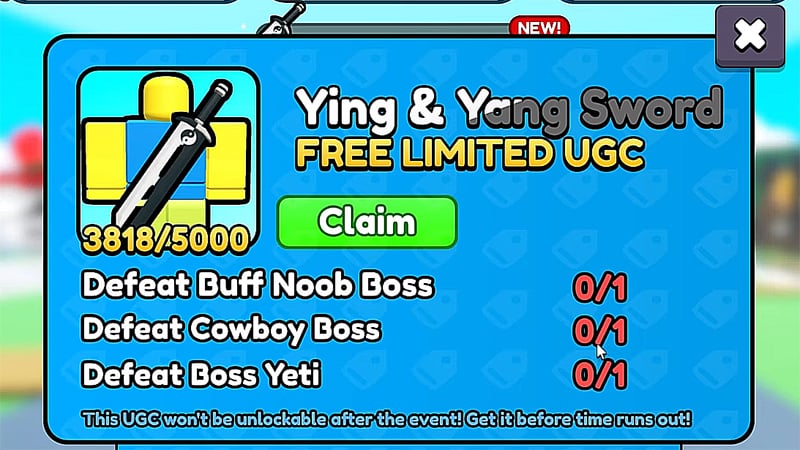
As we said, the gameplay of Punch Simulator is quite simple. Therefore, developers add various rewards to the game to motivate players to progress. The most valuable of these is the free limited UGC. And now you can get Yin & Yang Sword in Punch Simulator.

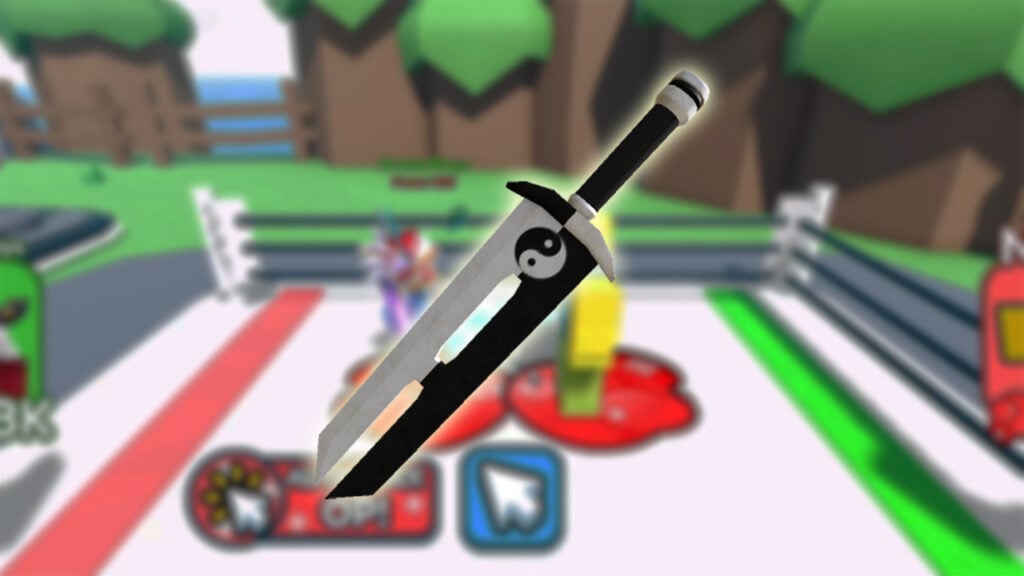
The Yin & Yang Sword is a big dark and white sword in the Yin and Yang style. It is a cosmetic item for your avatar, so you can also use it in other Roblox titles. But since the stock of these items is limited, you need to hurry.

How To Unlock Yin & Yang Sword in Punch Simulator

Unlocking this free limited UGC can be a little tricky for new players. But using our tips, you can complete all the requirements quickly. So, to get Yin & Yang Sword in Punch Simulator, you need to defeat three bosses:

  • Buff Noob Boss
  • Cowboy Boss
  • Boss Yeti

These bosses are pretty strong, so it can be difficult for new players to defeat them. However, progressing in Punch Simulator is pretty straightforward. You need to follow these simple tips to get a Yin & Yang Sword:

  • In the beginning, click as much as possible to increase your strength.
  • Try to buy new Gloves as often as possible to increase the multiplier.
  • Fight bosses to earn Wins and get Pets. Depending on their rarity, you can get huge multipliers.
  • Finally, invite your friends to get Friend Boost, which is increased by 10 times for the event. This Boost can help you complete the event several times faster.

That’s all you need to know about how to get Yin & Yang Sword in Punch Simulator. Follow our tips, and you can get this limited cosmetic item without problems. In the meantime, take a look at our guide on how to get Billy Bundle in Roblox.

Related:

How to Level Up Fast in Anime Fighting Simulator X

Roblox is available now for PC, iOS, Android, and Xbox One.

Related Topics
Guide Roblox
Share. Facebook Twitter LinkedIn Reddit Email
Alina Novichenko
  • Website

Alina is a professional freelance game guides writer, with 2 years experience in this industry. She joined TheNerdStash in 2022 and is glad to be part of a friendly team of writers.

SUGGESTED READS

Minecraft Accused of Mocking Lonely Kids, Sparking Mental Health Backlash: 'One of the Ickiest Things I've Seen'
Features

Minecraft Accused of Mocking Lonely Kids, Sparking Mental Health Backlash: ‘One of the Ickiest Things I’ve Seen’

Destiny 2 Renegades PS5 Review
8.5
Features

Destiny 2: Renegades Review – The Shooter Strikes Back

Clair Obscur: Expedition 33 Loses GOTY, Other Award from Indie Game Awards Over Generative AI: 'Some Weird Performative BS'
Game News

GOTY Stripped Over AI?: Clair Obscur: Expedition 33 Loses Awards at Indie Game Awards, ‘Some Weird Performative BS’

Sony Patents Real-time AI Game Censorship Tech That Could Even Make GTA 6 Kid-Friendly
Game News

Sony Patents Real-Time AI Game Censorship Tech That Could Even Make GTA 6 Kid-Friendly

Zenless Zone Zero Version 2.5 Announcement
Game News

Zenless Zone Zero Version 2.5 Is Ready To Wrap Up the Year With Two New Agents and a Free Outfit

PC Gamers Can't Catch a Break as Nvidia Plans 40% GeForce GPU Production Cuts, Report: 'Who Needs a PC Anyways'
Game News

PC Gamers Can’t Catch a Break as Nvidia Reportedly Plans 40% GeForce GPU Production Cuts: ‘Who Needs a PC Anyways’

Trending
Minecraft Accused of Mocking Lonely Kids, Sparking Mental Health Backlash: 'One of the Ickiest Things I've Seen'

Minecraft Accused of Mocking Lonely Kids, Sparking Mental Health Backlash: ‘One of the Ickiest Things I’ve Seen’

Destiny 2 Renegades PS5 Review
8.5

Destiny 2: Renegades Review – The Shooter Strikes Back

Clair Obscur: Expedition 33 Loses GOTY, Other Award from Indie Game Awards Over Generative AI: 'Some Weird Performative BS'

GOTY Stripped Over AI?: Clair Obscur: Expedition 33 Loses Awards at Indie Game Awards, ‘Some Weird Performative BS’

Sony Patents Real-time AI Game Censorship Tech That Could Even Make GTA 6 Kid-Friendly

Sony Patents Real-Time AI Game Censorship Tech That Could Even Make GTA 6 Kid-Friendly

The Nerd Stash
Facebook X (Twitter) Instagram YouTube LinkedIn
  • About Us
  • Join Our Team
  • Meet the Team
  • Privacy Policy
  • DMCA Policy
  • Contact Us
  • Terms of Use
  • Sitemap
  • Editorial Guidelines
  • Advertising Policy
© 2025 The Nerd Stash. All Rights Reserved.

Type above and press Enter to search. Press Esc to cancel.





