Close Menu
  • Gaming
    • Platforms
      • Nintendo
      • PC
      • PlayStation
      • Xbox
  • Entertainment
    • Movies
    • TV
    • Royals
  • Celebrity
    • Hollywood
  • Human Interest
  • Astrology
  • More
    • Reviews
Facebook X (Twitter) Instagram LinkedIn YouTube
  • About Us
  • Join Our Team
  • Meet the Team
  • Privacy Policy
  • DMCA Policy
  • Contact Us
  • Terms of Use
  • Sitemap
  • Editorial Guidelines
  • Advertising Policy
The Nerd Stash
  • Gaming
  • Celebrity
  • Hollywood
  • Human Interest
The Nerd Stash
Home»Gaming»How To Go Third Person in Apex Legends

How To Go Third Person in Apex Legends

Want to know how to go Third Person mode in Apex Legends? Although the new Apex Legends Season 17 brought many new skins, updated battle…

Artur NovichenkoBy Artur NovichenkoJuly 11, 20233 Mins Read
How To Go Third Person in Apex Legends
Image Source: Respawn via The Nerd Stash
This article is over 3 years old and may contain outdated information.

Want to know how to go Third Person mode in Apex Legends? Although the new Apex Legends Season 17 brought many new skins, updated battle arenas, and a new character named Ballistic, some changes are not included in the official list. After all, we all know that Respawn loves Easter eggs, and Third Person mode is one of them. As an FPS game, Apex Legends doesn’t provide players with an integrated Third Person feature, but veterans of the game know that this mode exists. The ability to go Third Person mode in Apex Legends is inextricably related to bushes, and Season 17 is no exception.

How To Activate Third-Person Mode in Apex Legends Season 17
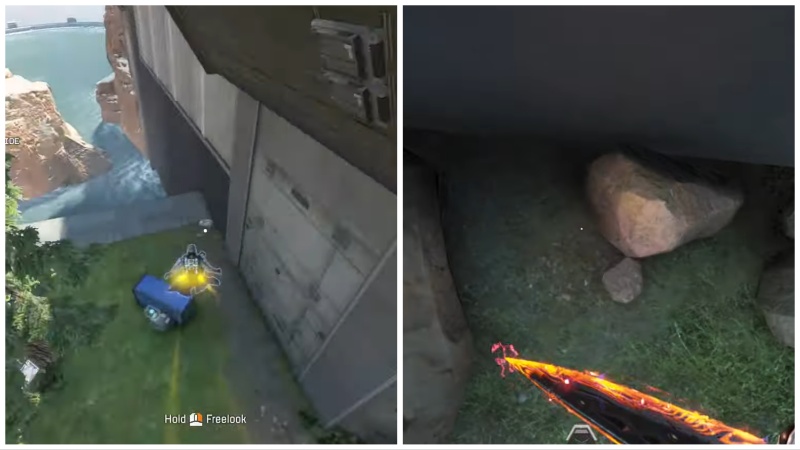
Activate Third Person in Apex Legends
Image Source: Respawn via YouTube bobz

If you are a new player in Apex Legends, you should know that the game does not have an integrated Third Person mode. So by going to the settings, you can not activate this mode. But as we said earlier, Respawn loves to hide for their players with easter eggs, and almost since the game’s release, Third Person mode has been one of them. Depending on the season, the way to activate this mode changed slightly. But it is always related to the bushes.

It’s worth noting that Third Person mode is only available in the Firing Range game mode, so you will have to accept this. But if you want to try a new gameplay experience and haven’t found the easter egg yourself, here’s what you should do:

  • As in any other season, during Apex Legends Season 17, there was a rotation of the battle arena for the Firing Range mode, and the desired bush hid in a new place. So when you enter the Firing Range, go straight and then to the far right corner near the rock.
  • Approaching the cliff at the foot of the rock, you will see a small bush next to the stones. Stand in the middle of the bush, and turn around with your back to the rock.
  • Next, you must crouch and look down at the left corner of the large stone in the ground.
  • Finally, press Esc and Change Legend. Select any character, and you will automatically go to Third Person mode.

During this season, the process has become much easier than before. For example, in Season 16, you had to die to activate the desired mode. In addition, sometimes, an error occurred, and players had to repeat attempts several times. And in even older seasons, this easter egg was activated only by some characters.

Related:

Apex Legends June 29 Update Patch Notes

Apex Legends is available on PlayStation, Xbox, Nintendo Switch, and PC.

Related Topics
Apex Legends Guide
Share. Facebook Twitter LinkedIn Reddit Email
Artur Novichenko
  • Website

Artur is a copywriter and SEO specialist, as well as a small business owner. In his free time, he loves to play computer games and is glad that he was able to connect his professional career with his hobby.

SUGGESTED READS

DC white house MAGA game
Gaming

Trump’s MAGA Video Games Feature Immigrant Hunts and Tetris Walls in Bold New Vision for DC: ‘It’s Like the White House is Being Run by Evil 12 Year Olds’

Can Blood of Dawnwalker Run on Steam Deck? Best Settings & Performance Guide
Gaming

Can Blood of Dawnwalker Run on Steam Deck? Best Settings & Performance Guide

The Blood of Dawnwalker Scouting Towers
Gaming

The Blood of Dawnwalker: How to Clear Scouting Towers and Reveal Map Locations

How to Fast Travel and Activate Shrines in Blood of Dawnwalker
Gaming

How to Fast Travel and Activate Shrines in Blood of Dawnwalker

State of Play September 2026 Announcements
Gaming

PlayStation State of Play (September 2026): All Major Announcements

CS2 float values
Gaming

How to Read Float Before Buying a Skin

The Nerd Stash
Facebook X (Twitter) Instagram YouTube LinkedIn
  • About Us
  • Join Our Team
  • Meet the Team
  • Privacy Policy
  • DMCA Policy
  • Contact Us
  • Terms of Use
  • Sitemap
  • Editorial Guidelines
  • Advertising Policy
© 2026 The Nerd Stash. All Rights Reserved.

Type above and press Enter to search. Press Esc to cancel.