

Close Menu
  • Gaming
    • Game Guides
    • Codes
    • Game News
    • Game Previews
    • Game Reviews
    • Game Features
    • Game Lists
    • Platforms
      • Nintendo
      • PC
      • PlayStation
      • Xbox
      • Mobile
  • Entertainment
    • Movies
    • Movie Features
    • Movie Reviews
    • TV
    • Reality TV
    • Royals
  • Celebrity
    • Hollywood
  • Human Interest
  • Astrology
  • Videos
  • More
    • Anime
    • Lists
    • Podcasts
    • Reviews
Facebook X (Twitter) Instagram LinkedIn YouTube
  • About Us
  • Join Our Team
  • Meet the Team
  • Privacy Policy
  • DMCA Policy
  • Contact Us
  • Terms of Use
  • Sitemap
  • Editorial Guidelines
  • Advertising Policy
The Nerd Stash
  • Gaming
  • Celebrity
    • Hollywood
  • Human Interest
  • Videos
The Nerd Stash
Home»Game Guides»How To Increase Manager Level in HoloCure

How To Increase Manager Level in HoloCure

Even though HoloCure is a survival bullet hell, it has activities that will help you relax. And, of course, we are talking about Holo House,…

Alina NovichenkoBy Alina NovichenkoAugust 22, 20233 Mins Read
How To Increase Manager Level in HoloCure
Image Source: KayAnimate via The Nerd Stash

Skip To...

  • What Is the Manager Level in HoloCure
  • How to Increase Manager Level in HoloCure
This article is over 2 years old and may contain outdated information.

Even though HoloCure is a survival bullet hell, it has activities that will help you relax. And, of course, we are talking about Holo House, which was added in version 0.6. In it, you can decorate your home, interact with other characters, fish, and even hire fans to earn HoloCoins. The latter is the best way to farm money in the game, so you should only hire the best workers. And for this, you will need a high Manager Level. So, read on to learn how to increase the Manager Level in HoloCure.

What Is the Manager Level in HoloCure
What Is the Manager Level in HoloCure
Image Source: KayAnimate via The Nerd Stash

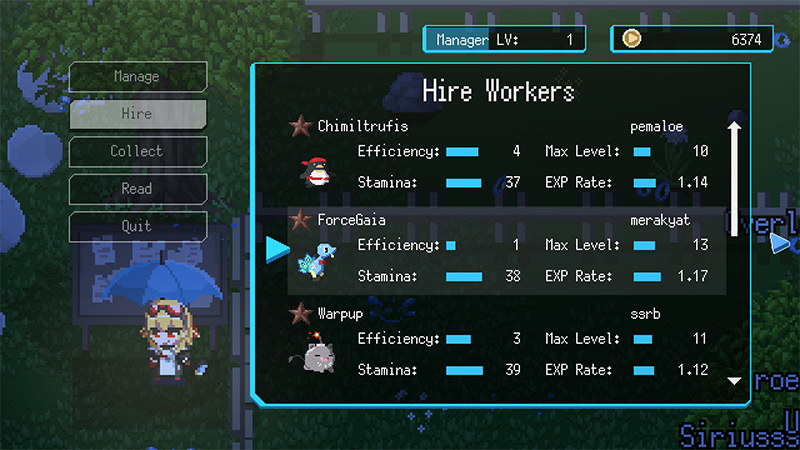
Holo House is a great mode for relaxing and earning a lot of coins in HoloCure. And the best way to do this is to hire fans willing to help their idols. To do this, you need to go a little down from the house and interact with the Management Board. Once done, you will see a small menu on the left, as well as your Manager Level and the number of HoloCoins in the top right corner.

Manager Level shows how good a manager you are. The higher the Level, the better workers you can hire. Their stats will be higher and as a result, you will earn more money. As of this writing, you can only reach Manager Level 4 in HoloCure. At this level, workers with a level cap of 50 will be available to you.

How to Increase Manager Level in HoloCure

So, to increase the Manager Level in HoloCure, you need to level up your workers by feeding them certain foods. At first, it can be simple fish or vegetables, but the higher the level of workers, the rarer dishes they will require.

Luckily, you will also get more Manager Level EXP for using rarer food. But you will have to feed your workers quite often, otherwise, they will get an Exhausted state and will not be able to produce Holo Coins for you. Therefore, always keep a supply of various food in your inventory.

That’s all you need to know about how to increase your Manager Level in HoloCure. The Management Board is not a mandatory activity, but it can be very useful for earning money fast. So, follow our advice to hire the best workers. In the meantime, take a look at our guide on how to get the Couch Potato achievement.

Related:

Holocure: All Super Items List

HoloCure is available for PC.

Related Topics
Guide Holocure
Share. Facebook Twitter LinkedIn Reddit Email
Alina Novichenko
  • Website

Alina is a professional freelance game guides writer, with 2 years experience in this industry. She joined TheNerdStash in 2022 and is glad to be part of a friendly team of writers.

SUGGESTED READS

Minecraft Accused of Mocking Lonely Kids, Sparking Mental Health Backlash: 'One of the Ickiest Things I've Seen'
Features

Minecraft Accused of Mocking Lonely Kids, Sparking Mental Health Backlash: ‘One of the Ickiest Things I’ve Seen’

Destiny 2 Renegades PS5 Review
8.5
Features

Destiny 2: Renegades Review – The Shooter Strikes Back

Clair Obscur: Expedition 33 Loses GOTY, Other Award from Indie Game Awards Over Generative AI: 'Some Weird Performative BS'
Game News

GOTY Stripped Over AI?: Clair Obscur: Expedition 33 Loses Awards at Indie Game Awards, ‘Some Weird Performative BS’

Sony Patents Real-time AI Game Censorship Tech That Could Even Make GTA 6 Kid-Friendly
Game News

Sony Patents Real-Time AI Game Censorship Tech That Could Even Make GTA 6 Kid-Friendly

Zenless Zone Zero Version 2.5 Announcement
Game News

Zenless Zone Zero Version 2.5 Is Ready To Wrap Up the Year With Two New Agents and a Free Outfit

PC Gamers Can't Catch a Break as Nvidia Plans 40% GeForce GPU Production Cuts, Report: 'Who Needs a PC Anyways'
Game News

PC Gamers Can’t Catch a Break as Nvidia Reportedly Plans 40% GeForce GPU Production Cuts: ‘Who Needs a PC Anyways’

Trending
Minecraft Accused of Mocking Lonely Kids, Sparking Mental Health Backlash: 'One of the Ickiest Things I've Seen'

Minecraft Accused of Mocking Lonely Kids, Sparking Mental Health Backlash: ‘One of the Ickiest Things I’ve Seen’

Destiny 2 Renegades PS5 Review
8.5

Destiny 2: Renegades Review – The Shooter Strikes Back

Clair Obscur: Expedition 33 Loses GOTY, Other Award from Indie Game Awards Over Generative AI: 'Some Weird Performative BS'

GOTY Stripped Over AI?: Clair Obscur: Expedition 33 Loses Awards at Indie Game Awards, ‘Some Weird Performative BS’

Sony Patents Real-time AI Game Censorship Tech That Could Even Make GTA 6 Kid-Friendly

Sony Patents Real-Time AI Game Censorship Tech That Could Even Make GTA 6 Kid-Friendly

The Nerd Stash
Facebook X (Twitter) Instagram YouTube LinkedIn
  • About Us
  • Join Our Team
  • Meet the Team
  • Privacy Policy
  • DMCA Policy
  • Contact Us
  • Terms of Use
  • Sitemap
  • Editorial Guidelines
  • Advertising Policy
© 2025 The Nerd Stash. All Rights Reserved.

Type above and press Enter to search. Press Esc to cancel.





