
Close Menu
  • Gaming
    • Game Guides
    • Codes
    • Game News
    • Game Previews
    • Game Reviews
    • Game Features
    • Game Lists
    • Platforms
      • Nintendo
      • PC
      • PlayStation
      • Xbox
      • Mobile
  • Entertainment
    • Movies
    • Movie Features
    • Movie Reviews
    • TV
    • Reality TV
    • Royals
  • Celebrity
    • Hollywood
  • Human Interest
  • Astrology
  • Videos
  • More
    • Anime
    • Lists
    • Podcasts
    • Reviews
Facebook X (Twitter) Instagram LinkedIn YouTube
  • About Us
  • Join Our Team
  • Meet the Team
  • Privacy Policy
  • DMCA Policy
  • Contact Us
  • Terms of Use
  • Sitemap
  • Editorial Guidelines
  • Advertising Policy
The Nerd Stash
  • Gaming
  • Celebrity
    • Hollywood
  • Human Interest
  • Videos
The Nerd Stash
Home»Game Guides»How to Make a Scarecrow in Coral Island

How to Make a Scarecrow in Coral Island

It’s time to scare the crows.

Patrick ArmstrongAlina NovichenkoBy Patrick Armstrong and Alina NovichenkoNovember 23, 20232 Mins Read
How To Make a Scarecrow in Coral Island
Image source: Stairway Games via The Nerd Stash

Skip To...

  • How to Craft a Scarecrow
  • How To Get More Scarecrows
This article is over 2 years old and may contain outdated information.

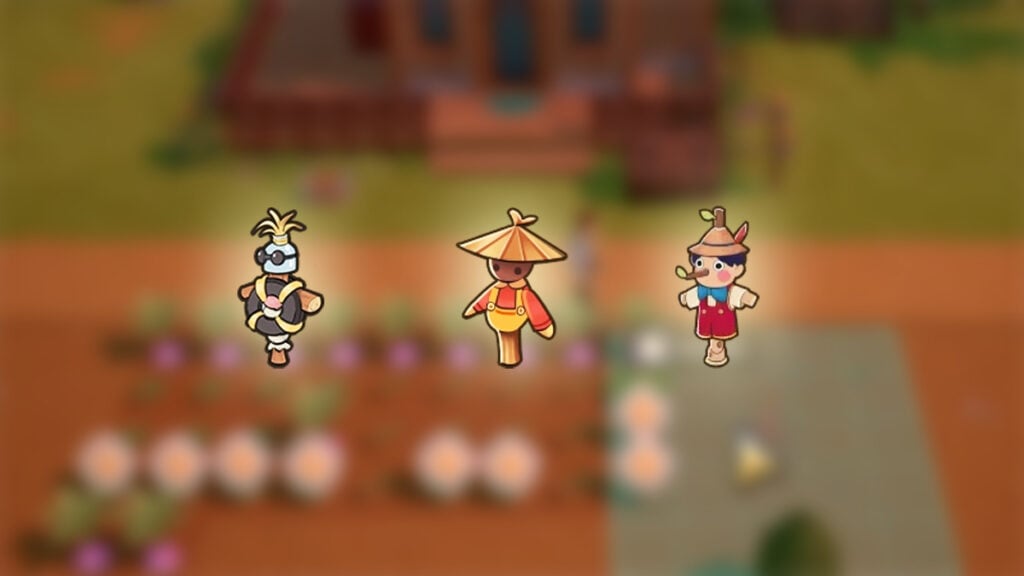
Although Coral Island has many different activities, Farming is the most important of them. This way, you can grow various crops to sell them or use them for crafting. However, you are not the only one who wants your harvest. Annoying crows also want to eat your crops every morning. Therefore, you have to craft a Scarecrow that will scare away all those pesky crows from your farm in Coral Island.

How to Craft a Scarecrow

(Updated on August 15, 2024 – updated links and format)
How to Craft a Scarecrow
Image source: Stairway Games via YouTube Quick Tips

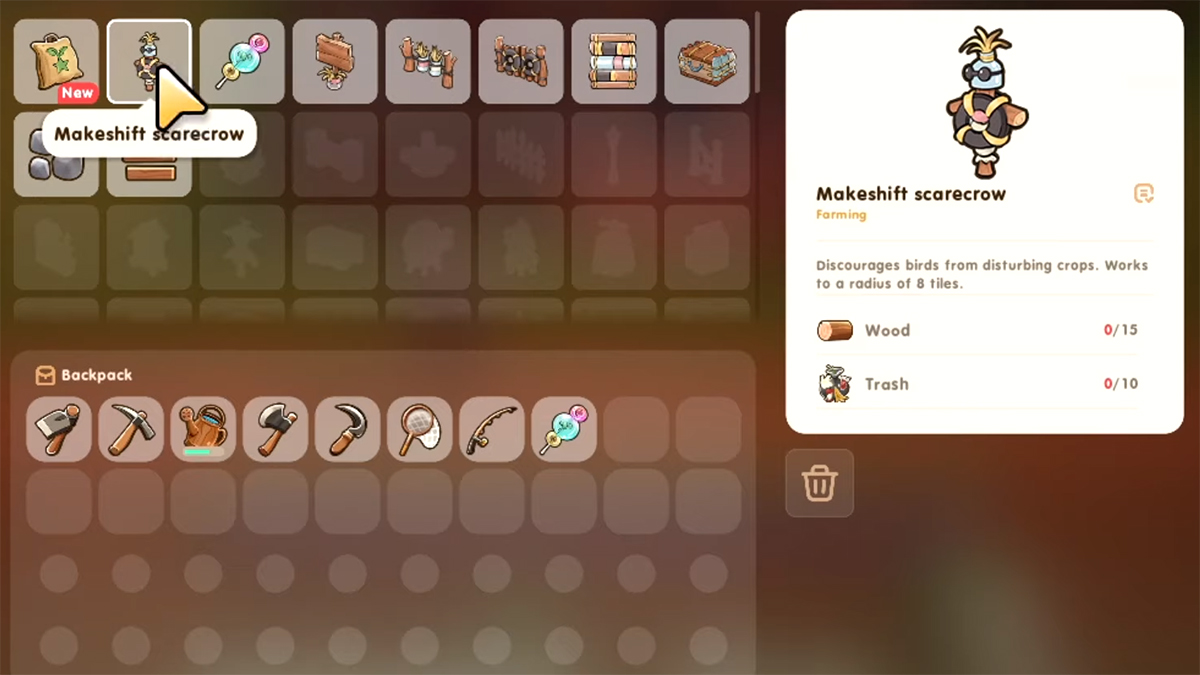
Crows have a 60% chance of coming to your farm every morning to eat your crops. This begins to happen when players start growing 12 or more crops on their farm. Luckily, once you discover the crime scene, you can start the Crows Be Gone quest and learn the Scarecrow crafting recipe in Coral Island.

More precisely, you can craft Makeshift Scarecrow. It is the most basic Scarecrow, capable of protecting a small 5×5 area from hungry crows. To make on of your own, you need only two resources:

  • Scrap – 10
  • Wood – 15

How To Get More Scarecrows

In the early stages of the game, Makeshift Scarecrow can be quite useful. But when your farm gets bigger, you will need a lot of Scarecrows to protect the entire area. The Ordinary Scarecrow is best suited for this, as you will unlock this crafting recipe after level 3 of Farming in Coral Island.

Related:

Coral Island Enchanting Guide

Unlike Makeshift, Ordinary Scarecrow protects an 11×11 area. But it also requires more materials for crafting:

  • Sap – 10
  • Fiber – 20
  • Wood – 20

Alternatively, you can purchase different Scarecrows from the Community Center Shop in Coral Island. They all cost 200 Merit Points and protect the same area as the Ordinary Scarecrow. Their only difference is their appearance, for example, Pino Scarecrow looks like a cute Pinocchio. By purchasing a Scarecrow this way, you will automatically unlock its crafting recipe.

That’s all you need to know about how to make a Scarecrow in Coral Island. This Farming equipment will help you save your crops from crows, so use them throughout your farm.


Related Topics
Coral Island Guide
Share. Facebook Twitter LinkedIn Reddit Email
Patrick Armstrong, Alina Novichenko
  • Website

Artist and writer with a lifelong love of video games. Their favorite games include Dead by Daylight, Meet Your Maker, and Project Zomboid.

Patrick Armstrong, Alina Novichenko
  • Website

Artist and writer with a lifelong love of video games. Their favorite games include Dead by Daylight, Meet Your Maker, and Project Zomboid.

SUGGESTED READS

Minecraft Accused of Mocking Lonely Kids, Sparking Mental Health Backlash: 'One of the Ickiest Things I've Seen'
Features

Minecraft Accused of Mocking Lonely Kids, Sparking Mental Health Backlash: ‘One of the Ickiest Things I’ve Seen’

Destiny 2 Renegades PS5 Review
8.5
Features

Destiny 2: Renegades Review – The Shooter Strikes Back

Clair Obscur: Expedition 33 Loses GOTY, Other Award from Indie Game Awards Over Generative AI: 'Some Weird Performative BS'
Game News

GOTY Stripped Over AI?: Clair Obscur: Expedition 33 Loses Awards at Indie Game Awards, ‘Some Weird Performative BS’

Sony Patents Real-time AI Game Censorship Tech That Could Even Make GTA 6 Kid-Friendly
Game News

Sony Patents Real-Time AI Game Censorship Tech That Could Even Make GTA 6 Kid-Friendly

Zenless Zone Zero Version 2.5 Announcement
Game News

Zenless Zone Zero Version 2.5 Is Ready To Wrap Up the Year With Two New Agents and a Free Outfit

PC Gamers Can't Catch a Break as Nvidia Plans 40% GeForce GPU Production Cuts, Report: 'Who Needs a PC Anyways'
Game News

PC Gamers Can’t Catch a Break as Nvidia Reportedly Plans 40% GeForce GPU Production Cuts: ‘Who Needs a PC Anyways’

Trending
Minecraft Accused of Mocking Lonely Kids, Sparking Mental Health Backlash: 'One of the Ickiest Things I've Seen'

Minecraft Accused of Mocking Lonely Kids, Sparking Mental Health Backlash: ‘One of the Ickiest Things I’ve Seen’

Destiny 2 Renegades PS5 Review
8.5

Destiny 2: Renegades Review – The Shooter Strikes Back

Clair Obscur: Expedition 33 Loses GOTY, Other Award from Indie Game Awards Over Generative AI: 'Some Weird Performative BS'

GOTY Stripped Over AI?: Clair Obscur: Expedition 33 Loses Awards at Indie Game Awards, ‘Some Weird Performative BS’

Sony Patents Real-time AI Game Censorship Tech That Could Even Make GTA 6 Kid-Friendly

Sony Patents Real-Time AI Game Censorship Tech That Could Even Make GTA 6 Kid-Friendly

The Nerd Stash
Facebook X (Twitter) Instagram YouTube LinkedIn
  • About Us
  • Join Our Team
  • Meet the Team
  • Privacy Policy
  • DMCA Policy
  • Contact Us
  • Terms of Use
  • Sitemap
  • Editorial Guidelines
  • Advertising Policy
© 2025 The Nerd Stash. All Rights Reserved.

Type above and press Enter to search. Press Esc to cancel.




