
Close Menu
  • Gaming
    • Game Guides
    • Codes
    • Game News
    • Game Previews
    • Game Reviews
    • Game Features
    • Game Lists
    • Platforms
      • Nintendo
      • PC
      • PlayStation
      • Xbox
      • Mobile
  • Entertainment
    • Movies
    • Movie Features
    • Movie Reviews
    • TV
    • Reality TV
    • Royals
  • Celebrity
    • Hollywood
  • Human Interest
  • Astrology
  • Videos
  • More
    • Anime
    • Lists
    • Podcasts
    • Reviews
Facebook X (Twitter) Instagram LinkedIn YouTube
  • About Us
  • Join Our Team
  • Meet the Team
  • Privacy Policy
  • DMCA Policy
  • Contact Us
  • Terms of Use
  • Sitemap
  • Editorial Guidelines
  • Advertising Policy
The Nerd Stash
  • Gaming
  • Celebrity
    • Hollywood
  • Human Interest
  • Videos
The Nerd Stash
Home»Game Guides»How to Make Babies in Fallout Shelter

How to Make Babies in Fallout Shelter

Love and radiation are in the air.

Patrick ArmstrongBy Patrick ArmstrongApril 26, 20243 Mins Read
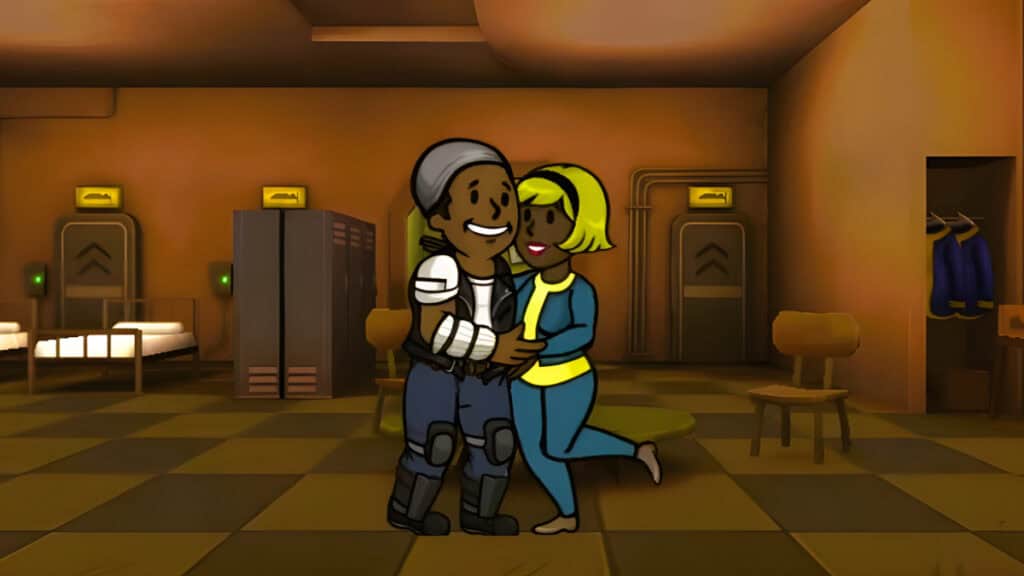
Loving parents embrace in Fallout Shelter
Image Source: Silent Gameplay YouTube via The Nerd Stash
This article is over 1 years old and may contain outdated information.

From roaming the wastes to wasting roamers, the open road is a big part of Fallout. Fallout Shelter turns that expectation on its head, tasking you with running a successful shelter instead. Keeping the lights on and your citizens well-armed is only the start of your worries, however. You’ll eventually want to expand, and for that, you need more Vault dwellers. You could always entice a wanderer to join by using the local radio station, but that’s riskier (and less romantic) than increasing your population the old-fashioned way. Here’s how to make babies in Fallout Shelter.

Fallout Shelter Babies Guide

Smiley faces and a newborn baby in Fallout Shelter
Image Source: Silent Gameplay YouTube via The Nerd Stash

Fallout Shelter is happy to off your population in gruesome ways, so you’ll need to keep your population high. Thankfully, your Vault dwellers don’t need to meet any special unlock conditions to have children. All they need is some comfortable living space and a bit of romance. Here’s what you need to do to make babies in Fallout Shelter:

  1. Build a Living Room
  2. Place an adult male and adult female Vault dweller inside
  3. Make sure the couple meets, talks, and dances
  4. Wait until the couple retires to the bedroom and you see green smiley faces

Related:

All Fallout Games In Release and Chronological Order up (2024)

The couple needs to meet, talk, and dance before their courtship can progress, so if nothing’s happening, make sure they didn’t miss a step. It’s also important to know that pregnant Vault dwellers won’t give birth if your Vault has no room for a new dweller. If you appear to be stuck, double-check that you have sufficient Living Rooms and that the Vault hasn’t reached its cap of 200 dwellers. First, you have space, then you have babies.

Couple Restrictions and Legendary Babies

Dwellers who share a parent can’t mate, nor can they mate with their parent or grandparent, so make sure you check their last names before tossing them in a room. Dwellers with max level and maxed stats can produce legendary children starting with 40 randomly assigned SPECIAL points, making them much more useful for your shelter. Learning how to make babies in Fallout Shelter is about more than just numbers, after all. You can have all the kiddos in the world, but if they don’t grow up to be big and strong, your Vault won’t last long.

Fallout Shelter is available for PC, PlayStation 4, Xbox One, Nintendo Switch, and Mobile.

Related Topics
Fallout Shelter Guide
Share. Facebook Twitter LinkedIn Reddit Email
Patrick Armstrong
  • Website

Artist and writer with a lifelong love of video games. Their favorite games include Dead by Daylight, Meet Your Maker, and Project Zomboid.

SUGGESTED READS

Minecraft Accused of Mocking Lonely Kids, Sparking Mental Health Backlash: 'One of the Ickiest Things I've Seen'
Features

Minecraft Accused of Mocking Lonely Kids, Sparking Mental Health Backlash: ‘One of the Ickiest Things I’ve Seen’

Destiny 2 Renegades PS5 Review
8.5
Features

Destiny 2: Renegades Review – The Shooter Strikes Back

Clair Obscur: Expedition 33 Loses GOTY, Other Award from Indie Game Awards Over Generative AI: 'Some Weird Performative BS'
Game News

GOTY Stripped Over AI?: Clair Obscur: Expedition 33 Loses Awards at Indie Game Awards, ‘Some Weird Performative BS’

Sony Patents Real-time AI Game Censorship Tech That Could Even Make GTA 6 Kid-Friendly
Game News

Sony Patents Real-Time AI Game Censorship Tech That Could Even Make GTA 6 Kid-Friendly

Zenless Zone Zero Version 2.5 Announcement
Game News

Zenless Zone Zero Version 2.5 Is Ready To Wrap Up the Year With Two New Agents and a Free Outfit

PC Gamers Can't Catch a Break as Nvidia Plans 40% GeForce GPU Production Cuts, Report: 'Who Needs a PC Anyways'
Game News

PC Gamers Can’t Catch a Break as Nvidia Reportedly Plans 40% GeForce GPU Production Cuts: ‘Who Needs a PC Anyways’

Trending
Minecraft Accused of Mocking Lonely Kids, Sparking Mental Health Backlash: 'One of the Ickiest Things I've Seen'

Minecraft Accused of Mocking Lonely Kids, Sparking Mental Health Backlash: ‘One of the Ickiest Things I’ve Seen’

Destiny 2 Renegades PS5 Review
8.5

Destiny 2: Renegades Review – The Shooter Strikes Back

Clair Obscur: Expedition 33 Loses GOTY, Other Award from Indie Game Awards Over Generative AI: 'Some Weird Performative BS'

GOTY Stripped Over AI?: Clair Obscur: Expedition 33 Loses Awards at Indie Game Awards, ‘Some Weird Performative BS’

Sony Patents Real-time AI Game Censorship Tech That Could Even Make GTA 6 Kid-Friendly

Sony Patents Real-Time AI Game Censorship Tech That Could Even Make GTA 6 Kid-Friendly

The Nerd Stash
Facebook X (Twitter) Instagram YouTube LinkedIn
  • About Us
  • Join Our Team
  • Meet the Team
  • Privacy Policy
  • DMCA Policy
  • Contact Us
  • Terms of Use
  • Sitemap
  • Editorial Guidelines
  • Advertising Policy
© 2025 The Nerd Stash. All Rights Reserved.

Type above and press Enter to search. Press Esc to cancel.





