
CS2 skins have many characteristics: design, rarity, and extra features like StatTrak. But there is one that many experienced players and traders consider the most important of all: the float value. It comes hand in hand with wear levels, and together they tell you a lot more about a skin than the name or rarity ever could. Let’s get into it and break down everything you need to know.
CS2 Float Values: An Overview
Wear levels are easy to understand from their names, but CS2 float values are more complex. Let’s break them down:
What Are Float Values?
Every skin in CS2 has a float value, a number between 0.00 and 1.00 that is set the moment the skin is created and never changes after that. The closer the number is to zero, the cleaner and newer the skin looks. The closer it gets to one, the more worn and scratched it appears. Two skins with the exact same name can look completely different in game simply because one has a float of 0.01 and the other has a float of 0.70. That single number explains a lot about why identical skins can sell for very different prices.
Float Values and Wear Levels
Float values and wear levels work together, but they are not the same thing. The wear level is the label you see on a skin, like Factory New or Field Tested, while the float value is the exact number sitting behind that label. Factory New covers floats from 0.00 to 0.07, Minimal Wear from 0.07 to 0.15, Field Tested from 0.15 to 0.38, Well Worn from 0.38 to 0.45, and Battle Scarred from 0.45 to 1.00. Two skins can have the same wear label but still look different depending on where they sit within that range.
How to Read Float Values
Reading float values becomes easy once you know what to look for. When you inspect a skin in your inventory, the float value appears below the item description. A float of 0.01 on a Factory New skin means it is about as clean as that skin can be. A float of 0.06 is still Factory New but already sits closer to the Minimal Wear boundary. The lower the float within any wear category, the better the skin generally looks and the more it tends to sell for.
How to Price Skins Based on Float Value
How do float values affect skin prices? Here’s what to know:
Lower Float Means Higher Price
Within the same wear category, skins with lower float values almost always sell for more than those sitting higher in the same range. A Minimal Wear skin with a float of 0.08 will typically be worth more than one at 0.14 even though both carry the same wear label. Before listing anything for sale, check where your float sits within its wear range and compare it against other active listings of the same skin. If your float is noticeably lower than most, you have room to price it higher than the average.
Check Sales, Not Listings
Active listings show what sellers want, but recent sales show what buyers actually paid. These two numbers are often different, and the gap between them matters when pricing a skin. Find a skin with a similar float to yours and look at what it sold for recently rather than what it is currently listed at. If recent sales are below listings, pricing near those sales will sell your skin faster than matching other sellers’ asking prices.
Float Sensitivity Varies
Not every skin changes dramatically with float value. Some designs are dark or heavily textured and look almost the same whether the float is 0.20 or 0.35. Others show a very clear difference between a clean and a worn version. Before pricing based on float, check how much the float actually affects the look of that specific skin. If the visual difference is barely noticeable, buyers will not pay much extra for a lower float.
Three Skins and Their Float and Wear Values
To understand this better, let’s look at three real skins, their prices, and how float affects their value:
Sport Gloves | Vice
The Sport Gloves Vice is one of the most popular glove skins in CS2. It has a pink and blue design that looks best at lower float values where the colors stay bright and clean. The float range goes from 0.06 to 0.80. Prices start from around $300 for the most worn versions and can reach $7,000 for the cleanest ones available on the market.
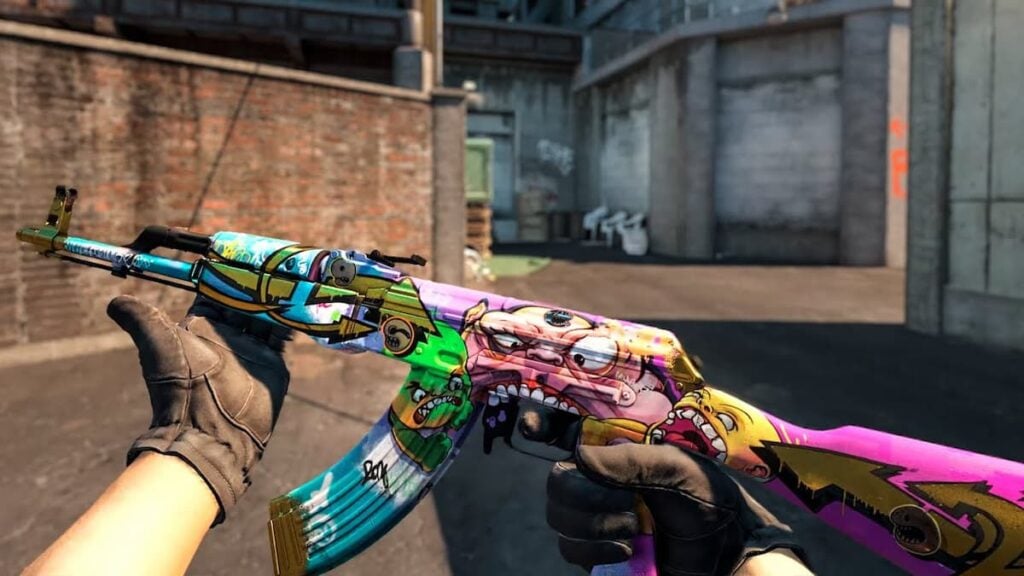
AK-47 | B the Monster
The AK-47 B the Monster came out in October 2024 and is a Covert skin from the Overpass 2024 Collection. It has graffiti artwork taken from the monster tunnel on the Overpass map with silver and gold details across the weapon. The float range goes from 0.00 to 0.80, and the design holds up well across different wear levels. A Field Tested version currently costs around $160, while a Factory New version can go above $700.
Glock-18 | Fully Tuned
The Glock-18 Fully Tuned came out in March 2026 as part of the Dead Hand Collection. It has a white base with pink and blue details that give it a clean and fresh look. The float range goes from 0.00 to 1.00, but the white parts of the skin pick up scratches easily, which makes the float value very important here. A Factory New version costs around $195, while more worn versions are available for as little as $40.
Conclusion
In this guide, we went through what float values are and how to read them, how they affect skin prices, and looked at three real examples from the market to put everything into context. We hope you found it useful and took something away from it. See you in the next one.