Close Menu
  • Gaming
    • Platforms
      • Nintendo
      • PC
      • PlayStation
      • Xbox
  • Entertainment
    • Movies
    • TV
    • Royals
  • Celebrity
    • Hollywood
  • Human Interest
  • Astrology
  • More
    • Anime
    • Reviews
Facebook X (Twitter) Instagram LinkedIn YouTube
  • About Us
  • Join Our Team
  • Meet the Team
  • Privacy Policy
  • DMCA Policy
  • Contact Us
  • Terms of Use
  • Sitemap
  • Editorial Guidelines
  • Advertising Policy
The Nerd Stash
  • Gaming
  • Celebrity
  • Hollywood
  • Human Interest
The Nerd Stash
Home»Gaming»How To Take Selfies and Pose in Zelda: Tears of the Kingdom

How To Take Selfies and Pose in Zelda: Tears of the Kingdom

Nowadays, gamers are all about creating memories alone or with others. In some games, we can try fantastic photo modes that let players create beautiful…

Giovanna De ItaBy Giovanna De ItaMay 13, 20233 Mins Read
This article is over 3 years old and may contain outdated information.

Nowadays, gamers are all about creating memories alone or with others. In some games, we can try fantastic photo modes that let players create beautiful compositions and share their creations. Thankfully, Zelda’s latest entry has a similar mode which, while less complex, still offers a fun way to capture certain things. Even if you don’t use the feature often, it is still great to have it as you can take a picture of an exciting place and return to it later. So, if you want to know how to take selfies and pose in Tears of the Kingdom, we’ll tell you all about it.

How To Take Selfies and Pose in Tears of the Kingdom
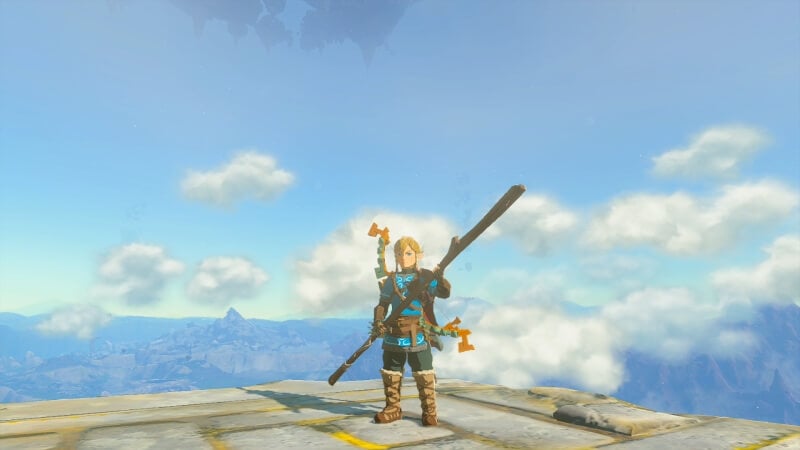
Zelda Tears of the Kingdom Selfies
Image via The Nerd Stash

To take selfies and pose in Tears of the Kingdom, you must first use the Camera function. You can activate it by holding the LB button and selecting the camera icon. Once inside the menu, you’ll see many functions, like zooming in and out and panning the camera. Yet, if you want to capture Link at a certain angle and even make him post, you’ll need to switch the camera. All you have to do for that is press “X” while on the camera menu, which will trigger selfie mode; once inside, you can pose.

While there are more helpful features, it is still great to have something fun to do and to capture Link from different angles. Plus, with how long the journey is, it’d be nice to see your progress as you explore the vast map of Hyrule. And who knows? You can even take some fun pictures to share with the community. We’re sure the Ultrahand mechanic will make way for some fabulous, fun creations leading to excellent photo ops.

This is all there is on how to take selfies and pose in Tears of the Kingdom. If you want to start capturing some photos, now you know how. As we mentioned, it is nice to make this a habit, as there are many fun things to discover that you might want to return later. This iteration of Hyrule is fantastic as it adds many new things to the already familiar Breath of the Wild map. If you thought the game was the same as its predecessor, a quick look at it will show it’s been completely revamped. So, get ready to capture the beauty of it with your camera during your travels.

The Legend of Zelda Tears of the Kingdom is available on Nintendo Switch.

Related Topics
Guides Legend of Zelda Tears of Kingdom
Share. Facebook Twitter LinkedIn Reddit Email
Giovanna De Ita
  • Website

Giovanna is a fan of every single game HoYoverse has launched. When she's not covering videogames, she writes her daily horoscopes and tarot readings for the astrology vertical in The Nerd Stash.

SUGGESTED READS

Outward 2 PC Preview
Features

Outward 2 Preview – Nothing Is Given, Everything Is Earned

Fatal Fury City of the Wolves Hands-On Preview Mr Karate
Features

Fatal Fury: City of the Wolves Mr. Karate Hands-On Preview – Patience is Key

Honkai Star Rail Version 4.3 Announcements
Gaming

Honkai: Star Rail Version 4.3 Unveils Blade’s New Form and More Fate Collab Characters

Take-Two CEO Reveals Fans Will Be Forced To Wait a Bit Longer for GTA 6 News 'This Summer,' But Insiders Disagree
Gaming

Take-Two CEO Reveals Fans Will Be Forced To Wait a Bit Longer for GTA 6 News ‘This Summer,’ But Insiders Disagree

007 First Light Launch Trailer
Gaming

007 First Light Celebrates the Long-Awaited Return of James Bond With Its Launch Trailer

Destiny 2 Final Update
Features

Destiny 2 Is Dead: Bungie’s Divisive Franchise Going on Maintenance Mode With Its Last Update Launching on June 9

The Nerd Stash
Facebook X (Twitter) Instagram YouTube LinkedIn
  • About Us
  • Join Our Team
  • Meet the Team
  • Privacy Policy
  • DMCA Policy
  • Contact Us
  • Terms of Use
  • Sitemap
  • Editorial Guidelines
  • Advertising Policy
© 2026 The Nerd Stash. All Rights Reserved.

Type above and press Enter to search. Press Esc to cancel.