Close Menu
  • Gaming
    • Platforms
      • Nintendo
      • PC
      • PlayStation
      • Xbox
  • Entertainment
    • Movies
    • TV
    • Royals
  • Celebrity
    • Hollywood
  • Human Interest
  • Astrology
  • More
    • Anime
    • Reviews
Facebook X (Twitter) Instagram LinkedIn YouTube
  • About Us
  • Join Our Team
  • Meet the Team
  • Privacy Policy
  • DMCA Policy
  • Contact Us
  • Terms of Use
  • Sitemap
  • Editorial Guidelines
  • Advertising Policy
The Nerd Stash
  • Gaming
  • Celebrity
  • Hollywood
  • Human Interest
The Nerd Stash
Home»Gaming»How To Unlock the Jukebox in Star Wars Jedi Survivor

How To Unlock the Jukebox in Star Wars Jedi Survivor

The long-awaited continuation of Cal Kesti’s adventures in a far galaxy brings a lot of new things compared to Fallen Order. The protagonist has matured,…

Artur NovichenkoBy Artur NovichenkoApril 28, 20233 Mins Read
jukebox-in-star-wars-jedi-survivor
via The Nerd Stash
This article is over 3 years old and may contain outdated information.

The long-awaited continuation of Cal Kesti’s adventures in a far galaxy brings a lot of new things compared to Fallen Order. The protagonist has matured, met many new NPCs, and even tamed several mounts. But constant adventures and trials can tire even the most persistent. Therefore, Pyloon Saloon is a great place to relax and enjoy the music. But for now, the bar is quiet. So we are here to help you and tell you how to find and unlock the Jukebox in Star Wars Jedi Survivor.

Finding the Jukebox in Star Wars Jedi Survivor

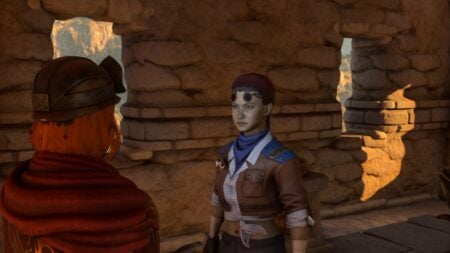
To unlock Jukebox in Star Wars Jedi Survivor, you must find Ashe Javi and DD-EC on the Koboh planet and talk to them. You can encounter these NPCs as part of the Musician & their Droid quest. However, the planet Koboh territories are relatively extensive, so visit the Harvest Ridge location and look for a small water wheel mounted on a rock. Go a little higher, and you will find the NPCs.

Once you talk to Ashe Javi, she and her robot will agree to visit the Pyloon Saloon with you. They will like this place and will decide to stay there longer. As you may have heard from the rumors, DD-EC is a great musician. And as soon as you come to the bar, you will see that this is not just a rumor. DD-EC will take his place on the DJ table and play many random tracks.

Related:

How to Climb in Star Wars Jedi Survivor

How To Use the Jukebox in Star Wars Jedi Survivor

how-to-use-the-jukebox-in-jedi-survivor
via The Nerd Stash

To change the music in the Pyloon Saloon, you must approach the DD-EC (Jukebox) and interact with it. A window with a vast list of songs will appear on the screen. Choose what you like, and the robot will immediately fulfill your request. While it won’t affect the story, listening to music while sitting in a bar between travels will bring you closer to your character.

If you haven’t visited the Pyloon Saloon for a long, the robot will play random tracks from its music library when you return. But you can also add to the robot musical arsenal. As you travel through the game world, you can find many music tracks in various locations. Also, you can buy some music tracks in the Doma Shop by spending some Priorite Shards. In a way, music tracks are full-fledged collectibles.

Related Topics
Guide Star Wars Jedi: Survivor
Share. Facebook Twitter LinkedIn Reddit Email
Artur Novichenko
  • Website

Artur is a copywriter and SEO specialist, as well as a small business owner. In his free time, he loves to play computer games and is glad that he was able to connect his professional career with his hobby.

SUGGESTED READS

007 First Light PS5 Review
9.5
Gaming

007 First Light Review – The Beginning of a Legend

Sony Finally 'Has an Issue' With $300 Million Games After Years of Funding Them
Gaming

Sony Finally ‘Has an Issue’ With $300 Million Games After Years of Funding Them

Outward 2 PC Preview
Features

Outward 2 Preview – Nothing Is Given, Everything Is Earned

Fatal Fury City of the Wolves Hands-On Preview Mr Karate
Features

Fatal Fury: City of the Wolves Mr. Karate Hands-On Preview – Patience is Key

Honkai Star Rail Version 4.3 Announcements
Gaming

Honkai: Star Rail Version 4.3 Unveils Blade’s New Form and More Fate Collab Characters

Take-Two CEO Reveals Fans Will Be Forced To Wait a Bit Longer for GTA 6 News 'This Summer,' But Insiders Disagree
Gaming

Take-Two CEO Reveals Fans Will Be Forced To Wait a Bit Longer for GTA 6 News ‘This Summer,’ But Insiders Disagree

The Nerd Stash
Facebook X (Twitter) Instagram YouTube LinkedIn
  • About Us
  • Join Our Team
  • Meet the Team
  • Privacy Policy
  • DMCA Policy
  • Contact Us
  • Terms of Use
  • Sitemap
  • Editorial Guidelines
  • Advertising Policy
© 2026 The Nerd Stash. All Rights Reserved.

Type above and press Enter to search. Press Esc to cancel.