
Close Menu
  • Gaming
    • Platforms
      • Nintendo
      • PC
      • PlayStation
      • Xbox
  • Entertainment
    • Movies
    • TV
    • Royals
  • Celebrity
    • Hollywood
  • Human Interest
  • Astrology
  • More
    • Anime
    • Reviews
Facebook X (Twitter) Instagram LinkedIn YouTube
  • About Us
  • Join Our Team
  • Meet the Team
  • Privacy Policy
  • DMCA Policy
  • Contact Us
  • Terms of Use
  • Sitemap
  • Editorial Guidelines
  • Advertising Policy
The Nerd Stash
  • Gaming
  • Celebrity
  • Hollywood
  • Human Interest
The Nerd Stash
Home»Gaming»How to Use Blue Chip Detector in PUBG

How to Use Blue Chip Detector in PUBG

PUBG: Battlegrounds’ latest update has caused a major clash between players. While a small portion of the community likes the update, many think it’s a bad…

Akın BilginBy Akın BilginJune 27, 20232 Mins Read
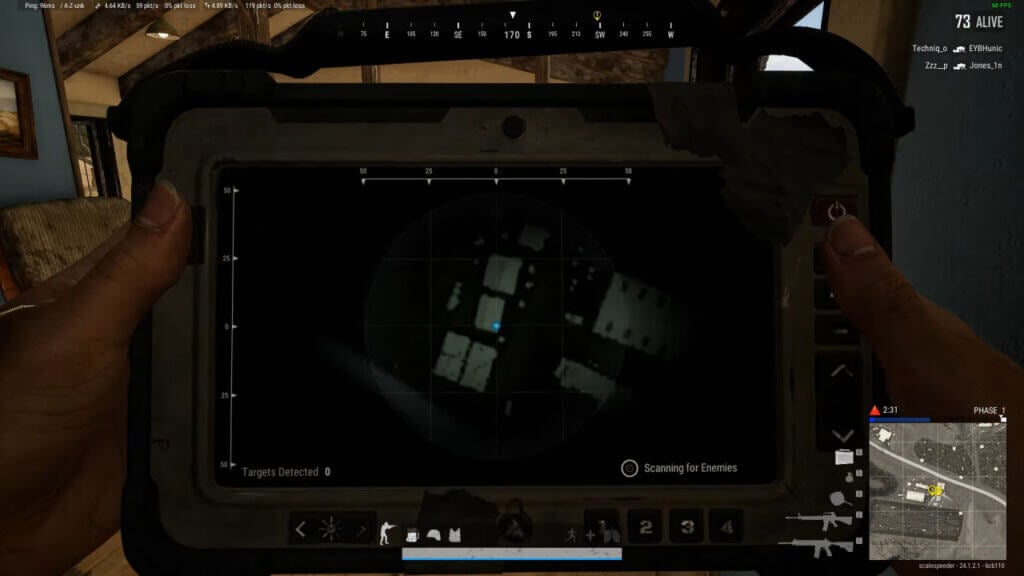
how to use blue chip detector pubg
Image Source: KRAFTON, Inc. via Scalespeeder Gaming Screenshot
This article is over 2 years old and may contain outdated information.

PUBG: Battlegrounds‘ latest update has caused a major clash between players. While a small portion of the community likes the update, many think it’s a bad idea and should be removed. With the Blue Chip Detector added to the game, you can see the locations of other players. This PUBG Heartbeat Sensor has nearly no cooldown, allowing gamers to see where others are at all times. Whether or not this is a good idea for the future of PUBG is debatable, but we’re going to take a closer look at the Blue Chip Detector in this article.

How to Use Heartbeat Sensor in PUBG
pubg heartbeat sensor
Image Source: KRAFTON, Inc. via Scalespeeder Gaming Screenshot

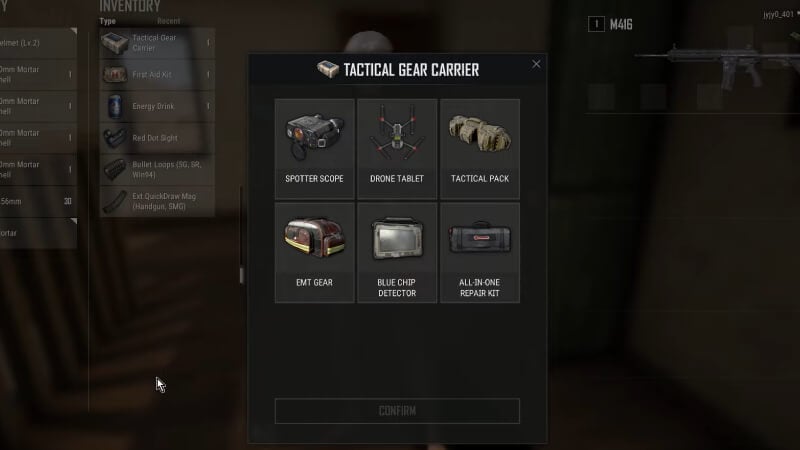
As soon as you land somewhere, you can start using the Blue Chip Detector. You don’t even need to find it in the game to use this item. To use the Heartbeat Sensor in PUBG, open your Inventory and you will see the Tactical Gear Carrier at the top. When you click on it, you will be presented with 6 different options:

  • Spotter Scope
  • Drone Tablet
  • Tactical Pack
  • EMT Gear
  • Blue Chip Detector
  • All-In-One Repair Kit

Once you choose one of these options, you cannot change it again until the game is over. So, if you are playing with a team, it might be wise for everyone to choose according to the needs of the unit. After selecting the Blue Chip Detector, you and your teammates will see which Tactical Gear you have selected on the bottom left. You can use this Heartbeat Sensor every 8 seconds by pressing the required key.

How to Use Blue Chip Detector on PC, XBOX, and PlayStation

PC: To use your Tactical Gear on the PC, press “6” after selecting Blue Chip Detector.

Xbox: To use your Tactical Gear on Xbox, you must press LB + Y.

PlayStation: To use the Heartbeat Sensor on PlayStation, press L1 + Triangle.

Related:

When Did PUBG Come Out? Answered

PUBG: Battlegrounds is available on PlayStation 5, PlayStation 4, Xbox Series X|S, Xbox One, Nintendo Switch, and PC.

Related Topics
Guide pubg
Share. Facebook Twitter LinkedIn Reddit Email
Akın Bilgin
  • Website
  • X (Twitter)

Akın Bilgin loves colony simulators, survival, and souls-like games. He has been a freelance guide writer for two years and is studying English Language and Literature in Turkey.

SUGGESTED READS

Your PlayStation Account Could Be Compromised: Sony's Security Flaw Lets Anyone Easily Disable 2FA
Gaming

Your PlayStation Account Could Be Compromised: Sony’s Security Flaw Lets Anyone Easily Disable 2FA

Rune Dice PC Review
9
Features

Rune Dice Review – A Magnificent Take on Roguelikes

PlayStation Plus Prices Are Going Up as Sony Tightens First-Party Exclusives
Gaming

PlayStation Plus Prices Are Going Up as Sony Tightens First-Party Exclusives Once More

Marvel Cosmic Invasion DLC Review
Features

Marvel Cosmic Invasion: Cyclops & The Thing Hands-On Impressions – Between a Rock and an Optic Blast

GTA 6's $115 Price Tag Already Has Fans Worried, Now Rockstar Might Skip Review Codes Too
Gaming

GTA 6’s $115 Price Tag Already Has Fans Worried, Now Rockstar Might Skip Review Codes Too

AMD's 'AI-Based' Game Engine Patent Sounds Like DLSS5 on Steroids
Gaming

AMD’s ‘AI-Based’ Game Engine Patent Sounds Like DLSS5 on Steroids

The Nerd Stash
Facebook X (Twitter) Instagram YouTube LinkedIn
  • About Us
  • Join Our Team
  • Meet the Team
  • Privacy Policy
  • DMCA Policy
  • Contact Us
  • Terms of Use
  • Sitemap
  • Editorial Guidelines
  • Advertising Policy
© 2026 The Nerd Stash. All Rights Reserved.

Type above and press Enter to search. Press Esc to cancel.





