Close Menu
  • Gaming
    • Platforms
      • Nintendo
      • PC
      • PlayStation
      • Xbox
  • Entertainment
    • Movies
    • TV
    • Royals
  • Celebrity
    • Hollywood
  • Human Interest
  • Astrology
  • More
    • Reviews
Facebook X (Twitter) Instagram LinkedIn YouTube
  • About Us
  • Join Our Team
  • Meet the Team
  • Privacy Policy
  • DMCA Policy
  • Contact Us
  • Terms of Use
  • Sitemap
  • Editorial Guidelines
  • Advertising Policy
The Nerd Stash
  • Gaming
  • Celebrity
  • Hollywood
  • Human Interest
The Nerd Stash
Home»Gaming»Microsoft Teams Officially Arrives on Xbox Game Bar

Microsoft Teams Officially Arrives on Xbox Game Bar

Xbox continues to include popular Microsoft services in Xbox Game Bar features, and now Microsoft Teams is the latest addition. The best thing to do…

Emre OzdoganBy Emre OzdoganAugust 16, 20232 Mins Read
microsoft teams on xbox game bar
Image Source: Lifewire
This article is over 3 years old and may contain outdated information.

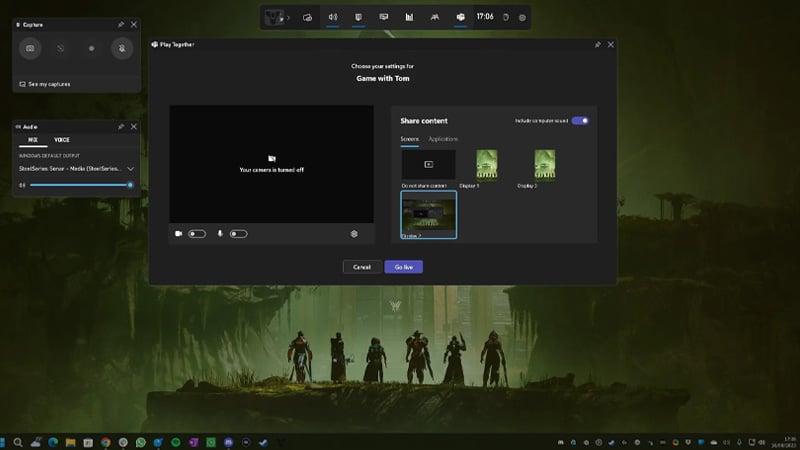
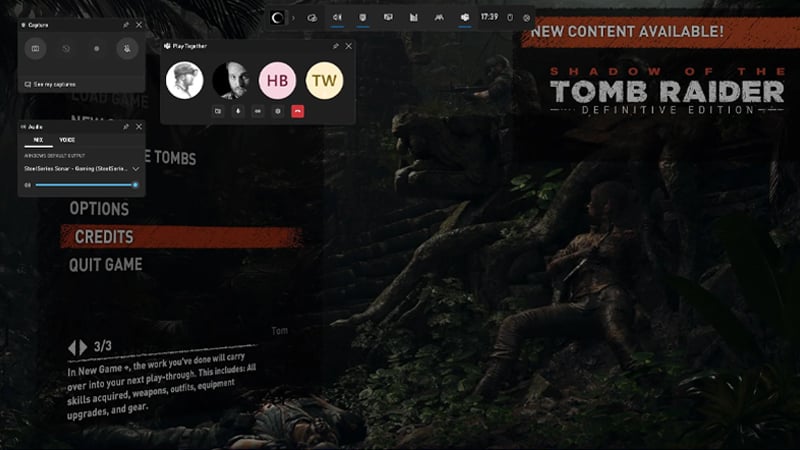
Xbox continues to include popular Microsoft services in Xbox Game Bar features, and now Microsoft Teams is the latest addition. The best thing to do with this new service is to stream games for your Xbox friends, and it doesn’t require any extra services. It is accessible through the CTRL + G shortcut, quickly allowing you to connect with your friends. Microsoft lets you stream games between platforms in this way, also allowing you to join casual meetings. Here’s how Microsoft Teams improves the communication experience on Windows.

Microsoft Teams Is Now Available on Xbox Game Bar

microsoft teams on xbox game bar
Image Source: The Verge, Tom Warren

Microsoft Teams used to be much different from Discord, focusing on school and business meetings instead of players. In fact, Discord already became available on Xbox consoles a few months ago, and it’s possible to join meetings and voice chats through Xbox services. Since it’s a first-party software, Microsoft Teams should now bring wider support for Xbox. 20 people can join in a Microsoft Teams meeting, and you can stream your games with a high-quality resolution through Xbox Game Bar. The quality depends on your PC’s specifications and internet connection. Your friends will also need a good connection to view the game streams in decent quality.

microsoft teams on xbox game bar
Image Source: The Verge, Tom Warren

The biggest reason behind the service’s arrival is Microsoft’s further plans for Teams. The company wants to open the gate for communities in the service and make it a stronger rival against Discord. Microsoft Teams already offers a good meeting experience with people you know, but you can’t join communities like Discord servers. That’s a mark against the service’s regular usage for players. Considering that the company has very strong assets in the gaming business, it’s actually weird that it didn’t release a direct rival to Discord thus far. The company attempted to buy the service instead, but that didn’t work.

Related Topics
xbox
Share. Facebook Twitter LinkedIn Reddit Email
Emre Ozdogan
  • Website
  • Instagram

Emre is a young journalist interested in technology and video games. He started gaming on his sister's laptop and continues on PlayStation these days.

SUGGESTED READS

GTA 6: How to Unlock the Dumpster K17 MCD Auto Pistol
Gaming

GTA 6: How to Unlock the Dumpster K17 MCD Auto Pistol

Warframe Tau update
Features

Warframe Is Going Full GTA With Its Biggest Update of the Year, and It’s Coming Sooner Than You Think

Xbox Black Friday Deals 2026
Gaming

Best Xbox Black Friday Deals (2026) for Games and Controllers

Black Friday Best Co-Op Games Deals 2026
Gaming

Best Black Friday Co-op Game Deals (2026)

Nintendo Black Friday Deals 2026
Gaming

Best Nintendo Switch 2 Black Friday Deals (2026)

PS5 Black Friday Deals 2026
Gaming

Best PS5 and PS5 Pro Black Friday Deals (2026)

The Nerd Stash
Facebook X (Twitter) Instagram YouTube LinkedIn
  • About Us
  • Join Our Team
  • Meet the Team
  • Privacy Policy
  • DMCA Policy
  • Contact Us
  • Terms of Use
  • Sitemap
  • Editorial Guidelines
  • Advertising Policy
© 2026 The Nerd Stash. All Rights Reserved.

Type above and press Enter to search. Press Esc to cancel.