Close Menu
  • Gaming
    • Game Guides
    • Codes
    • Game News
    • Game Previews
    • Game Reviews
    • Game Features
    • Game Lists
    • Platforms
      • Nintendo
      • PC
      • PlayStation
      • Xbox
      • Mobile
  • Entertainment
    • Movies
    • Movie Features
    • Movie Reviews
    • TV
    • Reality TV
    • Royals
  • Celebrity
    • Hollywood
  • Human Interest
  • Astrology
  • Videos
  • More
    • Anime
    • Lists
    • Podcasts
    • Reviews
Facebook X (Twitter) Instagram LinkedIn YouTube
  • About Us
  • Join Our Team
  • Meet the Team
  • Privacy Policy
  • DMCA Policy
  • Contact Us
  • Terms of Use
  • Sitemap
  • Editorial Guidelines
  • Advertising Policy
The Nerd Stash
  • Gaming
  • Celebrity
    • Hollywood
  • Human Interest
  • Videos
The Nerd Stash
Home»Game Guides»Minecraft: How to Find the Deep Dark

Minecraft: How to Find the Deep Dark

Deep Dark is a new biome first added in Minecraft 1.19 Deep Dark Experimental Snapshot for Java Edition and Experimental Wild Update for the Bedrock…

Sidharta F. RasidiBy Sidharta F. RasidiApril 22, 20222 Mins Read
Minecraft: How to Find the Deep Dark
This article is over 3 years old and may contain outdated information.

Deep Dark is a new biome first added in Minecraft 1.19 Deep Dark Experimental Snapshot for Java Edition and Experimental Wild Update for the Bedrock Edition. As you can expect from its name, it is a biome that’s, well, pitch black and located deep underground. Here’s where you can find the Deep Dark biome location and face a new fear in your Minecraft World.

Where to Find the Deep Dark Biome in Minecraft

Minecraft Live 2021 : New Deep Dark Gameplay

In order to find the Deep Dark biome location in your Minecraft’s Overworld, you need to go deep underground. Specifically, the Deep Dark is below Y-coordinate level 0. Usually, if you’ve found Deepslate blocks shaped like a vast ravine, it indicates that you’re near the biome. Here’s how to find out what coordinates you are at in Minecraft:

  • Java Version: Press the F3 key. Your exact coordinates are listed in the “XYZ” line. You could also refer to the “Block” line, but it doesn’t display your exact coordinates since the numbers are rounded.
  • Bedrock Version:
    • When you first create your World, turn on the Show Coordinate option in the World Options menu.
    • If you forgot or didn’t turn on the Show Coordinate option the first time around, don’t worry. Click the Pen icon or Edit button next to your World, then turn on Show Coordinate.

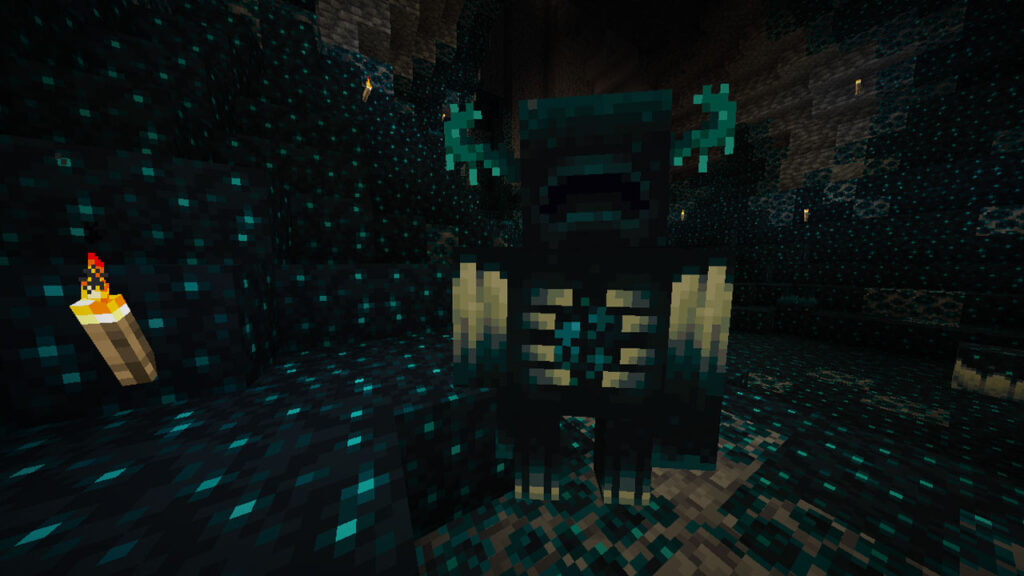
Large areas of Sculk blocks surrounded by Sculk veins, which feature Sculk-related blocks like Sculk Shriekers, Sculk Sensors, and Sculk Catalysts, are common in this biome. Although there are no mobs that spawn here, once triggered three times, a Sculk Shrieker will summon the dreaded Warden and afflicts you with the Darkness effect, occasionally dimming your vision. The only natural light sources in these places are Sculk Catalysts and lava. This is also the only environment where Ancient Cities can be generated.

Minecraft is available on PC, Android, iOS, Xbox One, Xbox Series X|S, Nintendo Switch, and PlayStation platforms.

Related Topics
Guide Minecraft
Share. Facebook Twitter LinkedIn Reddit Email
Sidharta F. Rasidi
  • Website

An ordinary Indonesian who enjoys playing and talking about video games. His favorite games are Monster Hunter: World, Space Invader Extreme 2, THE iDOLM@STER SP, Road Trip Adventure, Halo series, and KOEI Tecmo's Warriors series.

SUGGESTED READS

Diablo 4 Season of Divine Intervention Lanch
Game Guides

Everything You Need to Know About the Season of Divine Intervention in Diablo 4

Capgods have Pulled the Emergency Mega Man Lever, The Blue Bomber Is Back in Mega Man Dual Override
Game News

Capgods have Pulled the Emergency Mega Man Lever, The Blue Bomber Is Back in Mega Man Dual Override

Diablo 4 Lord of Hatred Expansion Announcement
Game News

Diablo 4 Announces Its Next Expansion, and Shadowdrops the Paladin Class for Those Who Pre-Order It

WH40K Fans are Eating Good with the Total War: Warhammer 40K Announcement
Game News

WH40K Fans are Eating Good with the Total War: Warhammer 40K Announcement

Warframe Wernzer Herzog explanation
Game Features

Still Confused What is Warframe? Hollywood Legend Werner Herzog is Here to Fix That

Screamer TGA Interview
Features

Screamer Exclusive Interview – Michele Caletti Talks About the Series’ Legacy, Narrative, and the Reboot’s Scope

Trending
Diablo 4 Season of Divine Intervention Lanch

Everything You Need to Know About the Season of Divine Intervention in Diablo 4

Capgods have Pulled the Emergency Mega Man Lever, The Blue Bomber Is Back in Mega Man Dual Override

Capgods have Pulled the Emergency Mega Man Lever, The Blue Bomber Is Back in Mega Man Dual Override

Diablo 4 Lord of Hatred Expansion Announcement

Diablo 4 Announces Its Next Expansion, and Shadowdrops the Paladin Class for Those Who Pre-Order It

WH40K Fans are Eating Good with the Total War: Warhammer 40K Announcement

WH40K Fans are Eating Good with the Total War: Warhammer 40K Announcement

The Nerd Stash
Facebook X (Twitter) Instagram YouTube LinkedIn
  • About Us
  • Join Our Team
  • Meet the Team
  • Privacy Policy
  • DMCA Policy
  • Contact Us
  • Terms of Use
  • Sitemap
  • Editorial Guidelines
  • Advertising Policy
© 2025 The Nerd Stash. All Rights Reserved.

Type above and press Enter to search. Press Esc to cancel.