Close Menu
  • Gaming
    • Platforms
      • Nintendo
      • PC
      • PlayStation
      • Xbox
  • Entertainment
    • Movies
    • TV
    • Royals
  • Celebrity
    • Hollywood
  • Human Interest
  • Astrology
  • More
    • Reviews
Facebook X (Twitter) Instagram LinkedIn YouTube
  • About Us
  • Join Our Team
  • Meet the Team
  • Privacy Policy
  • DMCA Policy
  • Contact Us
  • Terms of Use
  • Sitemap
  • Editorial Guidelines
  • Advertising Policy
The Nerd Stash
  • Gaming
  • Celebrity
  • Hollywood
  • Human Interest
The Nerd Stash
Home»Gaming»Naraka Bladepoint: How To Disable HVCI KMCI

Naraka Bladepoint: How To Disable HVCI KMCI

Have you recently installed Naraka Bladepoint and now looking to disable HVCI KMCI on your PC? The melee-combat battle royale game celebrates its second anniversary…

Sidharta F. RasidiBy Sidharta F. RasidiJuly 15, 20233 Mins Read
Naraka Bladepoint: How To Disable HVCI KMCI
Image source: 24 Entertainment
This article is over 3 years old and may contain outdated information.

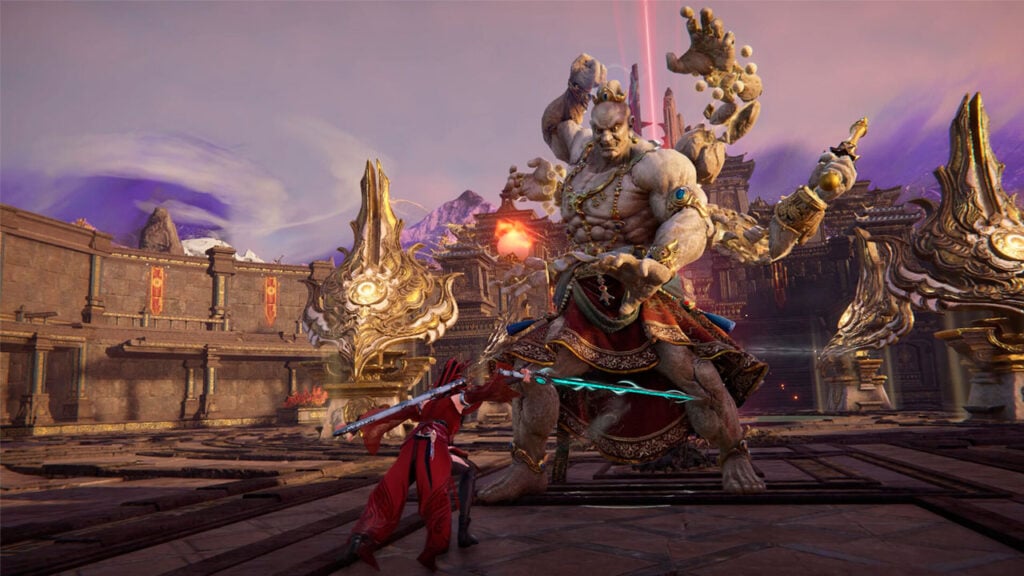
Have you recently installed Naraka Bladepoint and now looking to disable HVCI KMCI on your PC? The melee-combat battle royale game celebrates its second anniversary by turning it into a free-to-play title. However, you and other players might have trouble installing the game since it asks you to disable a feature called HVCI KMCI so it can be properly installed. So what is HVCI KMCI and how can you turn it off for Naraka Bladepoint?

How and Why You Have To Disable HVCI KMCI For Naraka Bladepoint
How and Why You Have To Disable HVCI KMCI For Naraka Bladepoint
Image source: via The Nerd Stash

Before we get to how to disable HVCI KMCI for Naraka Bladepoint, let’s discuss briefly why we have to do it. Simply put, disabling HVCI KMCI or Memory Integrity is required so the game’s kernel-level anti-cheat system can properly detect hacks. The kernel is basically the “core” of your computer’s operating system, having total control over all programs. This means any software that operates at the “kernel level” can easily make changes to your system without you even noticing.

When HVCI KMCI is turned on, essential Windows processes are isolated so they aren’t prone to tampering. When you turn it off, they are no longer isolated; unsafe but run faster too. This means, when HVCI KMCI is disabled, Naraka Bladepoint‘s anti-cheat can read your files and catch unauthorized commands much more efficiently.

Turning off HVCI KMCI also does give you up to a 12% performance boost when gaming! But it all depends on what games you’re playing since they all utilize the Windows processes differently. You might think, “Then, just turn it back on when I’m done gaming,” right? Well, toggling the setting requires a reboot so it might provide another level of inconvenience.

Still, at the end of the day, it’s all up to you whether you’re comfortable with turning off a security feature or not. Now we’ve got that out of the way, here’s how you can disable HVCI KMCI for Naraka Bladepoint‘s anti-cheat system.

  1. Open the PC Start menu.
  2. In the search bar, type Settings and click the gear icon to open the Settings menu.
  3. In the left sidebar, click on the Privacy & Security tab.
  4. Open the Windows Security menu by pressing the Windows Security option.
  5. Click on the Open Windows Security button.
  6. In the Windows Security menu, click on the Go To Settings button in the Device Security option.
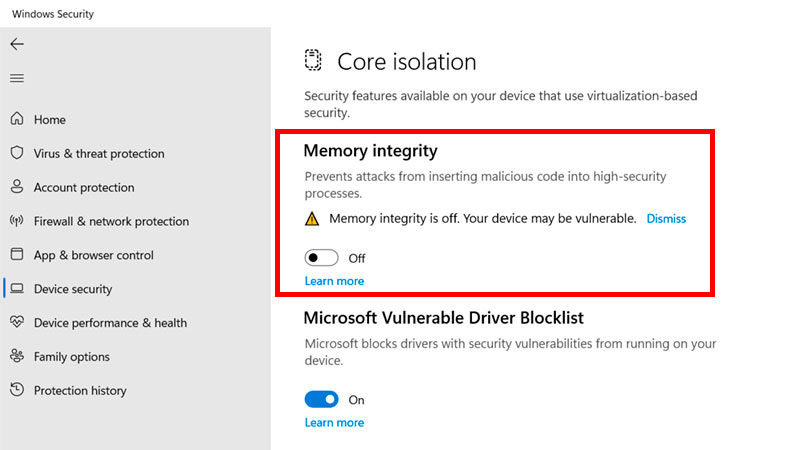
  7. Turn off the HVCI KMCI feature by toggling off the Memory Integrity switch.

You might notice that the Memory Integrity switch is already turned off. If that’s the case, then you do not need to tweak any settings. HVCI KMCI may have been unintentionally disabled without you even realizing it.

Related:

Modern Warfare 2: How to Disable Crossplay on Xbox

Naraka Bladepoint is currently available for free on PlayStation 5, Xbox Series X|S, and PC.

Related Topics
Guide Naraka Bladepoint
Share. Facebook Twitter LinkedIn Reddit Email
Sidharta F. Rasidi
  • Website

Since middle school, Sidharta has used his video game blog as a handy excuse to avoid studying. After graduating with a degree in Management Information Systems from Bina Nusantara University, he spent years honing his skills as a games journalist, working as an editor for a local gaming site and freelancing elsewhere. Nowadays, when he’s not busy crafting outrageous plots for his serialized comic, Sidharta covers niche games on his personal blog, StoPlayinGame.com. His favorite game series includes Monster Hunter, Earth Defense Force, THE iDOLM@STER, Road Trip Adventure, and KOEI Tecmo's Warriors.

SUGGESTED READS

Dragon's Dogma 2 Dark Arisen Expansion Review
9
Gaming

Dragon’s Dogma 2: Dark Arisen Review – ‘Twas Time for a Renewal

Overwatch Season 5 Launch
Gaming

Overwatch Kicks Off Its Season 5 With the Debut of Doctrine and a Spooky Battle Pass

Marvel Tokon Phoenix Cyclops
Gaming

MARVEL Tokon: Fighting Souls Is Ready to Welcome Phoenix Cyclops To the Roster

Order of the Sinking Star review
9
Gaming

Order of the Sinking Star Review – Mind-bending Fun

Gears of War E-Day All Act 5 Collectibles
Gaming

All Act 5 Collectibles in Gears of War: E-Day

9
Gaming

Star Wars: Galactic Racer Review – Takedowns Are a Path to The Dark Side

The Nerd Stash
Facebook X (Twitter) Instagram YouTube LinkedIn
  • About Us
  • Join Our Team
  • Meet the Team
  • Privacy Policy
  • DMCA Policy
  • Contact Us
  • Terms of Use
  • Sitemap
  • Editorial Guidelines
  • Advertising Policy
© 2026 The Nerd Stash. All Rights Reserved.

Type above and press Enter to search. Press Esc to cancel.