
Close Menu
  • Gaming
    • Platforms
      • Nintendo
      • PC
      • PlayStation
      • Xbox
  • Entertainment
    • Movies
    • TV
    • Royals
  • Celebrity
    • Hollywood
  • Human Interest
  • Astrology
  • More
    • Anime
    • Reviews
Facebook X (Twitter) Instagram LinkedIn YouTube
  • About Us
  • Join Our Team
  • Meet the Team
  • Privacy Policy
  • DMCA Policy
  • Contact Us
  • Terms of Use
  • Sitemap
  • Editorial Guidelines
  • Advertising Policy
The Nerd Stash
  • Gaming
  • Celebrity
  • Hollywood
  • Human Interest
The Nerd Stash
Home»Gaming»Pokemon Legends: Arceus – All Mystery Gift Codes

Pokemon Legends: Arceus – All Mystery Gift Codes

Get all the gifts for your ye olde Hisuian adventure.

Sidharta F. RasidiBy Sidharta F. RasidiMay 17, 20243 Mins Read
Pokemon Legends: Arceus - All Mystery Gift Codes
Image source: Nintendo via The Nerd Stash
This article is over 1 years old and may contain outdated information.

The Mystery Gift system has become a staple feature in the Pokemon series since its debut in Pokemon Silver and Gold. This feature lets Trainers acquire unique time-limited special items and sometimes even rare Pokemon. When an event is underway, players can connect to the internet or enter special codes given to them to obtain them. However, to redeem any codes and use the Mystery Gift feature in Pokemon Legends: Arceus, you have to unlock it first.

Pokemon Legends Arceus: Unlocking Mystery Gift

[Updated on May 17 – added list of all Mystery Gift rewards that are still redeemable]
Pokemon Legends Arceus: Unlocking Mystery Gift
Image source: Nintendo via The Nerd Stash

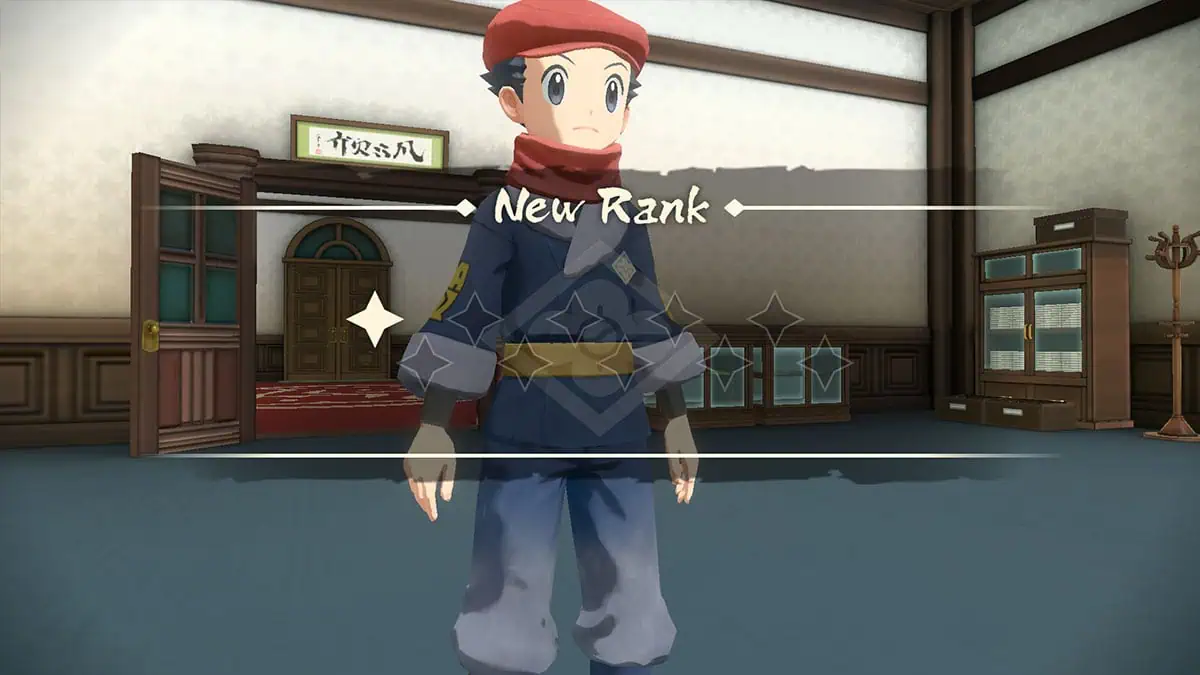
To unlock the Mystery Gift and Communications online feature, you have to achieve the First Star Rank in the Galaxy Expedition Team Survey Corps. You should be able to get more than 500 Research Points by completing the “Getting to Work on Research Task” tutorial. Once that’s done, talk to Captain Cyllene in Jubilife Village, and she will promote you.

The Mystery Gift option in the Communications menu should become accessible through the D-pad menu at this point. It’s worth noting that you can only get a Mystery Gift once per save data.

Pokemon Legends Arceus: How To Redeem and List of Mystery Gift Codes
Pokemon Legends Arceus: How To Redeem and List of Mystery Gift Codes
Image source: Nintendo via The Nerd Stash

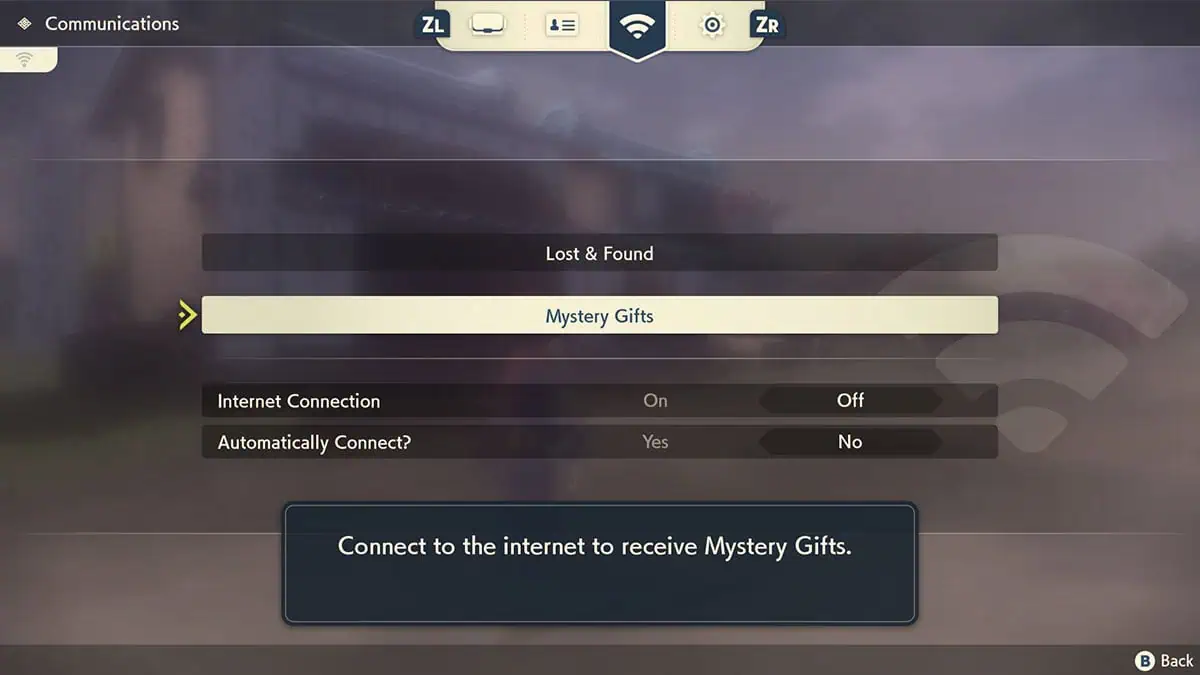
Like in Brilliant Diamond and Shining Pearl, there are two ways to redeem Mystery Gift:

  • Get via Internet: Connect to the internet via WiFi to download any currently running online events.
  • Get with Code/Password: Enter a promotional code to get items.
  • You can also check any Mystery Gift you have redeemed by selecting the Check Mystery Gifts option.
  • Aside from events, having a save file from other Pokemon games can also net you some additional cosmetics and content.

Related:

Pokemon Legends: Arceus – How to Complete the Pokedex
Mystery GiftOptionCodeNote
NuggetsGet with Code/Password–Nuggets x50. Code from official Japan exclusive strategy guide.
Shaymin Kimono Set––Have a Pokemon Sword or Shield save file.
Modern Team Galactic Outfit––Have a Pokemon Brilliant Diamond or Shining Pearl save file.
Pikachu Mask––Have a Pokemon, Let’s Go: Pikachu save file.
Eevee Mask––Have a Pokemon, Let’s Go: Eevee save file.
Shaymin Catch Request––Have a Pokemon Sword or Shield save file. The catch request will show up after you finish the main story.
Darkrai Catch Request––Have a Pokemon Brilliant Diamond or Shining Pearl save file. The catch request will show up after you finish the main story.

Pokémon Legends: Arceus is now available on the Nintendo Switch.
Related Topics
Guide Pokémon legends: arceus
Share. Facebook Twitter LinkedIn Reddit Email
Sidharta F. Rasidi
  • Website

An ordinary Indonesian who enjoys playing and talking about video games. His favorite games are Monster Hunter: World, Space Invader Extreme 2, THE iDOLM@STER SP, Road Trip Adventure, Halo series, and KOEI Tecmo's Warriors series.

SUGGESTED READS

MindsEye Layoffs 2026
Gaming

Studio Behind GTA-like Game, MindsEye, Hit With More Layoffs, and Nobody is Surprised: ‘Shocked There’s Even a Janitor Working There’

Princess Peach Spin-Off Movie May Already Be in Development, Job Listing Suggests
Gaming

Princess Peach Spin-Off Movie May Already Be in Development, Job Listing Suggests

Xbox's New CEO Wants to Reconnect With the 'Community,' Yet Brings In More CoreAI Leaders
Gaming

Xbox’s New CEO Wants to Reconnect With the ‘Community,’ Yet Brings In More CoreAI Leaders

Diablo 4 Season 13 Tier List
Gaming

Class Tier List for Diablo 4 Season 13 (Best Classes for Endgame & Leveling)

Take-Two Boss Finally Explains Why GTA 6 Is Skipping PC at Launch: 'We'll See How It Works Out'
Gaming

Take-Two Boss Finally Explains Why GTA 6 Is Skipping PC at Launch: ‘We’ll See How It Works Out’

Rockstar Employee Review Claims 'Unrealistic' Crunch as GTA 6 Development Intensifies: 'Had to Work Till 3AM'
Gaming

Rockstar Employee Review Claims ‘Unrealistic’ Crunch as GTA 6 Development Intensifies: ‘Had to Work Till 3AM’

The Nerd Stash
Facebook X (Twitter) Instagram YouTube LinkedIn
  • About Us
  • Join Our Team
  • Meet the Team
  • Privacy Policy
  • DMCA Policy
  • Contact Us
  • Terms of Use
  • Sitemap
  • Editorial Guidelines
  • Advertising Policy
© 2026 The Nerd Stash. All Rights Reserved.

Type above and press Enter to search. Press Esc to cancel.