
Close Menu
  • Gaming
    • Game Guides
    • Codes
    • Game News
    • Game Previews
    • Game Reviews
    • Game Features
    • Game Lists
    • Platforms
      • Nintendo
      • PC
      • PlayStation
      • Xbox
      • Mobile
  • Entertainment
    • Movies
    • Movie Features
    • Movie Reviews
    • TV
    • Reality TV
    • Royals
  • Celebrity
    • Hollywood
  • Human Interest
  • Astrology
  • Videos
  • More
    • Anime
    • Lists
    • Podcasts
    • Reviews
Facebook X (Twitter) Instagram LinkedIn YouTube
  • About Us
  • Join Our Team
  • Meet the Team
  • Privacy Policy
  • DMCA Policy
  • Contact Us
  • Terms of Use
  • Sitemap
  • Editorial Guidelines
  • Advertising Policy
The Nerd Stash
  • Gaming
  • Celebrity
    • Hollywood
  • Human Interest
  • Videos
The Nerd Stash
Home»Game News»Steam App’s UI Is Getting a New Look From a Complete Overhaul

Steam App’s UI Is Getting a New Look From a Complete Overhaul

Valve has given the UI of the Steam client a complete visual overhaul with its latest update, making it a lot more modern and cohesive.…

Danish TaleefBy Danish TaleefJune 15, 20233 Mins Read
This article is over 2 years old and may contain outdated information.

Valve has given the UI of the Steam client a complete visual overhaul with its latest update, making it a lot more modern and cohesive. These changes aim to streamline the process of discovering and playing games like the upcoming Starfield while making finding things quicker and easier on the eyes as well.

If you’ve recently updated Steam, you may have already noticed the refreshed look. However, Valve has not only focused on surface-level changes but has also implemented several substantial improvements behind the scenes. Alongside a redesigned control toolbar and an improved web browser, the introduction of a new notes feature is particularly interesting. And once people start using it, the feature will become the norm for PC gaming clients.

New Steam Client UI Features
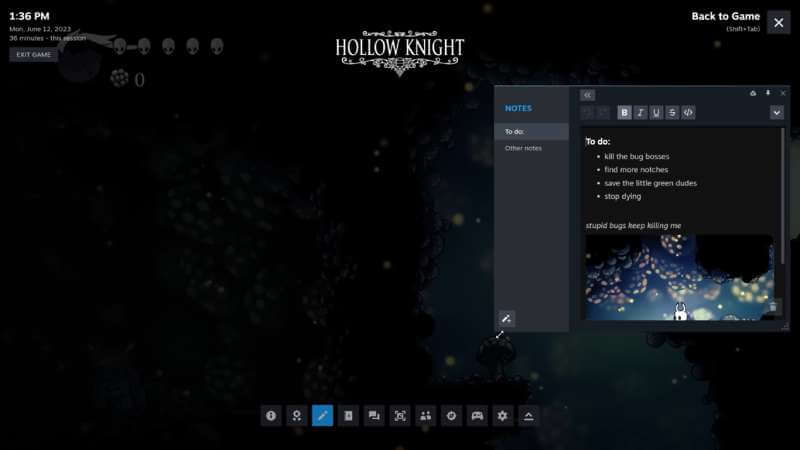
steam client update new UI
Image Source: Valve

The new notes feature allows users to create text-based notes with various formatting options and pin them to their overlay while gaming. This functionality proves invaluable for keeping track of to-do lists, jotting down items of interest in games, and documenting clues for puzzles. This will be quite useful in Metroidvania titles like the upcoming Prince of Persia: The Lost Crown. Furthermore, you can adjust the opacity of these notes to ensure they don’t obstruct your gameplay, and they will be automatically saved to the cloud for easy access from any location. Clearly, Valve has put a lot of thought not only behind this feature but the whole Steam UI overhaul.

Pinning is not limited to notes alone as you can also pin Steam guides, discussions, achievements, and the web browser. So, if you prefer to give a walkthrough a quick look while playing, you’re in luck. The core notification system has also undergone improvements. Instead of bombarding users with a million notifications like before, the green bell icon will only light up when there is something new to see. Additionally, users have the option to customize which notifications they wish to receive, allowing them to prioritize specific interests.

For anyone who spends a lot of time playing PC games on Steam, this will be quite an improvement. And it is great that Valve is focusing on consistently improving the Steam user experience beyond its big picture mode. More and more games are getting verified for the Steam Deck, like The Last of Us, encouraging gamers to play on both PC and the Deck. If you would like to check the Steam client update patch notes from Valve for the UI overhaul, check out the official release here. You can install the app from here.


Related Topics
Steam Client Updated UI
Share. Facebook Twitter LinkedIn Reddit Email
Danish Taleef
  • Website
  • X (Twitter)

A passionate gamer and Street Fighter nut, often found with a controller in close proximity. When I'm not playing games, I'm probably writing about them.

SUGGESTED READS

Minecraft Accused of Mocking Lonely Kids, Sparking Mental Health Backlash: 'One of the Ickiest Things I've Seen'
Features

Minecraft Accused of Mocking Lonely Kids, Sparking Mental Health Backlash: ‘One of the Ickiest Things I’ve Seen’

Destiny 2 Renegades PS5 Review
8.5
Features

Destiny 2: Renegades Review – The Shooter Strikes Back

Clair Obscur: Expedition 33 Loses GOTY, Other Award from Indie Game Awards Over Generative AI: 'Some Weird Performative BS'
Game News

GOTY Stripped Over AI?: Clair Obscur: Expedition 33 Loses Awards at Indie Game Awards, ‘Some Weird Performative BS’

Sony Patents Real-time AI Game Censorship Tech That Could Even Make GTA 6 Kid-Friendly
Game News

Sony Patents Real-Time AI Game Censorship Tech That Could Even Make GTA 6 Kid-Friendly

Zenless Zone Zero Version 2.5 Announcement
Game News

Zenless Zone Zero Version 2.5 Is Ready To Wrap Up the Year With Two New Agents and a Free Outfit

PC Gamers Can't Catch a Break as Nvidia Plans 40% GeForce GPU Production Cuts, Report: 'Who Needs a PC Anyways'
Game News

PC Gamers Can’t Catch a Break as Nvidia Reportedly Plans 40% GeForce GPU Production Cuts: ‘Who Needs a PC Anyways’

Trending
Minecraft Accused of Mocking Lonely Kids, Sparking Mental Health Backlash: 'One of the Ickiest Things I've Seen'

Minecraft Accused of Mocking Lonely Kids, Sparking Mental Health Backlash: ‘One of the Ickiest Things I’ve Seen’

Destiny 2 Renegades PS5 Review
8.5

Destiny 2: Renegades Review – The Shooter Strikes Back

Clair Obscur: Expedition 33 Loses GOTY, Other Award from Indie Game Awards Over Generative AI: 'Some Weird Performative BS'

GOTY Stripped Over AI?: Clair Obscur: Expedition 33 Loses Awards at Indie Game Awards, ‘Some Weird Performative BS’

Sony Patents Real-time AI Game Censorship Tech That Could Even Make GTA 6 Kid-Friendly

Sony Patents Real-Time AI Game Censorship Tech That Could Even Make GTA 6 Kid-Friendly

The Nerd Stash
Facebook X (Twitter) Instagram YouTube LinkedIn
  • About Us
  • Join Our Team
  • Meet the Team
  • Privacy Policy
  • DMCA Policy
  • Contact Us
  • Terms of Use
  • Sitemap
  • Editorial Guidelines
  • Advertising Policy
© 2025 The Nerd Stash. All Rights Reserved.

Type above and press Enter to search. Press Esc to cancel.