Close Menu
  • Gaming
    • Platforms
      • Nintendo
      • PC
      • PlayStation
      • Xbox
  • Entertainment
    • Movies
    • TV
    • Royals
  • Celebrity
    • Hollywood
  • Human Interest
  • Astrology
  • More
    • Anime
    • Reviews
Facebook X (Twitter) Instagram LinkedIn YouTube
  • About Us
  • Join Our Team
  • Meet the Team
  • Privacy Policy
  • DMCA Policy
  • Contact Us
  • Terms of Use
  • Sitemap
  • Editorial Guidelines
  • Advertising Policy
The Nerd Stash
  • Gaming
  • Celebrity
  • Hollywood
  • Human Interest
The Nerd Stash
Home»Features»Where is the Item Store in Phasmophobia?

Where is the Item Store in Phasmophobia?

Thanks to many well-known streamers playing the game, Phasmophobia is one of the most popular ghost-hunting horror games around. Thanks to its latest update, the game…

Mykel BrightBy Mykel BrightSeptember 27, 20222 Mins Read
Phasmophobia Gameplay
This article is over 3 years old and may contain outdated information.

Thanks to many well-known streamers playing the game, Phasmophobia is one of the most popular ghost-hunting horror games around. Thanks to its latest update, the game has players, new and old, flocking to it once more. A major change that veteran players will notice is that the Item Store is no longer available in the main menu. We’re here to help you navigate this change and find the Item Store in Phasmophobia so you can browse the equipment.

Item Store Location in Phasmophobia
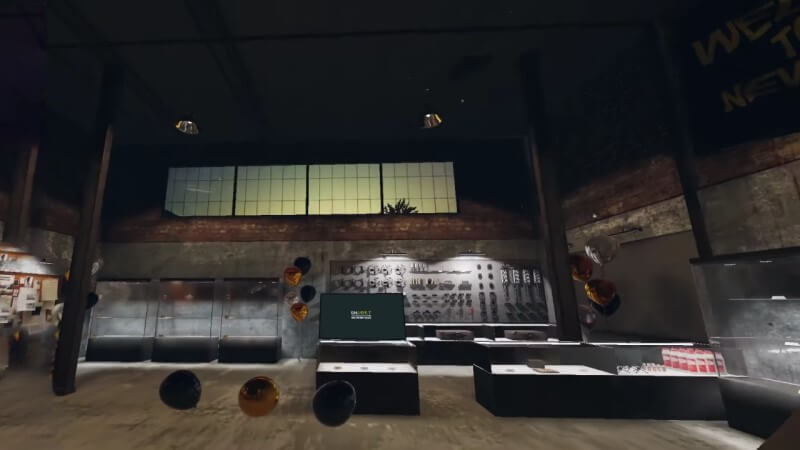
Phasmophobia Item Store Equipment Location

Previously, players could buy and sell equipment via the game’s main menu. However, that is no longer the case. Instead, you must explore the warehouse after exiting the lobby menu if you want your equipment.

It’s hard to miss, thankfully, because it looks like an oversized computer screen. On it, it is labeled “Equipment Store.” Here is where you can reach the Item Store for your equipment in Phasmophobia.

Simply interact with the screen, selecting the “Shop” option to browse the host of equipment. Make sure you purchase a good variety and a good amount of items. Besides the default equipment you start with, if you die, you’ll lose your items. So, you want to save your money to have enough to cover you and your crew in this instance.

Also, diversity is key. The ghosts in Phasmophobia are versatile, so the gear you get from the Item Store must also be. Otherwise, you may be in a sticky situation with no way out.

Thankfully, within the Item Store menu in Phasmophobia, you can also select the “Loadout” option when you’re done shopping. Once here, select a loadout combination. Each loadout combination is saved as a preference for each ghost you hunt down. This makes it easier for you to prepare for every encounter in the game.

Related:

Phasmophobia Locations: Where to Find All Maps

Phasmophobia is available on PC.

Related Topics
Guide Phasmophobia
Share. Facebook Twitter LinkedIn Reddit Email
Mykel Bright
  • Website

Since childhood, Mykel has had a passion for writing, drawing, comic books, video games, and all things horror. She finds various ways to blend her loves such as sketching out ideas for potential comics and working out ideas for choice-based visual novels.

SUGGESTED READS

Diablo 4 Season 13 Tier List
Gaming

Class Tier List for Diablo 4 Season 13 (Best Classes for Endgame & Leveling)

Take-Two Boss Finally Explains Why GTA 6 Is Skipping PC at Launch: 'We'll See How It Works Out'
Gaming

Take-Two Boss Finally Explains Why GTA 6 Is Skipping PC at Launch: ‘We’ll See How It Works Out’

Rockstar Employee Review Claims 'Unrealistic' Crunch as GTA 6 Development Intensifies: 'Had to Work Till 3AM'
Gaming

Rockstar Employee Review Claims ‘Unrealistic’ Crunch as GTA 6 Development Intensifies: ‘Had to Work Till 3AM’

All Rewards from Admin Abuse Eggs & Box in Roblox Adopt Me
Gaming

All Rewards from Admin Abuse Eggs & Box in Roblox Adopt Me

Gaming

World Heroes Perfect Reminds Me of the Golden Age of Fighting Games

Fatal Fury City of the Wolves Mr Karate Reveal
Gaming

Fatal Fury: City of the Wolves Unveils Its Next Season 2 Fighter, and It’s a Classic

The Nerd Stash
Facebook X (Twitter) Instagram YouTube LinkedIn
  • About Us
  • Join Our Team
  • Meet the Team
  • Privacy Policy
  • DMCA Policy
  • Contact Us
  • Terms of Use
  • Sitemap
  • Editorial Guidelines
  • Advertising Policy
© 2026 The Nerd Stash. All Rights Reserved.

Type above and press Enter to search. Press Esc to cancel.