
Close Menu
  • Gaming
    • Game Guides
    • Codes
    • Game News
    • Game Previews
    • Game Reviews
    • Game Features
    • Game Lists
    • Platforms
      • Nintendo
      • PC
      • PlayStation
      • Xbox
      • Mobile
  • Entertainment
    • Movies
    • Movie Features
    • Movie Reviews
    • TV
    • Reality TV
    • Royals
  • Celebrity
    • Hollywood
  • Human Interest
  • Astrology
  • More
    • Anime
    • Lists
    • Podcasts
    • Reviews
Facebook X (Twitter) Instagram LinkedIn YouTube
  • About Us
  • Join Our Team
  • Meet the Team
  • Privacy Policy
  • DMCA Policy
  • Contact Us
  • Terms of Use
  • Sitemap
  • Editorial Guidelines
  • Advertising Policy
The Nerd Stash
  • Gaming
  • Celebrity
  • Hollywood
  • Human Interest
The Nerd Stash
Home»Features»Roblox: How to Get Free Hair

Roblox: How to Get Free Hair

Nobody wants to appear like the basic avatar when they first open Roblox. Especially with the characters’ default 90s grunge hairdo. Although the majority of…

Adrian OpreaBy Adrian OpreaAugust 2, 20222 Mins Read
Roblox How to Get Free Hair
This article is over 3 years old and may contain outdated information.

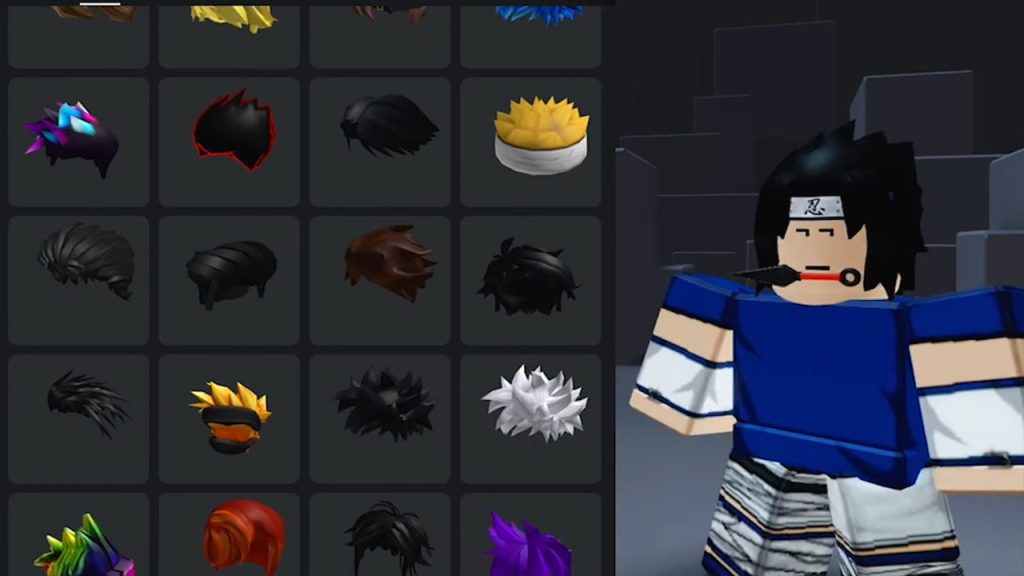
Nobody wants to appear like the basic avatar when they first open Roblox. Especially with the characters’ default 90s grunge hairdo. Although the majority of hairstyles will require real money, there are two simple ways to get free hair. Even better, you may select from over 30 free styles, and none of them need you to play any particular game. The several ways to get free hair in Roblox are listed below, ready for you to use.

Get Free Hair in Roblox

Roblox Get Free Hair

By selecting the Avatar Shop option from the top header, PC users may discover free hair they can get in Roblox. Next, you should tap the Hair option under the Body Parts menu on the left side of the screen. The list may then be sorted from “Price (low to high)” to find all free hairstyles.

You may accomplish this on Xbox and Mobile by selecting the Shop option under the Avatar tab in the main menu. Go to the Body area from there, then select the Hair option from the drop-down menu. There is a price adjustor above the Hair category that has to be adjusted to zero. This will allow you to display all of the free styles.

Unlocking characters who already have hair and clothing allows you to use their featured pieces on your own avatar. You may accomplish this by going to the Shop, selecting the Characters tab, and sorting the items according to price.

Related:
Roblox: A One Piece Game Codes (July 2022)

There are now 25 free characters to choose from; the majority of them have hairstyles that are not available in the Hair menu. You may then use a character’s hairdo from your inventory after you’ve unlocked them.

The free hairstyles are the same across all platforms, so there’s no need to download the game somewhere else to get more. Players should also check the Roblox main menu for any potential special events. These frequently take place during holidays and provide free hair as well as a number of other free goods.


Roblox is available now for PC, iOS, Android, and Xbox One.

Related Topics
Guide Roblox
Share. Facebook Twitter LinkedIn Reddit Email
Adrian Oprea
  • Website
  • Facebook
  • X (Twitter)
  • Instagram

As a "professional" single-player RPG player, Adrian is often stigmatized. He has decided to pour his frustration into writing guides.

SUGGESTED READS

Red Dead Redemption 2 FPS
Game News

YouTuber Goes Viral for Surviving Red Dead Redemption 2 at 2 FPS on Potato Laptop: ‘Nice Way to Wait for GTA 6’

Honkai: Star Rail 4.2 Update
Game News

Honkai: Star Rail Is Gearing Up For Its Third Anniversary Coming With Version 4.2

'SteamGPT' Datamine May Bring AI Chatbot, Anti-cheat Support to Steam
Game News

‘SteamGPT’ Datamine May Bring AI Chatbot, Anti-cheat Support to Steam

GTA 6 Online May Not Launch Day One, and That Might Be a Smart Move From Rockstar
Game News

GTA 6 Online May Not Launch Day One, and That Might Be a Smart Move From Rockstar

Invincible VS Open Beta Features
Game News

The Invincible VS Open Beta Will Feature 10 Characters and Three Game Modes

Samson PC Review
7
Game Reviews

Samson Review – An Uninspiring Tyndalston Story

The Nerd Stash
Facebook X (Twitter) Instagram YouTube LinkedIn
  • About Us
  • Join Our Team
  • Meet the Team
  • Privacy Policy
  • DMCA Policy
  • Contact Us
  • Terms of Use
  • Sitemap
  • Editorial Guidelines
  • Advertising Policy
© 2026 The Nerd Stash. All Rights Reserved.

Type above and press Enter to search. Press Esc to cancel.




