Close Menu
  • Gaming
    • Platforms
      • Nintendo
      • PC
      • PlayStation
      • Xbox
  • Entertainment
    • Movies
    • TV
    • Royals
  • Celebrity
    • Hollywood
  • Human Interest
  • Astrology
  • More
    • Anime
    • Reviews
Facebook X (Twitter) Instagram LinkedIn YouTube
  • About Us
  • Join Our Team
  • Meet the Team
  • Privacy Policy
  • DMCA Policy
  • Contact Us
  • Terms of Use
  • Sitemap
  • Editorial Guidelines
  • Advertising Policy
The Nerd Stash
  • Gaming
  • Celebrity
  • Hollywood
  • Human Interest
The Nerd Stash
Home»Features»Slime Rancher 2: What is Gadget Mode & ( How to Use It)

Slime Rancher 2: What is Gadget Mode & ( How to Use It)

Do you want to know the Gadget Mode and how to use it in Slime Rancher 2? Slime Rancher 2 was just released, and many…

Asanga WijeratneBy Asanga WijeratneSeptember 25, 20223 Mins Read
Slime Rancher 2 Gadget Mode
This article is over 3 years old and may contain outdated information.

Do you want to know the Gadget Mode and how to use it in Slime Rancher 2? Slime Rancher 2 was just released, and many people are already curious about this game Mode. In the 0.4.0 update, Monomi Park introduced a new game feature to the Slime Rancher as Slime Science. You can develop various gadgets by accessing the Lab. This update introduced one of the Modes called Gadget Mode. This guide will show you what Gadget Mode is and how to use it in Slime Rancher 2.

What is The Gadget Mode in Slime Rancher 2?

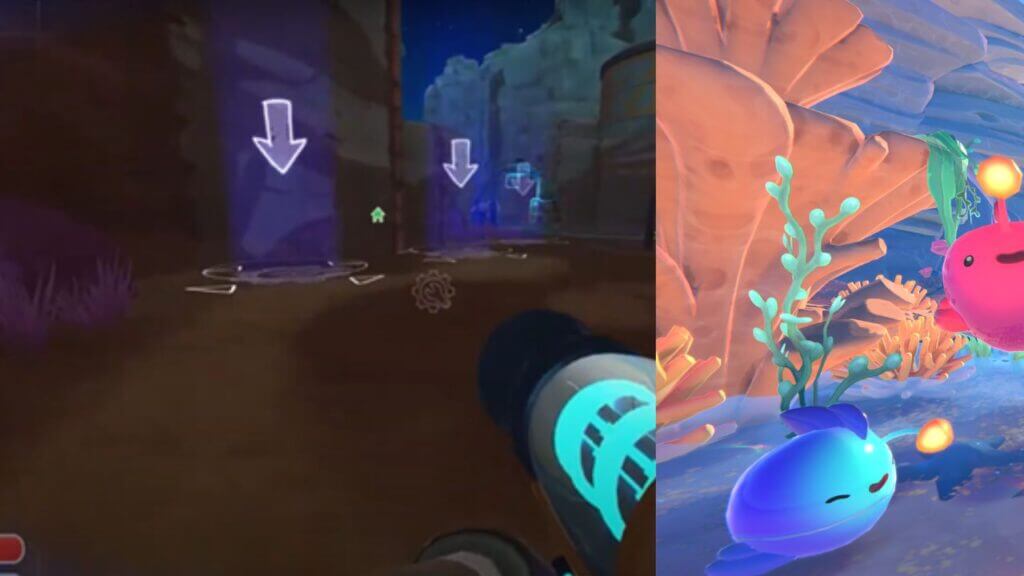
Gadget Mode is the Mode that allows you to see locations where you can place Gadgets. There are three types of Gadgets currently you can locate in those places. They are Utilities, Warp Techs, and Decorations. You can place, move and remove these Gadgets within these located areas. But remember you will not be able to use the vacpack while this Mode is on.

There are plenty of Gadget locations around the Base, and you will find many newGadget locations in the regions you acquire. Therefore there is no need to place all your Gadgets in a small area. You can pretty much distribute them around your Base as you see fit.

Related:

Slime Rancher 2: How to Unlock the Jetpack

How to Use Gadget Mode in Slime Rancher 2?

Gadget Mode in Slime Rancher 2


Follow the below steps to use the Gadget Mode in Slime Rancher 2.

  1. Press T on the Keyboard or the D-pad down button in Console. It will switch you to the Gadget Mode allowing you to see locations and place Gadgets on it. In this Mode, you can locate a gadget and move or remove them.
  2.  Once you have chosen to build the site from the map, press the interact button (E for Keyboard, X for X box, and ▢ PS4).
  3. Then you will see the Gadget menu with eligible objects you can place in that particular place. Select the Gadget from the menu, and it will be placed in your selected locations.

Gadget mode is a primary game mode in Slime Rancher 2. You can use it to get various gadgets you need for your ranch. In this guide, we have shown you how to use gadget mode. We hope this guide has helped you understand Gadget mode and how to use it. Please let us know in the comment section below if you have any questions.

Slime Rancher 2 is available now for PC and Xbox Series X|S.

Related Topics
Guide Slime Rancher 2
Share. Facebook Twitter LinkedIn Reddit Email
Asanga Wijeratne
  • Website

SUGGESTED READS

World of Tanks HEAT Closed Beta Preview
Features

World of Tanks HEAT Hands-On Preview – Faster, Flashier, and Just as Tactical

Where to Find the Secret Fall Shop in Roblox Adopt Me
Gaming

Where to Find the Secret Fall Shop in Roblox Adopt Me

Diablo 4 Lord of Hatred Review
10
Features

Diablo 4: Lord of Hatred Review – Breaking the Cycle

Shuhei Yoshida Says He Was Fired From Playstation Studios for Saying 'No' to Jim Ryan: 'He Asked For Ridiculous Things'
Gaming

Shuhei Yoshida Says He Was Fired From Playstation Studios for Saying ‘No’ to Jim Ryan: ‘He Asked For Ridiculous Things’

Splinter Cell Remake Shows Signs of Life Despite Recent Layoffs at Ubisoft Toronto
Gaming

Splinter Cell Remake Shows Signs of Life Despite Recent Layoffs at Ubisoft Toronto

Fastest Ways to Get a Purrowl in Roblox Adopt Me
Gaming

Fastest Ways to Get a Purrowl & Trade Value in Roblox Adopt Me

The Nerd Stash
Facebook X (Twitter) Instagram YouTube LinkedIn
  • About Us
  • Join Our Team
  • Meet the Team
  • Privacy Policy
  • DMCA Policy
  • Contact Us
  • Terms of Use
  • Sitemap
  • Editorial Guidelines
  • Advertising Policy
© 2026 The Nerd Stash. All Rights Reserved.

Type above and press Enter to search. Press Esc to cancel.