
Close Menu
  • Gaming
    • Game Guides
    • Codes
    • Game News
    • Game Previews
    • Game Reviews
    • Game Features
    • Game Lists
    • Platforms
      • Nintendo
      • PC
      • PlayStation
      • Xbox
      • Mobile
  • Entertainment
    • Movies
    • Movie Features
    • Movie Reviews
    • TV
    • Reality TV
    • Royals
  • Celebrity
    • Hollywood
  • Human Interest
  • Astrology
  • More
    • Anime
    • Lists
    • Podcasts
    • Reviews
Facebook X (Twitter) Instagram LinkedIn YouTube
  • About Us
  • Join Our Team
  • Meet the Team
  • Privacy Policy
  • DMCA Policy
  • Contact Us
  • Terms of Use
  • Sitemap
  • Editorial Guidelines
  • Advertising Policy
The Nerd Stash
  • Gaming
  • Celebrity
  • Hollywood
  • Human Interest
The Nerd Stash
Home»Game Guides»How to Fix Blue Characters Error in Hogwarts Legacy

How to Fix Blue Characters Error in Hogwarts Legacy

I’m blue da ba dee…

Asanga WijeratneBy Asanga WijeratneFebruary 8, 20232 Mins Read
How to Fix Blue Characters Error in Hogwarts Legacy
This article is over 3 years old and may contain outdated information.

[Updated on September 14, 2024, to revise outdated formatting and improve readability.]

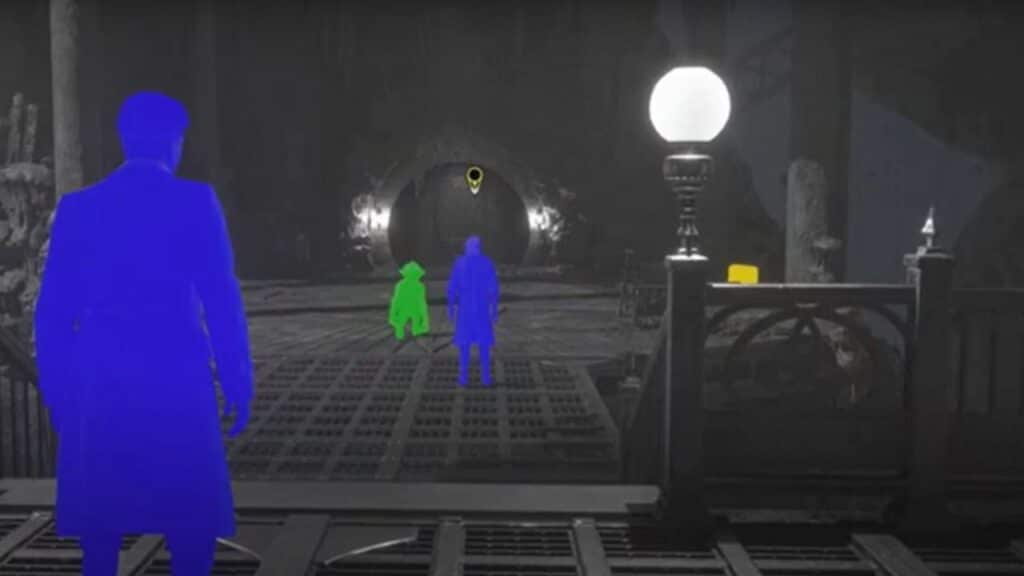
The Blue Characters Error is a recently identified bug that has caused dismay among gamers. This issue relates to the game’s accessibility settings, particularly the high contrast feature. Traditionally it is used to improve visibility in low-light environments. Unfortunately, when this feature is activated, characters appear as blue silhouettes instead of their intended models. This has caused difficulty with gameplay and led to great annoyance for many players.

The Blue Characters bug has been a troublesome issue for gamers on both Xbox and PlayStation platforms, causing numerous difficulties during the playthrough of Hogwarts Legacy. This bug primarily manifests during the game’s prolog but has been known to appear at other times as well. The bright palette in the game’s graphics makes it even harder for players to differentiate characters and environmental elements when this error occurs, resulting in considerable gameplay disruption for many players. However, there is an easy fix to resolve this error.
Related:

Hogwarts Legacy: How to Unlock All Dark Arts Spells
How to Fix Blue Characters Error in Hogwarts Legacy

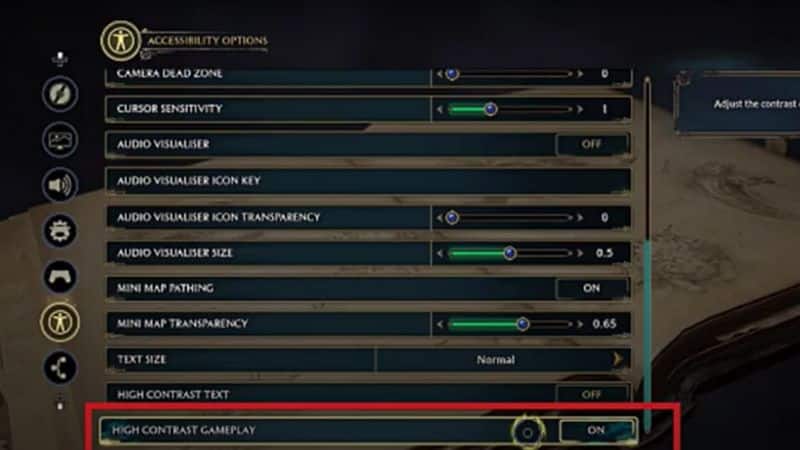
You can fix the Blue Characters Error in Hogwarts Legacy by switching off the High Contrast Gameplay from the Setting menu. Here are the steps you need to follow.

  1. Pause the game and go to Settings.
  2. Scroll down to the Accessibility menu on the Right Side. It is shown with the symbol of a person with stretched Arms.
  3. Go to the “High Contrast Game Play” at the bottom and turn it off.

The Blue Characters Error can be annoying, but with this guide’s help, it should be easy to overcome. Now that you’ve gone through these steps, you won’t have to worry about it again. However, if issues persist or you have any other questions about resolving the error, get in touch with us in the comments below. We’re always happy to help! Thank you for taking the time to read our guide, and we wish you many hours of joyous gaming without further interruptions.


Related Topics
Guide Hogwarts Legacy
Share. Facebook Twitter LinkedIn Reddit Email
Asanga Wijeratne
  • Website

SUGGESTED READS

Honkai: Star Rail 4.2 Update
Game News

Honkai: Star Rail Is Gearing Up For Its Third Anniversary Coming With Version 4.2

'SteamGPT' Datamine May Bring AI Chatbot, Anti-cheat Support to Steam
Game News

‘SteamGPT’ Datamine May Bring AI Chatbot, Anti-cheat Support to Steam

GTA 6 Online May Not Launch Day One, and That Might Be a Smart Move From Rockstar
Game News

GTA 6 Online May Not Launch Day One, and That Might Be a Smart Move From Rockstar

Invincible VS Open Beta Features
Game News

The Invincible VS Open Beta Will Feature 10 Characters and Three Game Modes

Samson PC Review
7
Game Reviews

Samson Review – An Uninspiring Tyndalston Story

Best mods for Project Zomboid Build 42
Game Guides

Top 10 Best Project Zomboid Mods (Updated for Build 42.16)

The Nerd Stash
Facebook X (Twitter) Instagram YouTube LinkedIn
  • About Us
  • Join Our Team
  • Meet the Team
  • Privacy Policy
  • DMCA Policy
  • Contact Us
  • Terms of Use
  • Sitemap
  • Editorial Guidelines
  • Advertising Policy
© 2026 The Nerd Stash. All Rights Reserved.

Type above and press Enter to search. Press Esc to cancel.




