
Close Menu
  • Gaming
    • Platforms
      • Nintendo
      • PC
      • PlayStation
      • Xbox
  • Entertainment
    • Movies
    • TV
    • Royals
  • Celebrity
    • Hollywood
  • Human Interest
  • Astrology
  • More
    • Anime
    • Reviews
Facebook X (Twitter) Instagram LinkedIn YouTube
  • About Us
  • Join Our Team
  • Meet the Team
  • Privacy Policy
  • DMCA Policy
  • Contact Us
  • Terms of Use
  • Sitemap
  • Editorial Guidelines
  • Advertising Policy
The Nerd Stash
  • Gaming
  • Celebrity
  • Hollywood
  • Human Interest
The Nerd Stash
Home»Gaming»Fortnite: How to Increase Heat Level using a Burner Pay Phone

Fortnite: How to Increase Heat Level using a Burner Pay Phone

Do you want to know how to increase your heat level using a Burner Pay Phone in Fortnite? Fortnite is a popular Battle Royale game…

Asanga WijeratneBy Asanga WijeratneFebruary 19, 20233 Mins Read
Fortnite Heat Level
This article is over 3 years old and may contain outdated information.

Do you want to know how to increase your heat level using a Burner Pay Phone in Fortnite? Fortnite is a popular Battle Royale game developed by Epic Games in 2017. the heat level is the newest game mechanic introduced with the Fortnite Most wanted event. This guide will tell you how to increase your heat level using a Burner Pay Phone in Fortnite.

What is The Heat Level in Fortnite?

The Heat Level of a character displays various benefits for each respective level in the Heads-Up Display (HUD). Players with higher heat levels are apparent but more susceptible to enemy fire. In contrast, Cold-Blooded players are incredibly hostile toward other players and can perform tactical maneuvers without leaving an obvious trail. The unique advantages of each level range from different Bars obtained from enemy demise to increased health and shield regeneration times, along with increased speed capabilities. One must understand the tactical value and limitations of one’s Heat Level to succeed.

The Fortnite Most Wanted event has been a great addition to the game since its inception. It’s been a wild ride of chasing down criminals, collecting bounties, and increasing your heat level. The burners pay phones scattered throughout the map offer players a way to increase their heat level and face new challenges. Don’t forget that this event will end at the end of February, but the fun doesn’t have to stop then – you can always keep increasing your heat level in search of higher rewards!

How to Increase Heat Level using a Burner Pay Phone in Fortnite?

Heat Level in Fortnite
Image via Fortnite GG

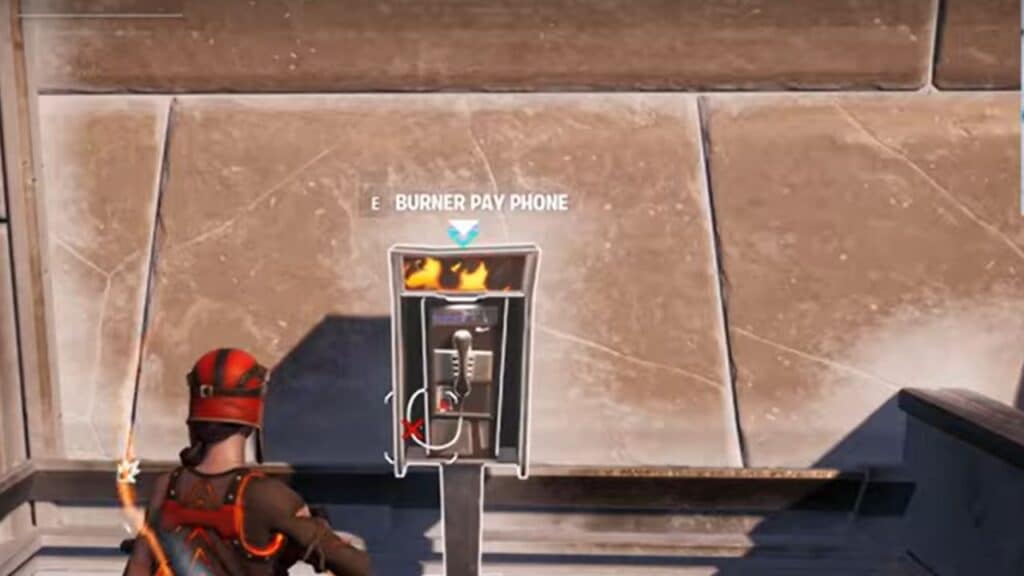
You can increase your heat level using a Burner Pay Phone in Fortnite by interacting with it and increasing one heat level for 5000 Gold. Here are the steps you need to follow.

  1. Go to a Burner Pay Phone at any location shown above the map.
  2. Interact with it and get the prompt to pay 5000 Gold.
  3. Confirm your selection and wait for the process to finish. Once done, your heat level will be increased by one.

Following the abovementioned steps, you can increase your heat level using a Burner Pay Phone in Fortnite. Understanding each Heat Level’s tactical value and limitations is essential as this can help you get an edge over your opponents. Understanding the advantages and disadvantages of each level can help you plan your strategies in Fortnite effectively. Good luck

Also, Fortnite is available for PC, PS4, PS5, Xbox One, and Xbox Series X|S.

Related Topics
Fortnite Guide
Share. Facebook Twitter LinkedIn Reddit Email
Asanga Wijeratne
  • Website

SUGGESTED READS

Vampire Survivors Developer Goes Wild With Over 15 New Games, Expands to Japan and Italy: 'Profit Is Not a Priority'
Gaming

Vampire Survivors Developer Goes Wild With Over 15 New Projects, Expands to Japan and Italy: ‘Profit Is Not a Priority’

Gaming

The Expanse: Osiris Reborn Is Owlcats Most Ambitious Leap Yet ‘A stunning jump forward’

World of Tanks HEAT Closed Beta Preview
Features

World of Tanks HEAT Hands-On Preview – Faster, Flashier, and Just as Tactical

Where to Find the Secret Fall Shop in Roblox Adopt Me
Gaming

Where to Find the Secret Fall Shop in Roblox Adopt Me

Diablo 4 Lord of Hatred Review
10
Features

Diablo 4: Lord of Hatred Review – Breaking the Cycle

Shuhei Yoshida Says He Was Fired From Playstation Studios for Saying 'No' to Jim Ryan: 'He Asked For Ridiculous Things'
Gaming

Shuhei Yoshida Says He Was Fired From Playstation Studios for Saying ‘No’ to Jim Ryan: ‘He Asked For Ridiculous Things’

The Nerd Stash
Facebook X (Twitter) Instagram YouTube LinkedIn
  • About Us
  • Join Our Team
  • Meet the Team
  • Privacy Policy
  • DMCA Policy
  • Contact Us
  • Terms of Use
  • Sitemap
  • Editorial Guidelines
  • Advertising Policy
© 2026 The Nerd Stash. All Rights Reserved.

Type above and press Enter to search. Press Esc to cancel.





