Close Menu
  • Gaming
    • Platforms
      • Nintendo
      • PC
      • PlayStation
      • Xbox
  • Entertainment
    • Movies
    • TV
    • Royals
  • Celebrity
    • Hollywood
  • Human Interest
  • Astrology
  • More
    • Reviews
Facebook X (Twitter) Instagram LinkedIn YouTube
  • About Us
  • Join Our Team
  • Meet the Team
  • Privacy Policy
  • DMCA Policy
  • Contact Us
  • Terms of Use
  • Sitemap
  • Editorial Guidelines
  • Advertising Policy
The Nerd Stash
  • Gaming
  • Celebrity
  • Hollywood
  • Human Interest
The Nerd Stash
Home»Gaming»Roblox: One Fruit Simulator Codes (May 2024)

Roblox: One Fruit Simulator Codes (May 2024)

Boast your boosts!

Nat CollazoAlina NovichenkoBy Nat Collazo and Alina NovichenkoMay 9, 20242 Mins Read
Roblox One Fruit Simulator Codes
Image Source: Digital Sea via The Nerd Stash
This article is over 2 years old and may contain outdated information.

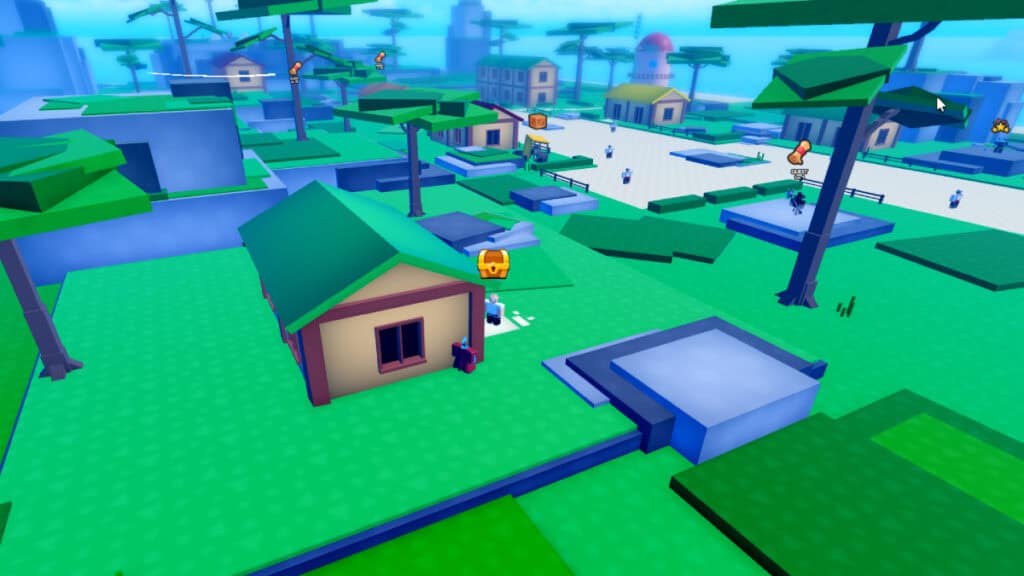
One Piece has no shortage of experiences within Roblox. If you’re a fan of the anime and aren’t actively playing Blox Fruits or A One Piece Game, then you’re most likely hanging out in One Fruit Simulator. Using codes gives you access to extra boosts that help make leveling up much less of a chore. All you need to do to redeem One Fruit Simulator codes is to copy your YouTube Channel ID!

All Working Codes for One Fruit Simulator

[Updated on May 9 to add new codes].

Roblox One Fruit Simulator Codes
Image Source: Digital Sea via The Nerd Stash

All of the codes that work for One Fruit Simulator are as follows:

CodesRewards
SHINYDIAMOND120 minutes of additional boosts.
WHOLECAKESOON120 minutes of additional boosts.

Before redeeming any of the above codes in One Fruit Simulator, you need to get a YouTube account if you don’t have one already and copy your YouTube Channel ID. You also need to be subscribed to @TheBoss_Brandon for any of the codes to work.

Related:

Endless Grades: Codes (May 2024)

How To Redeem One Fruit Simulator Codes

There are two sets of instructions for redeeming codes in One Fruit Simulator. First is the actual code redemption process:

  1. Head to the Menu button on the bottom left-hand side of the game after opening it.
  2. In the new menu, select the thumbs up icon.
  3. A window with two textboxes will appear for you to type in your YouTube Channel ID and any of the above codes.
  4. Once the ID and codes have been typed in, press the green Redeem button.

The second set of instructions is for getting your YouTube Channel ID:

  1. Go to YouTube.com.
  2. Click on your profile picture on the top right-hand corner of the website.
  3. Go to the Settings option.
  4. On the new page, select the Advanced Settings option on the left-hand side.
  5. You can copy the Channel ID from the new page.

Related:

Roblox: Extalia Simulator Codes (May 2024)

How To Get More Rewards

In the same window where you type in codes, you can also select either the Twitter or Likes buttons. Each one will give you instructions to earn more rewards:

  • Twitter: Follow @thebossinnicar1 on Twitter/X and verify that you did so to earn 2% more EXP and 30 minutes of double EXP.
  • Like: Join the game’s official group to earn 2% more EXP and 30 minutes of double EXP.

Roblox is available to play on PC, mobile devices, Xbox, and PlayStation.

Related Topics
Guide Roblox
Share. Facebook Twitter LinkedIn Reddit Email
Nat Collazo, Alina Novichenko
  • Website
  • X (Twitter)
  • Instagram

Nat is a journalist with over ten years of online publishing experience. They are a massive fan of hanging out with both their wife and cat which would ideally be all the time. Nat received an undergraduate degree in English Literature from Florida International University, then returned to complete a graduate degree in Mass Communications before moving across the country to settle in New England.

Nat Collazo, Alina Novichenko
  • Website
  • X (Twitter)
  • Instagram

Nat is a journalist with over ten years of online publishing experience. They are a massive fan of hanging out with both their wife and cat which would ideally be all the time. Nat received an undergraduate degree in English Literature from Florida International University, then returned to complete a graduate degree in Mass Communications before moving across the country to settle in New England.

SUGGESTED READS

Konami is Rebooting Metal Gear, Castlevania, Other Existing IPs: 'Important Initiatives as Pillars of Our Business'
Gaming

Konami is Rebooting Metal Gear, Castlevania, Other Existing IPs: ‘Important Initiatives as Pillars of Our Business’

Gaming

GTA 6 Leaker Hunt Goes Nuclear as Take-Two Demands Discord and Microsoft Hand Over Private Data

Raid Shadow Legends new players
Gaming

7 New-Player Mistakes That Cost You Free Rewards in Raid: Shadow Legends (August 2026)

PlayStation's Phantom Blade Zero Preorders Have 'Far Exceeded Expectations' Despite Disc-less Release Concerns
Gaming

PlayStation’s Phantom Blade Zero Preorders Have ‘Far Exceeded Expectations’ Despite Disc-less Release Concerns

Gaming

Interview: Dawn of War 4 Voice Actor Toby Longworth Discusses Space Marine Voices and How RoboCop Inspired His Dreadnought Performance

Mortal Shell 2 Sester Genessa Unlock
Gaming

How to Unlock Sester Genessa in Mortal Shell 2

The Nerd Stash
Facebook X (Twitter) Instagram YouTube LinkedIn
  • About Us
  • Join Our Team
  • Meet the Team
  • Privacy Policy
  • DMCA Policy
  • Contact Us
  • Terms of Use
  • Sitemap
  • Editorial Guidelines
  • Advertising Policy
© 2026 The Nerd Stash. All Rights Reserved.

Type above and press Enter to search. Press Esc to cancel.