Close Menu
  • Gaming
    • Platforms
      • Nintendo
      • PC
      • PlayStation
      • Xbox
  • Entertainment
    • Movies
    • TV
    • Royals
  • Celebrity
    • Hollywood
  • Human Interest
  • Astrology
  • More
    • Reviews
Facebook X (Twitter) Instagram LinkedIn YouTube
  • About Us
  • Join Our Team
  • Meet the Team
  • Privacy Policy
  • DMCA Policy
  • Contact Us
  • Terms of Use
  • Sitemap
  • Editorial Guidelines
  • Advertising Policy
The Nerd Stash
  • Gaming
  • Celebrity
  • Hollywood
  • Human Interest
The Nerd Stash
Home»Features»How To Use Baby Carrier In Sims 4 Growing Together

How To Use Baby Carrier In Sims 4 Growing Together

The latest update to The Sims 4 comes courtesy of Growing Together. This expansion provides a host of new features. You can create better interpersonal relationships and…

Mykel BrightBy Mykel BrightMarch 18, 20233 Mins Read
This article is over 3 years old and may contain outdated information.

The latest update to The Sims 4 comes courtesy of Growing Together. This expansion provides a host of new features. You can create better interpersonal relationships and enjoy the new infant life stage as they develop likes and dislikes. This expansion even allows grandparents to play favorites with their grandchildren. But when it comes to infants, you don’t just have to carry them in your arms. You can finally use a baby carrier. If you’re struggling with it, we’ll show you just how quick and simple it is to use a baby carrier in The Sims 4 Growing Together.

How to Use a Baby Carrier in The Sims 4 Growing Together
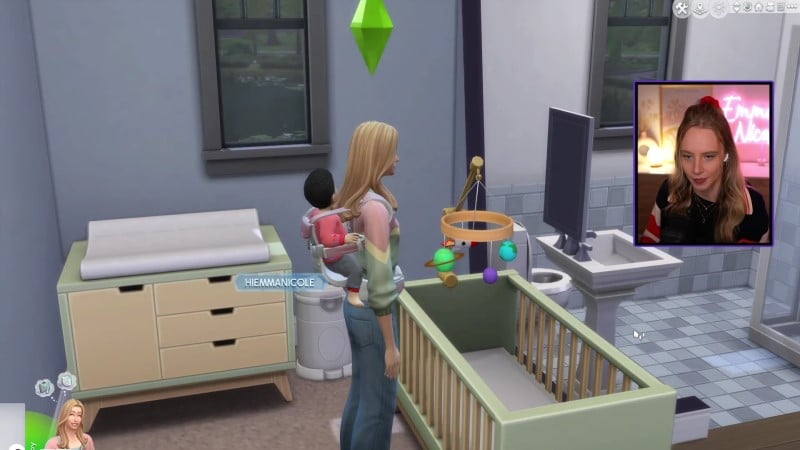
How to Use a Baby Carrier in The Sims 4 Growing Together
Credit: Emma Nicole on YouTube

Rather than walk with your little bundle of joy outside or inside the house, you can instead strap them into a cozy baby carrier and be on your way. In fact, just like for many parents in the world, a baby carrier gives them the freedom needed to get things done.

Need to simply get ready in the morning, like brushing your teeth? You can do so with the baby carrier. Perhaps you want to clean up a bit around the house? Once you learn how to use a baby carrier in The Sims 4 Growing Together, you can do that too.

Thanks to the baby carrier, your character can even go on a healthy jog.

So, how do you use it? It’s simple. You don’t have to look in the catalog and purchase it. As long as you have an infant, you have the baby carrier. Or, more specifically, the back carrier.

Related:

How to Baby-Proof the House in the Sims 4

To use the baby carrier in The Sims 4 Growing Together, select your infant. You should see the option “Put [infant’s name] in Back Carrier.” If you don’t immediately see it when you click on the infant, look for it under “More Choices…”.

Also, “More Choices…” comes in handy if you want to change the look of the baby carrier. Once you select that, choose “Baby Care…”, “More Choices…” and then “Set Preferred Back Carrier…”.

There is only a handful of basic options, however. So, if you want to use a baby carrier with more flair in The Sims 4 Growing Together, you may be out of luck on that avenue.

Nonetheless, once you choose “Put [infant’s name] in Back Carrier,” you will promptly add the infant to your back. It’s a cool new feature since you don’t have to choose between doing other things and keeping your little one close by.

If you want, check out the video below of Emma Nicole on YouTube exploring the baby carrier:

The Sims 4 is available for PC, macOS, PlayStation, and Xbox systems.

Related Topics
Guide The Sims 4
Share. Facebook Twitter LinkedIn Reddit Email
Mykel Bright
  • Website

Since childhood, Mykel has had a passion for writing, drawing, comic books, video games, and all things horror. She finds various ways to blend her loves such as sketching out ideas for potential comics and working out ideas for choice-based visual novels.

SUGGESTED READS

Lies of P Sequel, 'Wonders of O,' Might've Been Spoiled by Neowiz
Gaming

Lies of P Sequel, ‘Wonders of O,’ Might’ve Been Spoiled by Neowiz

graveyard keeper 2 review
8.5
Gaming

Graveyard Keeper 2 Review: A Sequel that Urns Its Praise

BlizzCon 2026 Announcements
Gaming

Everything Announced at BlizzCon 2026

Dragon Quest Monsters The Withered World Makes an Excellent First Impression on a Series Newcomer
Gaming

Dragon Quest Monsters: The Withered World Makes an Excellend First Impression on a Series Newcomer

World of Warcraft Forever Announcement
Gaming

World of Warcraft: Forever Is More Than Classic Plus; It’s The Best Way to Relive Azeroth

CONTROL Resonant Looks Like Remedy Entertainment Took the Brakes Completely Off
Gaming

CONTROL: Resonant Looks Like Remedy Entertainment Took the Brakes Completely Off

The Nerd Stash
Facebook X (Twitter) Instagram YouTube LinkedIn
  • About Us
  • Join Our Team
  • Meet the Team
  • Privacy Policy
  • DMCA Policy
  • Contact Us
  • Terms of Use
  • Sitemap
  • Editorial Guidelines
  • Advertising Policy
© 2026 The Nerd Stash. All Rights Reserved.

Type above and press Enter to search. Press Esc to cancel.