Close Menu
  • Gaming
    • Platforms
      • Nintendo
      • PC
      • PlayStation
      • Xbox
  • Entertainment
    • Movies
    • TV
    • Royals
  • Celebrity
    • Hollywood
  • Human Interest
  • Astrology
  • More
    • Reviews
Facebook X (Twitter) Instagram LinkedIn YouTube
  • About Us
  • Join Our Team
  • Meet the Team
  • Privacy Policy
  • DMCA Policy
  • Contact Us
  • Terms of Use
  • Sitemap
  • Editorial Guidelines
  • Advertising Policy
The Nerd Stash
  • Gaming
  • Celebrity
  • Hollywood
  • Human Interest
The Nerd Stash
Home»Features»How to Climb in Star Wars Jedi Survivor

How to Climb in Star Wars Jedi Survivor

Star Wars Jedi: Survivor is the highly anticipated sequel to the smash hit Star Wars Jedi: Fallen Order from 2019. Developer Respawn has taken great…

Michael StoyanoffBy Michael StoyanoffApril 27, 20232 Mins Read
climb
Image via EA
This article is over 3 years old and may contain outdated information.

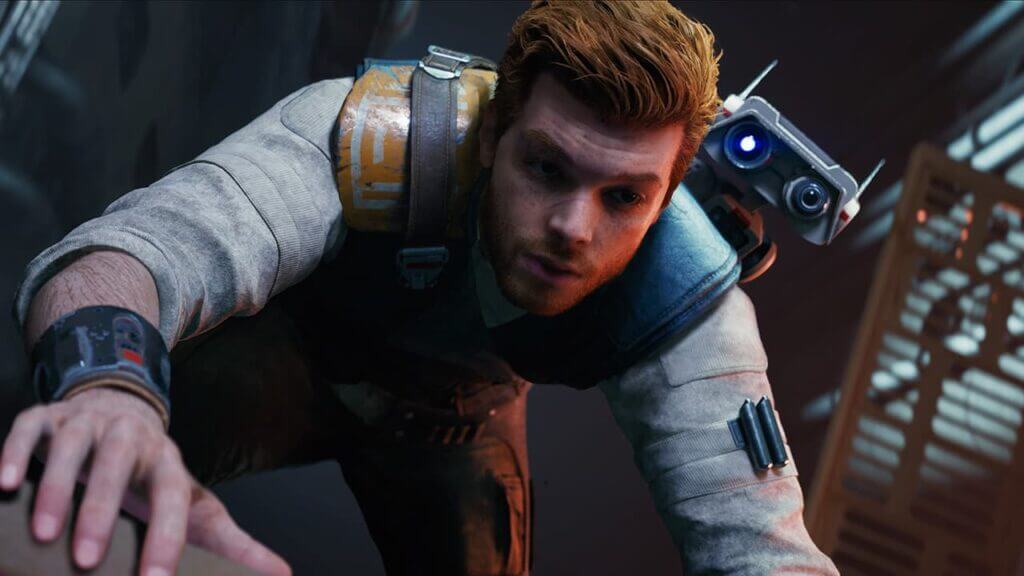
Star Wars Jedi: Survivor is the highly anticipated sequel to the smash hit Star Wars Jedi: Fallen Order from 2019. Developer Respawn has taken great care to make sure that all of Cal Kestis’s unlocked abilities from the first game are at his disposal in the second outing. Cal must navigate hostile environments, and one of the best way to do that is by climbing to scale walls. This feature, along with wall running, is back for the sequel. Here is how you climb in Star Wars Jedi: Survivor.

How to Climb Walls in Star Wars Jedi: Survivor

Star Wars Jedi: Survivor features a vast array of worlds to explore. However, you are not getting anywhere without learning how to climb. In this sequel, climbing with Cal Kestis involves approaching a climbable surface or jumping onto a wall that has noticeable things to hold. Once Cal latches on, you must tap a button to hold onto the wall. On Xbox, this is done when you press A, or X on the PlayStation. Press the Spacebar if you are on PC.

Most climbable surfaces have vines or grating to signal that they can be gripped for climbing. Once you have a hold on the spot, simply press the direction you want to go to scale the wall. You can make the process quicker by jumping in the direction that you want to travel. This will make Cal leap towards that spot and automatically grip the wall again. All of this is very similar to how Cal scaled walls in Fallen Order.

Related:

Star Wars Jedi: Survivor Review – More Than a Sequel

Stop Climbing in Star Wars Jedi: Survivor

In order to stop climbing in Star Wars Jedi: Survivor, simply press the B Button on Xbox, Circle on PlayStation, or Z on PC.

Star Wars Jedi: Survivor is available on PC, Steam, PlayStation 5, and Xbox Series X/S. The game also comes with a ton of fun extra goodies via a Deluxe Edition.

Related Topics
Star Wars Jedi: Survivor
Share. Facebook Twitter LinkedIn Reddit Email
Michael Stoyanoff
  • Website

SUGGESTED READS

007 First Light Story Review
Gaming

007 First Light Launches Its Update #1 With New TacSim Content

XBOX Backward Compatibility on PC Could Support Xbox 360 Games Too, Dataminers Confirm
Gaming

XBOX Backward Compatibility on PC Could Support Xbox 360 Games Too, Dataminers Confirm

Aliens Fireteam Elite 2 Release Date
Gaming

Aliens: Fireteam Elite 2 Launches on August 25 With Movie-inspired DLC Packs

Sony Reportedly Knew the PlayStation Disc Shut Down Would 'Piss Everyone Off,' Warned Employees to Stay Silent
Gaming

Sony Reportedly Knew the PlayStation Disc Shut Down Would ‘Piss Everyone Off,’ Warned Employees to Stay Silent

How to play Halo: Campaign Evolved Co-Op
Gaming

Halo Campaign Evolved Co-Op Guide

Aliens Fireteam Elite 2 Horde Mode
Gaming

Aliens: Fireteam Elite 2 Has Revamped Its Horde Mode In the Best Possible Way

The Nerd Stash
Facebook X (Twitter) Instagram YouTube LinkedIn
  • About Us
  • Join Our Team
  • Meet the Team
  • Privacy Policy
  • DMCA Policy
  • Contact Us
  • Terms of Use
  • Sitemap
  • Editorial Guidelines
  • Advertising Policy
© 2026 The Nerd Stash. All Rights Reserved.

Type above and press Enter to search. Press Esc to cancel.