

Close Menu
  • Gaming
    • Platforms
      • Nintendo
      • PC
      • PlayStation
      • Xbox
  • Entertainment
    • Movies
    • TV
    • Royals
  • Celebrity
    • Hollywood
  • Human Interest
  • Astrology
  • More
    • Anime
    • Reviews
Facebook X (Twitter) Instagram LinkedIn YouTube
  • About Us
  • Join Our Team
  • Meet the Team
  • Privacy Policy
  • DMCA Policy
  • Contact Us
  • Terms of Use
  • Sitemap
  • Editorial Guidelines
  • Advertising Policy
The Nerd Stash
  • Gaming
  • Celebrity
  • Hollywood
  • Human Interest
The Nerd Stash
Home»Gaming»How To Get (& Use) A Disguise in DMZ

How To Get (& Use) A Disguise in DMZ

Want to know how to get and use a Disguise in COD Warzone 2.0 DMZ? Disguise is a new item that was just recently added…

Sidharta F. RasidiBy Sidharta F. RasidiJune 17, 20233 Mins Read
How To Get (& Use) A Disguise in DMZ
Image source: Activision Blizzard via The Nerd Stash
This article is over 2 years old and may contain outdated information.

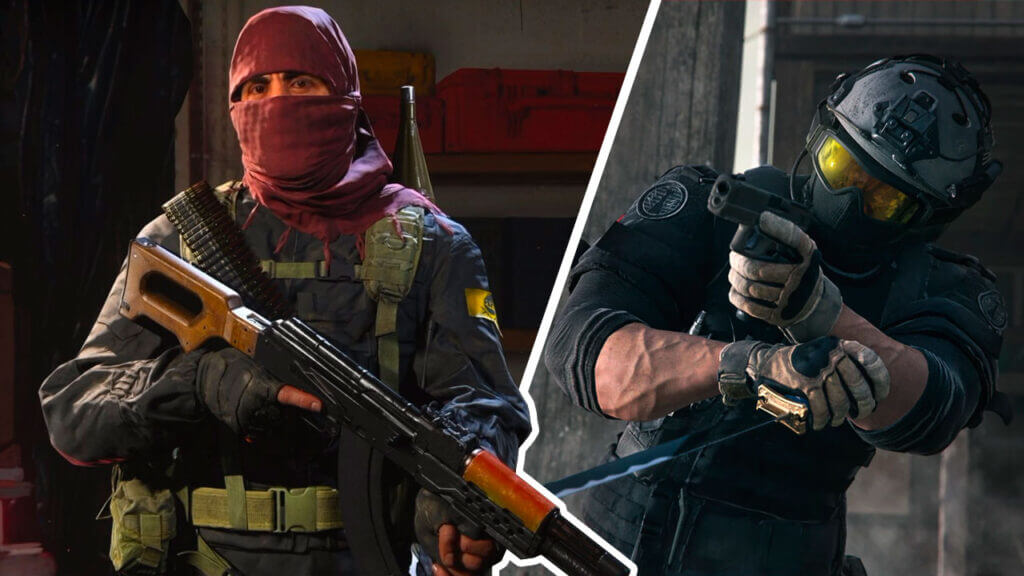
Want to know how to get and use a Disguise in COD Warzone 2.0 DMZ? Disguise is a new item that was just recently added in June 2023 Season 4 update. As the name suggests, this item will let anyone disguise themselves while trekking through Al Mazrah. This is a very useful item to have when you play solo or when all your teammates are down and have to play carefully. This COD: Warzone 2.0 DMZ guide will tell you how to get and use the new Disguise item.

COD Warzone 2.0 DMZ: How to Get and Use a Disguise
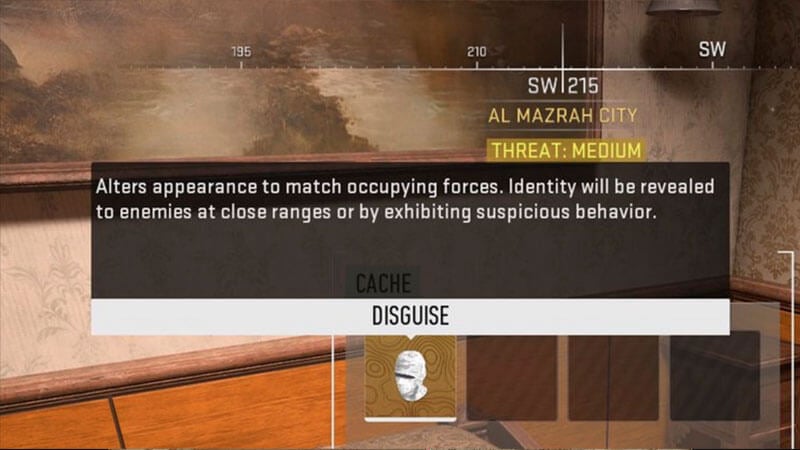
Disguise item in COD DMZ
Image source: Activision Blizzard via @KillerStidge on Twitter

“Alters appearance to match occupying forces. Identity will be revealed to enemies at close range or by exhibiting suspicious behavior.” – official Disguise description.

The new Disguise item in COD Warzone 2.0 DMZ can be found randomly in various loot Caches. At the time of writing, the COD DMZ community seems to think that Disguise mostly spawns in Duffel Bags. While using this item, your character will be disguised as a Tier 2 AQ, Shadow Company, or Vondel NPC soldier depending on the theme of the map.

Once obtained, the Disguise can be easily equipped from your Backpack just like the Night Vision Goggles or NVG:

  1. Open your Backpack inventory by pressing the Down D-pad button or Tab on the keyboard.
  2. Locate the Disguise item.
  3. Hover over the Disguise item.
  4. Press the Equip button.

When you use the Disguise, your skin will be replaced with the skin of an AQ, Shadow Company, or Vondel soldier. But it is not just for looks! Obviously, unsuspecting players will assume that you are just an NPC soldier. At the same time, the AI bot soldiers will also ignore anyone wearing the Disguise. However, do keep in mind that the item cannot be Extracted unless you have a Secure Backpack.

Nevertheless, you will be instantly spotted if you fire your gun without a Silencer or Suppressor and run in front of the bots wearing a Disguise in DMZ. Killstreaks like the Helicopter and Wheelson can easily spot you as well. Your Disguise will also be disabled if you are within 5 meters of AI bots and enemy players or getting hit enough times. If you do anything suspicious like doing bunnyhops across the map, needless to say, other players can easily spot your camouflage too. You will know if you are exposed to enemies when the Disguise icon flashes white. See the Disguise in action through YouTuber RD-RONIN’s short video below.

Related:

Where To Find Hydrogen Peroxide in DMZ

Call of Duty: Warzone 2.0 is available on PlayStation 4, PlayStation 5, Xbox One, Xbox Series X|S, and PC.

Related Topics
Guide Warzone DMZ
Share. Facebook Twitter LinkedIn Reddit Email
Sidharta F. Rasidi
  • Website

An ordinary Indonesian who enjoys playing and talking about video games. His favorite games are Monster Hunter: World, Space Invader Extreme 2, THE iDOLM@STER SP, Road Trip Adventure, Halo series, and KOEI Tecmo's Warriors series.

SUGGESTED READS

Fatal Fury City of the Wolves Hands-On Preview Mr Karate
Features

Fatal Fury: City of the Wolves Mr. Karate Hands-On Preview – Patience is Key

Honkai Star Rail Version 4.3 Announcements
Gaming

Honkai: Star Rail Version 4.3 Unveils Blade’s New Form and More Fate Collab Characters

Take-Two CEO Reveals Fans Will Be Forced To Wait a Bit Longer for GTA 6 News 'This Summer,' But Insiders Disagree
Gaming

Take-Two CEO Reveals Fans Will Be Forced To Wait a Bit Longer for GTA 6 News ‘This Summer,’ But Insiders Disagree

007 First Light Launch Trailer
Gaming

007 First Light Celebrates the Long-Awaited Return of James Bond With Its Launch Trailer

Destiny 2 Final Update
Features

Destiny 2 Is Dead: Bungie’s Divisive Franchise Going on Maintenance Mode With Its Last Update Launching on June 9

GTA Studio's Secrets Stay Buried Forever as Rockstar Reportedly Enforces 'Lifetime NDAs' on Ex-Developers
Gaming

GTA Studio’s Secrets Stay Buried Forever as Rockstar Reportedly Enforces ‘Lifetime NDAs’ on Ex-Developers

The Nerd Stash
Facebook X (Twitter) Instagram YouTube LinkedIn
  • About Us
  • Join Our Team
  • Meet the Team
  • Privacy Policy
  • DMCA Policy
  • Contact Us
  • Terms of Use
  • Sitemap
  • Editorial Guidelines
  • Advertising Policy
© 2026 The Nerd Stash. All Rights Reserved.

Type above and press Enter to search. Press Esc to cancel.




