Close Menu
  • Gaming
    • Platforms
      • Nintendo
      • PC
      • PlayStation
      • Xbox
  • Entertainment
    • Movies
    • TV
    • Royals
  • Celebrity
    • Hollywood
  • Human Interest
  • Astrology
  • More
    • Reviews
Facebook X (Twitter) Instagram LinkedIn YouTube
  • About Us
  • Join Our Team
  • Meet the Team
  • Privacy Policy
  • DMCA Policy
  • Contact Us
  • Terms of Use
  • Sitemap
  • Editorial Guidelines
  • Advertising Policy
The Nerd Stash
  • Gaming
  • Celebrity
  • Hollywood
  • Human Interest
The Nerd Stash
Home»Gaming»How To Spin Dash in Sonic Frontiers

How To Spin Dash in Sonic Frontiers

Sonic Frontiers is the latest game in the Sonic franchise and the first good one in the 3D space for a very long time. The game…

Masoud KazemiBy Masoud KazemiJune 24, 20232 Mins Read
Sonic Frontiers Spin Dash
Image Source: SEGA
This article is over 3 years old and may contain outdated information.

Sonic Frontiers is the latest game in the Sonic franchise and the first good one in the 3D space for a very long time. The game became the best-selling 3D game of the franchise as well. We are also expecting the trailer of the game’s DLC in the near future. Still, there are major changes from 2D to 3D but there are certain movements that are signatures of Sonic and regardless of the game, we will see them. The Spin Dash is one of those signature moves and here is the guide on how to do it in Sonic Frontiers.

How To Spin Dash in Sonic Frontiers
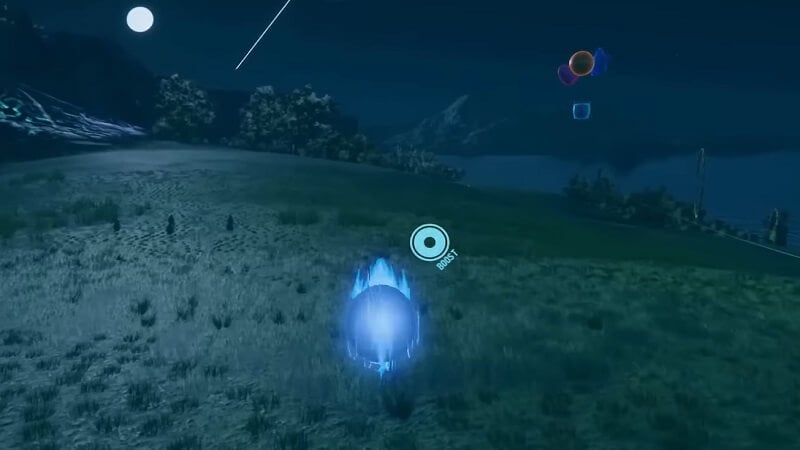
Sonic Frontiers Spin Dash
Image Source: SEGA via BrosClanYt

The Spin Dash was first introduced in Sonic the Hedgehog 2 and quickly become one of Sonic’s most popular moves. Even though it was such an iconic move, it was just added to the game with the new update.

Before you could actually do the Spin Dash in Sonic Frontiers, you have to first unlock this ability. In order to do this, you have to get S Rank in all Action Chain Challenges in the game. Once you got the ability you can easily use this move anytime you want.

To perform this move, you have to hold the O button on PlayStation, B on Xbox, or A on your Nintendo controller. Then you must hold the L2 on PlayStation, LT on Xbox, or L on the Nintendo controller. By pressing these two buttons Sonic will wind up to Spin Dash.

Now to execute the move, you have to release the O on PlayStation, B on Xbox, or A on Nintendo Switch so Sonic would perform this move. If you want to do this mid-air, all you have to do is press L2 on PlayStation, LT on Xbox, or L on Nintendo Switch.

That is everything you need to know about doing the Spin Dash in Sonic Frontiers. Sonic Frontiers is available for PlayStation 5, PlayStation 4, Xbox One, Xbox Series X|S, Nintendo Switch, and PC.

Related Topics
Guide Sonic Frontiers
Share. Facebook Twitter LinkedIn Reddit Email
Masoud Kazemi
  • Website
  • X (Twitter)

I don't care about the real world. I cared only about the world of fiction. -Woody Allen

SUGGESTED READS

Do I Need To Play Other Onimusha Games Before Way of the Sword, Explained
Gaming

Do I Need To Play Other Onimusha Games Before Way of the Sword, Explained

7.5
Gaming

Hot Wheels Infinite Rush Review – A Solid Family Friendly Racing Adventure

DC white house MAGA game
Gaming

Trump’s MAGA Video Games Feature Immigrant Hunts and Tetris Walls in Bold New Vision for DC: ‘It’s Like the White House is Being Run by Evil 12 Year Olds’

Can Blood of Dawnwalker Run on Steam Deck? Best Settings & Performance Guide
Gaming

Can Blood of Dawnwalker Run on Steam Deck? Best Settings & Performance Guide

The Blood of Dawnwalker Scouting Towers
Gaming

The Blood of Dawnwalker: How to Clear Scouting Towers and Reveal Map Locations

How to Fast Travel and Activate Shrines in Blood of Dawnwalker
Gaming

How to Fast Travel and Activate Shrines in Blood of Dawnwalker

The Nerd Stash
Facebook X (Twitter) Instagram YouTube LinkedIn
  • About Us
  • Join Our Team
  • Meet the Team
  • Privacy Policy
  • DMCA Policy
  • Contact Us
  • Terms of Use
  • Sitemap
  • Editorial Guidelines
  • Advertising Policy
© 2026 The Nerd Stash. All Rights Reserved.

Type above and press Enter to search. Press Esc to cancel.