
Close Menu
  • Gaming
    • Platforms
      • Nintendo
      • PC
      • PlayStation
      • Xbox
  • Entertainment
    • Movies
    • TV
    • Royals
  • Celebrity
    • Hollywood
  • Human Interest
  • Astrology
  • More
    • Anime
    • Reviews
Facebook X (Twitter) Instagram LinkedIn YouTube
  • About Us
  • Join Our Team
  • Meet the Team
  • Privacy Policy
  • DMCA Policy
  • Contact Us
  • Terms of Use
  • Sitemap
  • Editorial Guidelines
  • Advertising Policy
The Nerd Stash
  • Gaming
  • Celebrity
  • Hollywood
  • Human Interest
The Nerd Stash
Home»Gaming»How to Change Camera Angle in Madden 24

How to Change Camera Angle in Madden 24

Being able to see every point is essential in sports games like Madden 24, allowing you to gain visual dominance of the field. Getting the best…

Sergen ÇelikBy Sergen ÇelikAugust 16, 20233 Mins Read
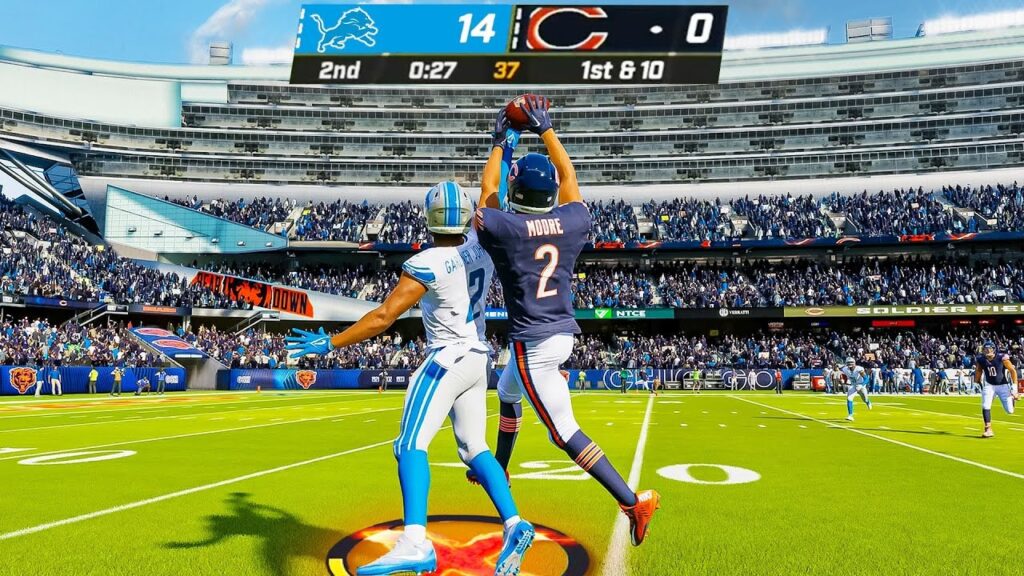
how to change camera angle madden 24
Image Source: EA Games via The Nerd Stash
This article is over 2 years old and may contain outdated information.

Being able to see every point is essential in sports games like Madden 24, allowing you to gain visual dominance of the field. Getting the best perspective on both teams makes a big difference. When you watch and control each play clearly from every angle, your chances of being successful increase as well. That’s why you may need to know about changing your camera angle in Madden 24 before its launch. Let’s go over how to change to a better view in Madden 24!

Altering Your Camera Angle in Madden 24

(Updated on October 7, 2024 – updated links and format)

madden 24 camera angles
Image Source: EA Games via The Nerd Stash

To change the camera angle in-game, use the following controls:

  • Console – Press up and down on the D-pad
  • PC – Press Pg Up and Pg Down

Using the D-pad is pretty easy, and the more you play, the more you get used to it. You can also adjust it on the fly, so it won’t be a hassle. There are various perspectives from which to see the field before and after the snap, including those from the H-Back and the Skycam. If you want to see the entire field, you can choose standard view or wide view.

Raising the camera angle will be better for the offense because it will give you a full viewpoint of the field. This way, you’ll have a better look at the defense and see what they’re up to. Unfortunately, you have to cycle through all of them to switch from one view to another. You may need to cycle a bit to switch to the default camera angle for both offense and defense. You are also not allowed to change the camera angle once the ball is snapped. Instead, you need to wait for the play to end to change your view in Madden 24.

Changing the Camera Angle in Menus

switch view madden 24
Image Source: EA Games via The Nerd Stash

If you don’t like to switch your angle all the time and wish to stay at one, you can visit your settings to customize it. 

  1. Enter the “Options” in your screen menu.
  2. Find “Settings,” then click “Visual Feedback.”
  3. Finally, select “Camera.” Here, you can create a new default view for Madden 24. 

You can still use the D-pad for consoles and Pg Up-Down for PC to switch between the camera angles, but the one you set will be your default in Madden 24.

Here are all the preferred camera angle settings for offense and defense:

  • Offense: Standard, Wide, All-22, Broadcast, and Zoom.
  • Defense: Standard, Wide, All-22, Broadcast, Defensive Perspective, and Zoom.

Moreover, you can turn the camera on or off to avoid switching camera angles on the fly, enable the Passing Cam option for the camera to follow the thrown ball, and set your default camera view.

Related:

How to Sprint & Run Faster in Madden 24

Hopefully, this guide has given you a solid idea of how to change or switch your camera angle in Madden 24.

Related Topics
Guide Madden 24
Share. Facebook Twitter LinkedIn Reddit Email
Sergen Çelik
  • Website

I game and write.

SUGGESTED READS

MindsEye Layoffs 2026
Gaming

Studio Behind GTA-like Game, MindsEye, Hit With More Layoffs, and Nobody is Surprised: ‘Shocked There’s Even a Janitor Working There’

Princess Peach Spin-Off Movie May Already Be in Development, Job Listing Suggests
Gaming

Princess Peach Spin-Off Movie May Already Be in Development, Job Listing Suggests

Xbox's New CEO Wants to Reconnect With the 'Community,' Yet Brings In More CoreAI Leaders
Gaming

Xbox’s New CEO Wants to Reconnect With the ‘Community,’ Yet Brings In More CoreAI Leaders

Diablo 4 Season 13 Tier List
Gaming

Class Tier List for Diablo 4 Season 13 (Best Classes for Endgame & Leveling)

Take-Two Boss Finally Explains Why GTA 6 Is Skipping PC at Launch: 'We'll See How It Works Out'
Gaming

Take-Two Boss Finally Explains Why GTA 6 Is Skipping PC at Launch: ‘We’ll See How It Works Out’

Rockstar Employee Review Claims 'Unrealistic' Crunch as GTA 6 Development Intensifies: 'Had to Work Till 3AM'
Gaming

Rockstar Employee Review Claims ‘Unrealistic’ Crunch as GTA 6 Development Intensifies: ‘Had to Work Till 3AM’

The Nerd Stash
Facebook X (Twitter) Instagram YouTube LinkedIn
  • About Us
  • Join Our Team
  • Meet the Team
  • Privacy Policy
  • DMCA Policy
  • Contact Us
  • Terms of Use
  • Sitemap
  • Editorial Guidelines
  • Advertising Policy
© 2026 The Nerd Stash. All Rights Reserved.

Type above and press Enter to search. Press Esc to cancel.





