
Close Menu
  • Gaming
    • Platforms
      • Nintendo
      • PC
      • PlayStation
      • Xbox
  • Entertainment
    • Movies
    • TV
    • Royals
  • Celebrity
    • Hollywood
  • Human Interest
  • Astrology
  • More
    • Reviews
Facebook X (Twitter) Instagram LinkedIn YouTube
  • About Us
  • Join Our Team
  • Meet the Team
  • Privacy Policy
  • DMCA Policy
  • Contact Us
  • Terms of Use
  • Sitemap
  • Editorial Guidelines
  • Advertising Policy
The Nerd Stash
  • Gaming
  • Celebrity
  • Hollywood
  • Human Interest
The Nerd Stash
Home»Gaming»How to Equip and Upgrade Sigils in Immortals of Aveum

How to Equip and Upgrade Sigils in Immortals of Aveum

Immortals of Aveum proves that guns aren’t necessary when making a fun single-player FPS game. This title brings the good old gunplay we all love…

Julio La PineBy Julio La PineAugust 22, 20233 Mins Read
Immortals of Aveum Sigils Explained
Image Source Ascendant Studios
This article is over 3 years old and may contain outdated information.

Immortals of Aveum proves that guns aren’t necessary when making a fun single-player FPS game. This title brings the good old gunplay we all love from the genre, but instead of sticking to guns, you’ll be using sigils, the game’s weapons. Each sigil belongs to a type of magic: blue for long range, red for short range, and green for medium range. If you want to optimize your build and increase damage output, we’ll tell you how to equip and upgrade sigils in Immortals of Aveum.

Immortals of Aveum: How to Use Sigils

Blue Sigil
Image Source Ascendant Studios via The Nerd Stash

Sigils in Immortals of Aveum are weapons. Every sigil has a different fire mode, which changes things up while playing. Some can fire long rage bolts, while others work better in close quarters. To equip and use them, here’s what you must do:

  1. Head to the Gear Menu.
  2. Scroll down to the Sigil tab; you’ll see three options.
  3. Equip the Sigil that corresponds to the magic color.
  4. Close the menu and aim with R2/RT.

While you’ll learn this as soon as you start the game, improving them takes a bit more effort and time, but it is crucial if you want to face the game’s tougher opponents.

How to Upgrade Sigils
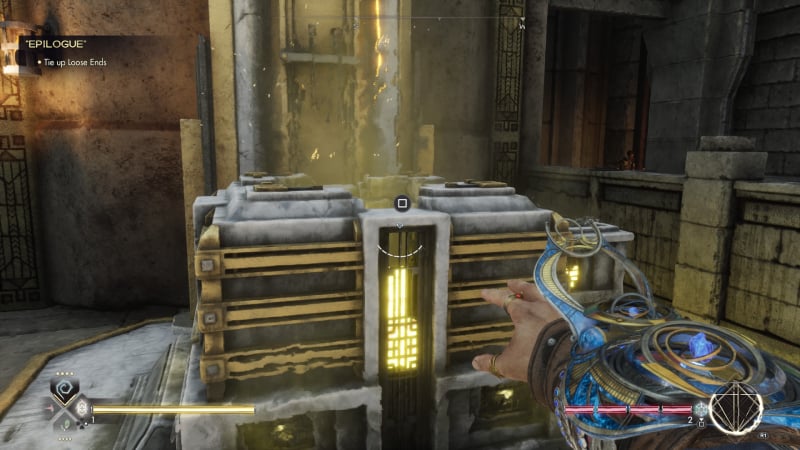
Immortals of Aveum Forge Location
Image Source Ascendant Studios via The Nerd Stash

To upgrade Sigils in Immortals of Aveum, you must find a Forge. Almost all main areas have a Forge, yet the easiest one to find is in Lucium. Once you arrive at the forge, approach it and press and hold Square or X until the menu opens. Here, you’ll see three menus, which are the following:

  • Craft: This will let you craft Sigils with Gold and Magic Essences.
  • Upgrade: You can upgrade your existing Sigils with Gold and Magic Essences.
  • Deconstruct: Dismantle unused Sigils to obtain Gold and Magic Essences.
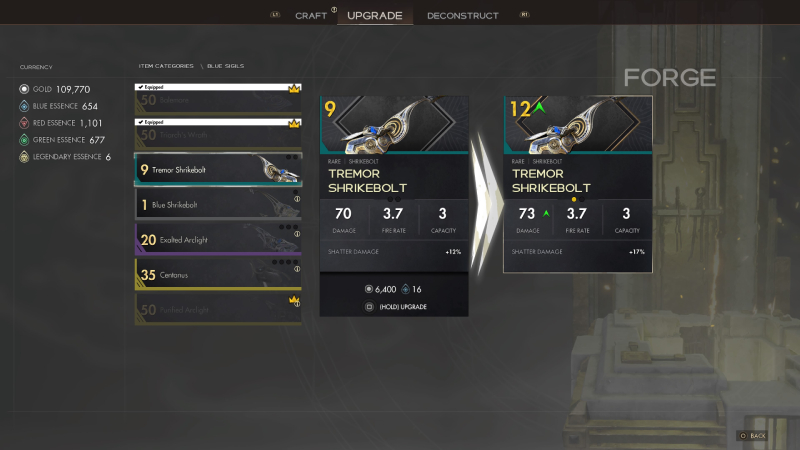
Immortals of Aveum Upgrade Screen
Image Source Ascendant Studios via The Nerd Stash

The important one is the middle one. There, you can upgrade your favorite Sigils to increase their damage and effects, which helps a lot when playing the game’s campaign.

Related:

Top Anticipated Games Releasing in August 2023

And that’s a wrap on how to equip and upgrade Sigils in Immortals of Aveum. Now that you know remember to save as much gold as possible and dismantle any Sigils you don’t want to get that coveted Magic Essence.

Immortals of Aveum is out now on PS5, Xbox Series X|S, and PC.

Related Topics
Guide Immortals of Aveum
Share. Facebook Twitter LinkedIn Reddit Email
Julio La Pine
  • Website

News/Guide Writer for The Nerd Stash. When not working, you'll find him playing Final Fantasy 14, any good JRPG, and modding Project Zomboid.

SUGGESTED READS

Do I Need To Play Other Onimusha Games Before Way of the Sword, Explained
Gaming

Do I Need To Play Other Onimusha Games Before Way of the Sword, Explained

7.5
Gaming

Hot Wheels Infinite Rush Review – A Solid Family Friendly Racing Adventure

DC white house MAGA game
Gaming

Trump’s MAGA Video Games Feature Immigrant Hunts and Tetris Walls in Bold New Vision for DC: ‘It’s Like the White House is Being Run by Evil 12 Year Olds’

Can Blood of Dawnwalker Run on Steam Deck? Best Settings & Performance Guide
Gaming

Can Blood of Dawnwalker Run on Steam Deck? Best Settings & Performance Guide

The Blood of Dawnwalker Scouting Towers
Gaming

The Blood of Dawnwalker: How to Clear Scouting Towers and Reveal Map Locations

How to Fast Travel and Activate Shrines in Blood of Dawnwalker
Gaming

How to Fast Travel and Activate Shrines in Blood of Dawnwalker

The Nerd Stash
Facebook X (Twitter) Instagram YouTube LinkedIn
  • About Us
  • Join Our Team
  • Meet the Team
  • Privacy Policy
  • DMCA Policy
  • Contact Us
  • Terms of Use
  • Sitemap
  • Editorial Guidelines
  • Advertising Policy
© 2026 The Nerd Stash. All Rights Reserved.

Type above and press Enter to search. Press Esc to cancel.